


title: MOSS-VL-SFT-0408
date: 2026-04-08T00:00:00.000Z
category: Multimodal-LLM
status: SFT
language:
  - en
library_name: transformers
pipeline_tag: video-text-to-text
license: apache-2.0
base_model: fnlp-vision/moss-video-preview-base
tags:
  - SFT
  - Video-Understanding
  - Image-Understanding
  - MOSS-VL
  - OpenMOSS
  - multimodal
  - video
  - vision-language

MOSS-VL-SFT-0408
📌 Introduction
We introduce MOSS-VL-SFT-0408, the supervised fine-tuned checkpoint in the MOSS-VL series (part of the OpenMOSS ecosystem).
This is an SFT checkpoint (instruction-tuned). It is NOT the Real-Time SFT streaming checkpoint.
This model is designed as a high-performance offline engine for multimodal tasks, bridging the gap between static image understanding and dynamic real-time interaction.
This checkpoint is intended for:
- video/image understanding with significantly improved instruction following capabilities.
- Serving as a strong starting point for further Real-Time SFT or specific domain adaptation.
🚀 Key Features & Status
| Feature | Status | Description |
|---|---|---|
| Model Loading | ✅ | Standard HF loading with trust_remote_code=True |
| Image Understanding | ✅ | Single/Multi-image input support |
| Video Understanding | ✅ | Native video frame sequence processing |
| Mixed Inference | ✅ | Interleaved image and video inputs |
| Offline Generation | ✅ | Optimized offline_generate & offline_batch_generate |
| Benchmarks/Metrics | ⏳ | Coming in future updates |
🏗 Model Architecture
MOSS-VL-SFT-0408 adopts a decoupled multimodal design, utilizing a cross-attention mechanism to bridge high-resolution visual encoding with advanced language reasoning.

Figure 1: MOSS-VL Core Architecture.
Temporal-Aware Prompting
At the model-family level, MOSS-VL uses timestamp-aware multimodal prompting for video understanding. This design gives sampled frames explicit temporal anchors, which helps the model reason about order, duration, and event localization more robustly.
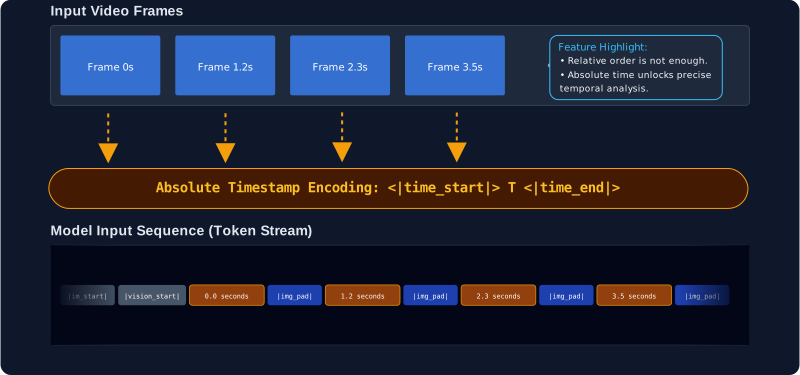
Figure 2: Illustration of the timestamped sequence input pipeline.
Multimodal RoPE
MOSS-VL uses multimodal rotary position encoding to align text tokens and visual features in a shared spatial-temporal coordinate system. At a high level, this improves video-text grounding and helps preserve temporal structure during multimodal reasoning.

Figure 3: 3D-RoPE spatial-temporal alignment.
🚀 Quickstart
Queue-based offline inference (Python)
import os
import queue
import threading

import torch
from transformers import AutoModelForCausalLM, AutoProcessor

checkpoint = "path/to/checkpoint"
video_path = "data/example_video.mp4"
prompt = "Describe the video."

max_new_tokens = 1024
temperature = 1.0
top_k = 50
top_p = 1.0
repetition_penalty = 1.0

video_fps = 1.0
video_minlen = 8
video_maxlen = 256


def load_model(checkpoint: str):
    processor = AutoProcessor.from_pretrained(
        checkpoint,
        trust_remote_code=True,
        frame_extract_num_threads=1,
    )
    model = AutoModelForCausalLM.from_pretrained(
        checkpoint,
        trust_remote_code=True,
        device_map="auto",
        torch_dtype=torch.bfloat16,
        attn_implementation="flash_attention_2",
    )
    return model, processor


if not checkpoint:
    raise ValueError("Missing `checkpoint`.")
if not video_path:
    raise ValueError("Missing `video_path`.")
if not os.path.isfile(video_path):
    raise FileNotFoundError(f"Video not found: {video_path}")

model, processor = load_model(checkpoint)
new_queries: "queue.Queue[dict]" = queue.Queue()
output_text_queue: "queue.Queue[str]" = queue.Queue()

query = {
    "prompt": prompt,
    "images": [],
    "videos": [video_path],
    "media_kwargs": {
        "video_fps": video_fps,
        "video_minlen": video_minlen,
        "video_maxlen": video_maxlen,
    },
    "generate_kwargs": {
        "temperature": temperature,
        "top_k": top_k,
        "top_p": top_p,
        "max_new_tokens": max_new_tokens,
        "repetition_penalty": repetition_penalty,
        "do_sample": False,
    },
}


def drain_output():
    while True:
        tok = output_text_queue.get()
        if tok == "<|round_end|>":
            break
        print(tok, end="", flush=True)


worker = threading.Thread(
    target=model.offline_generate,
    args=(processor, new_queries, output_text_queue),
    kwargs={"vision_chunked_length": 64},
    daemon=True,
)
worker.start()

new_queries.put(query)
drain_output()

new_queries.put({"stop_offline_generate": True})
worker.join(timeout=5.0)
For image-only usage, keep the same template and change:
- replace
video_pathwithimage_path - validate
image_pathinstead ofvideo_path - set
imagesto[image_path] - set
videosto[] - remove
media_kwargsif you do not need video-specific controls
Batched offline inference (Python)
import torch
from transformers import AutoModelForCausalLM, AutoProcessor

checkpoint = "path/to/checkpoint"

shared_generate_kwargs = {
    "temperature": 1.0,
    "top_k": 50,
    "top_p": 1.0,
    "max_new_tokens": 256,
    "repetition_penalty": 1.0,
    "do_sample": False,
}

shared_media_kwargs = {
    "video_fps": 1.0,
    "video_minlen": 8,
    "video_maxlen": 256,
}


def load_model(checkpoint: str):
    processor = AutoProcessor.from_pretrained(
        checkpoint,
        trust_remote_code=True,
        frame_extract_num_threads=1,
    )
    model = AutoModelForCausalLM.from_pretrained(
        checkpoint,
        trust_remote_code=True,
        device_map="auto",
        torch_dtype=torch.bfloat16,
        attn_implementation="flash_attention_2",
    )
    return model, processor


model, processor = load_model(checkpoint)
queries = [
    {
        "prompt": "Describe sample A.",
        "images": [],
        "videos": ["data/sample_a.mp4"],
        "media_kwargs": dict(shared_media_kwargs),
        "generate_kwargs": dict(shared_generate_kwargs),
    },
    {
        "prompt": "Describe sample B.",
        "images": [],
        "videos": ["data/sample_b.mp4"],
        "media_kwargs": dict(shared_media_kwargs),
        "generate_kwargs": dict(shared_generate_kwargs),
    },
]

with torch.no_grad():
    result = model.offline_batch_generate(
        processor,
        queries,
        session_states=None,
        vision_chunked_length=64,
    )

texts = [item["text"] for item in result["results"]]
session_states = result["session_states"]
followup_queries = [
    {
        "prompt": "Summarize sample A in one sentence.",
        "generate_kwargs": dict(shared_generate_kwargs),
    },
    {
        "prompt": "Restart sample B and answer again.",
        "reset_session": True,
        "generate_kwargs": dict(shared_generate_kwargs),
    },
]

with torch.no_grad():
    followup_result = model.offline_batch_generate(
        processor,
        followup_queries,
        session_states=session_states,
        vision_chunked_length=64,
    )
Intended Use
- offline image understanding
- offline video understanding
- multimodal prompt experiments for release validation
- checkpoint-level inference integration and debugging
Requirements
Core validated inference dependencies:
python==3.12.13torch==2.8.0+cu128torchvision==0.23.0+cu128transformers==4.57.1accelerate==1.12.0flash_attn==2.8.1torchcodec==0.7.0numpy==2.4.3pillow==12.1.1joblib==1.5.2einops==0.8.2
Installation commands:
conda create -n moss_vl python=3.12 pip -y
conda activate moss_vl
pip install -i https://pypi.org/simple --no-build-isolation -r requirements.txt
Validated setup notes:
- CUDA runtime used for validation:
12.8 - Inference loading uses
trust_remote_code=Trueandattn_implementation="flash_attention_2"
Limitations and Future Work
- realtime usage is not documented here
- benchmark, metric, and training details are still blank
- some sections are intentionally placeholders until release information is finalized
- batch calls currently require shared
generate_kwargsand sharedmedia_kwargswithin one call - batch streaming and batch cancel / stop protocol are not part of
offline_batch_generate(...) - the queue example is intentionally minimal and does not include production-grade timeout or worker error handling
Citation
@misc{moss_vl_2026,
  title         = {{MOSS-VL Technical Report}},
  author        = {OpenMOSS Team},
  year          = {2026},
  howpublished  = {\url{https://github.com/fnlp-vision/MOSS-VL}},
  note          = {GitHub repository}
}