---
license: apache-2.0
---
PaddleOCR-VL-1.6: Expanding the Frontier of Document Parsing with Under-Optimized Region Refinement and Progressive Post-Training
[](https://github.com/PaddlePaddle/PaddleOCR)
[](https://huggingface.co/PaddlePaddle/PaddleOCR-VL-1.6)
[](https://modelscope.cn/models/PaddlePaddle/PaddleOCR-VL-1.6)
[](https://huggingface.co/spaces/PaddlePaddle/PaddleOCR-VL-1.6_Online_Demo)
[](https://modelscope.cn/studios/PaddlePaddle/PaddleOCR-VL-1.6_Online_Demo/summary)
[](https://discord.gg/JPmZXDsEEK)
[](https://x.com/PaddlePaddle)
[](./LICENSE)
**🔥 [Official Website](https://www.paddleocr.com)**
**📝 [Technical Report](https://arxiv.org/pdf/2606.03264)**
## Introduction
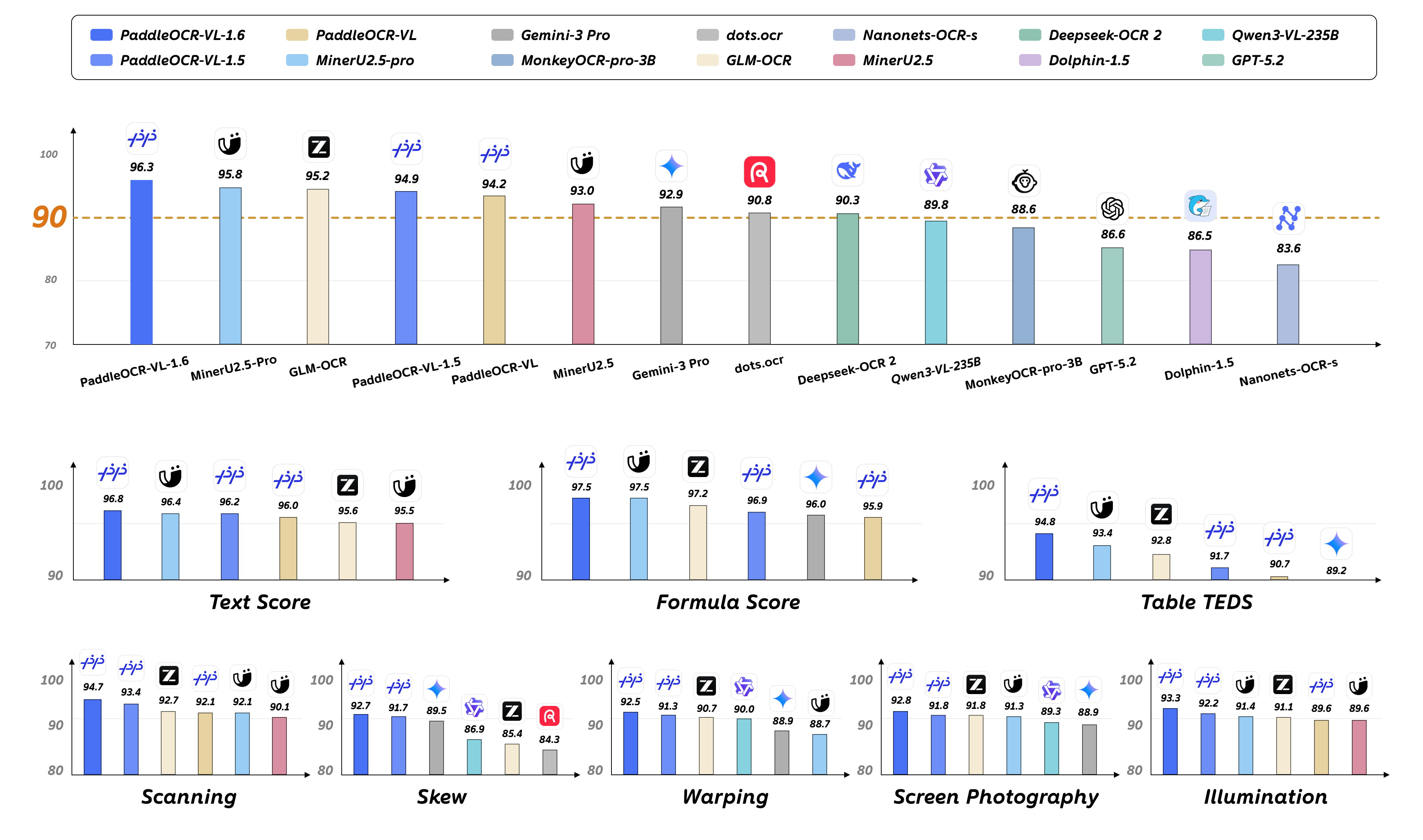
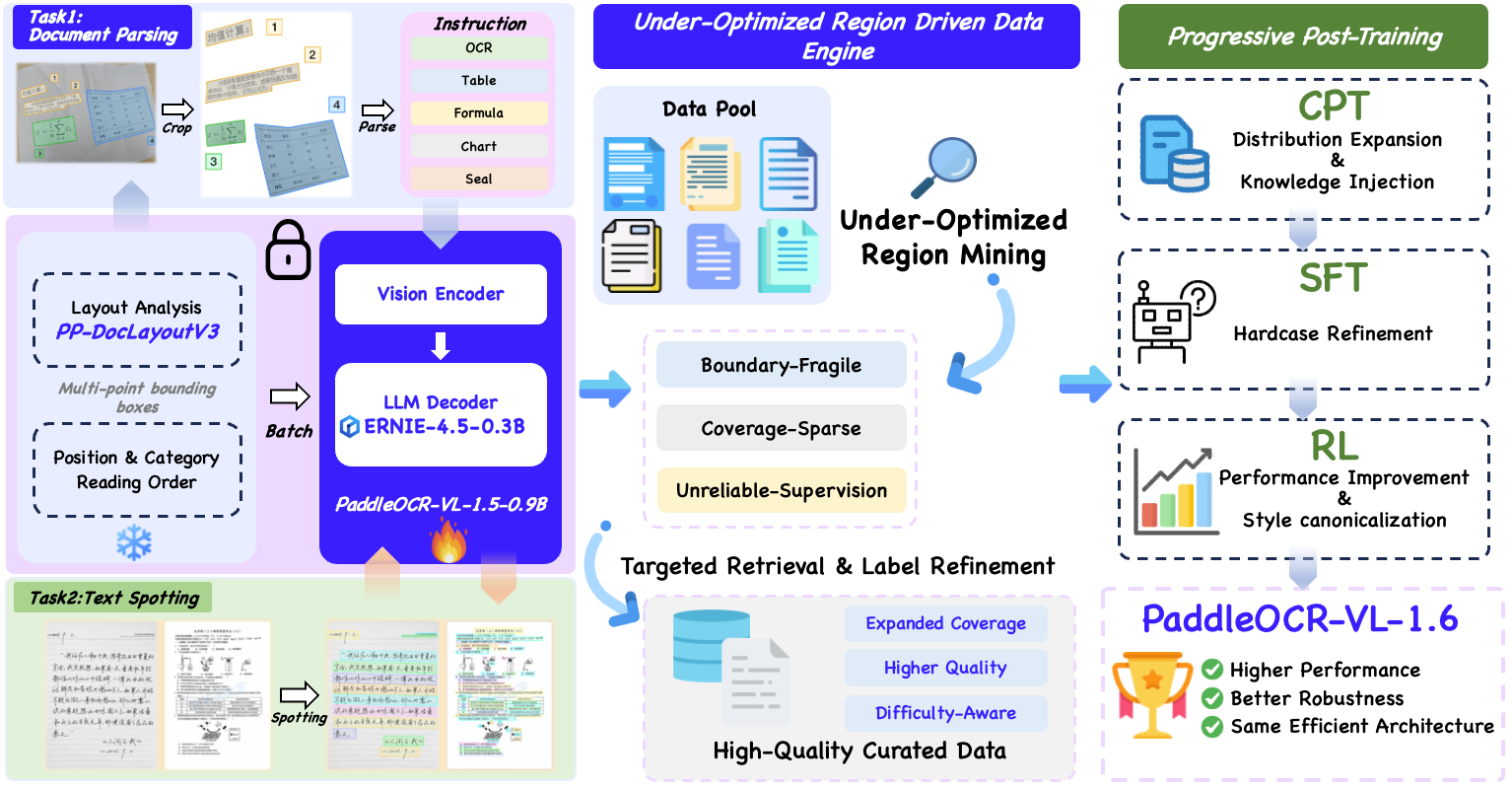
We introduce PaddleOCR-VL-1.6, an upgraded compact document parsing model built upon PaddleOCR-VL-1.5. PaddleOCR-VL-1.6 introduces a region-aware data optimization framework that identifies weak regions from the previous model, applies targeted enhancement to those regions, and improves the reliability of supervision signals. It further adopts a progressive post-training recipe based on curated data selection and reinforcement learning, pushing model performance to a higher level through staged optimization. **PaddleOCR-VL-1.6 achieves a new state-of-the-art score of 96.33% on OmniDocBench v1.6, sets new records on OmniDocBench v1.5 and Real5-OmniDocBench as well**, and demonstrates strong competitiveness against top-tier VLMs. The model architecture is fully compatible with PaddleOCR-VL-1.5, enabling zero-cost plug-and-play migration.
### **Model Architecture**
## PaddleOCR-VL-1.6 Usage with llama.cpp
### Install Dependencies
Install [PaddlePaddle](https://www.paddlepaddle.org.cn/install/quick) and [PaddleOCR](https://github.com/PaddlePaddle/PaddleOCR):
```bash
# The following command installs the PaddlePaddle version for CUDA 12.6. For other CUDA versions and the CPU version, please refer to https://www.paddlepaddle.org.cn/en/install/quick?docurl=/documentation/docs/en/develop/install/pip/linux-pip_en.html
python -m pip install paddlepaddle-gpu==3.2.1 -i https://www.paddlepaddle.org.cn/packages/stable/cu126/
python -m pip install -U "paddleocr[doc-parser]>=3.6.0"
```
> **Please ensure that you install PaddlePaddle framework version 3.2.1 or above, along with the special version of safetensors.** For macOS users, please use Docker to set up the environment.
### Basic Usage
1. Start the VLM inference server:
```
llama-server \
-m /path/to/PaddleOCR-VL-1.6-GGUF.gguf \
--mmproj /path/to/PaddleOCR-VL-1.6-GGUF-mmproj.gguf \
--port 8080 \
--host 0.0.0.0 \
--temp 0
```
2. Call the PaddleOCR CLI or Python API:
```bash
paddleocr doc_parser \
-i https://paddle-model-ecology.bj.bcebos.com/paddlex/imgs/demo_image/paddleocr_vl_demo.png \
--pipeline_version v1.6 \
--vl_rec_backend llama-cpp-server \
--vl_rec_server_url http://127.0.0.1:8080/v1
```
```python
from paddleocr import PaddleOCRVL
pipeline = PaddleOCRVL(pipeline_version="v1.6", vl_rec_backend="llama-cpp-server", vl_rec_server_url="http://127.0.0.1:8080/v1")
output = pipeline.predict("https://paddle-model-ecology.bj.bcebos.com/paddlex/imgs/demo_image/paddleocr_vl_demo.png")
for res in output:
res.print()
res.save_to_json(save_path="output")
res.save_to_markdown(save_path="output")
```
**For more usage details and parameter explanations, see the [documentation](https://www.paddleocr.ai/latest/en/version3.x/pipeline_usage/PaddleOCR-VL.html).**
## PaddleOCR-VL-1.6-0.9B Usage with llama.cpp
Currently, the PaddleOCR-VL-1.6-0.9B model facilitates seamless inference via the transformers library, supporting comprehensive text spotting and the recognition of complex elements including formulas, tables, charts, and seals. Below is a simple script we provide to support inference using the PaddleOCR-VL-1.6-0.9B model with llama.cpp.
#### Usage Tips
We have six types of element-level recognition:
- Text recognition, indicated by the prompt `OCR:`.
- Formula recognition, indicated by the prompt `Formula Recognition:`.
- Table recognition, indicated by the prompt `Table Recognition:`.
- Chart recognition, indicated by the prompt `Chart Recognition:`.
- Seal recognition, indicated by the prompt `Seal Recognition:`.
- Spotting, indicated by the prompt `Spotting:`, and need to set `image_max_pixels` to `1605632`:
```
git clone https://github.com/ggml-org/llama.cpp.git
cd llama.cpp
python -m pip install gguf
python ./gguf-py/gguf/scripts/gguf_set_metadata.py /path/to/PaddleOCR-VL-1.6-GGUF/PaddleOCR-VL-1.6-mmproj.gguf clip.vision.image_max_pixels 1605632 --force
# back to default value (1003520):
# python ./gguf-py/gguf/scripts/gguf_set_metadata.py /path/to/PaddleOCR-VL-1.6-GGUF/PaddleOCR-VL-1.6-mmproj.gguf clip.vision.image_max_pixels 1003520 --force
```
#### llama-cli Usage
```shell
llama-cli \
-m /path/to/PaddleOCR-VL-1.6-GGUF/PaddleOCR-VL-1.6.gguf \
--mmproj /path/to/PaddleOCR-VL-1.6-GGUF/PaddleOCR-VL-1.6-mmproj.gguf \
-p 'OCR:' \
--image 'test_image.jpg'
```
#### llama-server Usage
```
llama-server -m /path/to/PaddleOCR-VL-1.6.gguf --mmproj /path/to/PaddleOCR-VL-1.6-GGUF/PaddleOCR-VL-1.6-mmproj.gguf --temp 0
```
# Acknowledgements
We extend our gratitude to [@megemini](https://github.com/megemini) for their significant [pull request](https://github.com/ggml-org/llama.cpp/pull/18825), which adds support for [PaddleOCR-VL-1.5-0.9B](https://huggingface.co/PaddlePaddle/PaddleOCR-VL-1.5) and [PaddleOCR-VL-0.9B](https://huggingface.co/PaddlePaddle/PaddleOCR-VL) models to llama.cpp.