Alibaba Cloud · Qwen Team
Qwen-Image
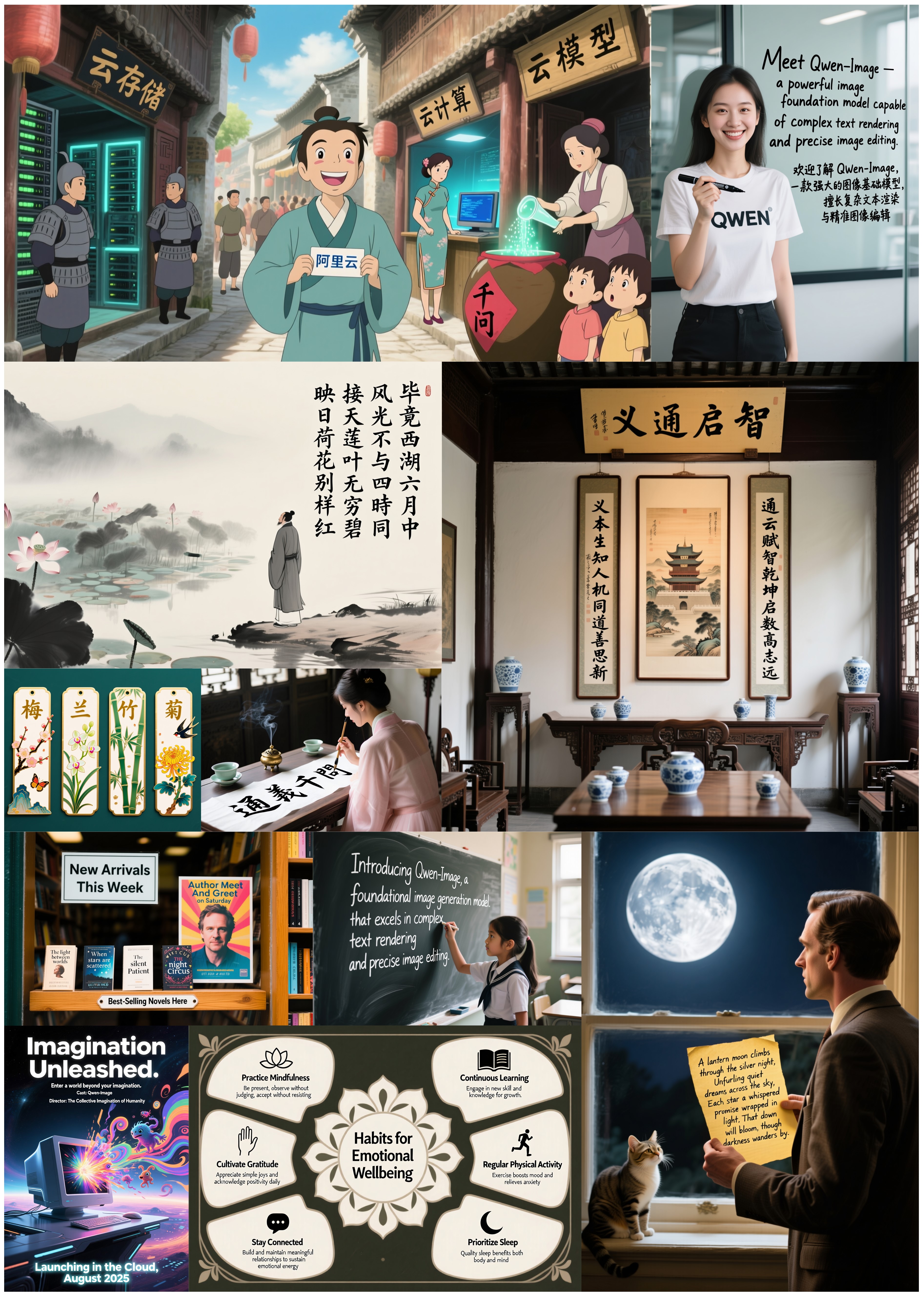
An open image generation foundation model in the Qwen series. Its distinguishing strength is rendering legible text inside the image — including Chinese — rather than the smeared glyphs most diffusion models produce.
Overview
Qwen-Image is a general-purpose text-to-image model that also handles editing and several image-understanding tasks. The authors' benchmark summary is reproduced below.

Reported benchmarks
Published by the Qwen team with the model release. These are the authors' own figures and have not been independently reproduced here.

What it does well
Text inside the image
Typography is generated as part of the scene, holding layout and letterforms together for both alphabetic scripts and Chinese — the capability the model is built around.
Style range
Photographic, painterly, anime and flat-design outputs all come from the same checkpoint, steered by prompt rather than by LoRA.
Editing operations
Style transfer, object insertion and removal, detail enhancement and text replacement inside an existing image.
Understanding tasks
Detection, segmentation, depth and edge estimation, novel view synthesis and super-resolution, framed as conditional generation.
Showcase


Run it
The hosted endpoint runs the same weights without a local GPU.
# 1. submit the job
curl -X POST "https://api.wavespeed.ai/api/v3/wavespeed-ai/qwen-image/text-to-image" \
  -H "Authorization: Bearer $WAVESPEED_API_KEY" \
  -H "Content-Type: application/json" \
  -d '{
        "prompt": "A chalkboard outside a coffee shop reading \"Qwen Coffee \u2014 $2 a cup\", warm morning light, shallow depth of field",
        "size": "1328*1328",
        "enable_sync_mode": false
    }'

# -> {"code": 200, "data": {"id": "<request-id>", "status": "created", ...}}

# 2. poll until status is "completed"
curl "https://api.wavespeed.ai/api/v3/predictions/<request-id>/result" \
  -H "Authorization: Bearer $WAVESPEED_API_KEY"

# -> {"code": 200, "data": {"status": "completed", "outputs": ["https://..."]}}
import os, time, requests
API = "https://api.wavespeed.ai/api/v3"
KEY = os.environ["WAVESPEED_API_KEY"]
HEADERS = {"Authorization": f"Bearer {KEY}"}
# submit
res = requests.post(
f"{API}/wavespeed-ai/qwen-image/text-to-image",
headers={**HEADERS, "Content-Type": "application/json"},
json={
"prompt": "A chalkboard outside a coffee shop reading \"Qwen Coffee \u2014 $2 a cup\", warm morning light, shallow depth of field",
"size": "1328*1328",
"enable_sync_mode": false
},
timeout=30,
)
res.raise_for_status()
request_id = res.json()["data"]["id"]
# poll
while True:
data = requests.get(
f"{API}/predictions/{request_id}/result",
headers=HEADERS,
timeout=30,
).json()["data"]
if data["status"] == "completed":
print(data["outputs"][0])
break
if data["status"] == "failed":
raise RuntimeError(data.get("error", "generation failed"))
time.sleep(1.5)const API = "https://api.wavespeed.ai/api/v3";
const KEY = process.env.WAVESPEED_API_KEY;
const headers = { Authorization: `Bearer ${KEY}` };
// submit
const submit = await fetch(`${API}/wavespeed-ai/qwen-image/text-to-image`, {
method: "POST",
headers: { ...headers, "Content-Type": "application/json" },
body: JSON.stringify({
"prompt": "A chalkboard outside a coffee shop reading \"Qwen Coffee \u2014 $2 a cup\", warm morning light, shallow depth of field",
"size": "1328*1328",
"enable_sync_mode": false
}),
});
const { data: { id } } = await submit.json();
// poll
for (;;) {
const res = await fetch(`${API}/predictions/${id}/result`, { headers });
const { data } = await res.json();
if (data.status === "completed") {
console.log(data.outputs[0]);
break;
}
if (data.status === "failed") throw new Error(data.error ?? "generation failed");
await new Promise((r) => setTimeout(r, 1500));
}Requests are asynchronous: POST returns a request id, then you poll /predictions/<id>/result until status is completed. Set enable_sync_mode: true to have the call block and return outputs directly.
API keys are created in the WaveSpeed dashboard.
Running locally
Weights are Apache-2.0 and load through diffusers.
import torch
from diffusers import DiffusionPipeline

pipe = DiffusionPipeline.from_pretrained(
    "Qwen/Qwen-Image",
    torch_dtype=torch.bfloat16,
).to("cuda")

# The Qwen team recommends appending a quality suffix to the prompt.
magic = {"en": "Ultra HD, 4K, cinematic composition.", "zh": "超清,4K,电影级构图"}

image = pipe(
    prompt='A chalkboard reading "Qwen Coffee — $2 a cup". ' + magic["en"],
    negative_prompt=" ",
    width=1664,
    height=928,          # 1:1 1328x1328 · 16:9 1664x928 · 4:3 1472x1140
    num_inference_steps=50,
    true_cfg_scale=4.0,
    generator=torch.Generator(device="cuda").manual_seed(42),
).images[0]

image.save("out.png")