

File size: 24,460 Bytes
548bac4 e2acb4a cedcdc3 e2acb4a 548bac4 e2acb4a 548bac4 e2acb4a 548bac4 e2acb4a 548bac4 e2acb4a 548bac4 e1fef46 | 1 2 3 4 5 6 7 8 9 10 11 12 13 14 15 16 17 18 19 20 21 22 23 24 25 26 27 28 29 30 31 32 33 34 35 36 37 38 39 40 41 42 43 44 45 46 47 48 49 50 51 52 53 54 55 56 57 58 59 60 61 62 63 64 65 66 67 68 69 70 71 72 73 74 75 76 77 78 79 80 81 82 83 84 85 86 87 88 89 90 91 92 93 94 95 96 97 98 99 100 101 102 103 104 105 106 107 108 109 110 111 112 113 114 115 116 117 118 119 120 121 122 123 124 125 126 127 128 129 130 131 132 133 134 135 136 137 138 139 140 141 142 143 144 145 146 147 148 149 150 151 152 153 154 155 156 157 158 159 160 161 162 163 164 165 166 167 168 169 170 171 172 173 174 175 176 177 178 179 180 181 182 183 184 185 186 187 188 189 190 191 192 193 194 195 196 197 198 199 200 201 202 203 204 205 206 207 208 209 210 211 212 213 214 215 216 217 218 219 220 221 222 223 224 225 226 227 228 229 230 231 232 233 234 235 236 237 238 239 240 241 242 243 244 245 246 247 248 249 250 251 252 253 254 255 256 257 258 259 260 261 262 263 264 265 266 267 268 269 270 271 272 273 274 275 276 277 278 279 280 281 282 283 284 285 286 287 288 289 290 291 292 293 294 295 296 297 298 299 300 301 302 303 304 305 306 307 308 309 310 311 312 313 314 315 316 317 318 319 320 321 322 323 324 325 326 327 328 329 330 331 332 333 334 335 336 337 338 339 340 341 342 343 344 345 346 347 348 349 350 351 352 353 354 355 356 357 358 359 360 361 362 363 364 365 366 367 368 369 370 371 372 373 374 375 376 377 378 379 380 381 382 383 384 385 386 387 388 389 390 391 392 393 394 395 396 397 398 399 400 401 402 403 404 405 406 407 408 409 410 411 412 413 414 415 416 417 418 419 420 421 422 423 424 425 426 427 428 429 430 431 432 433 434 435 436 437 438 439 440 441 442 443 444 445 446 447 448 449 450 451 452 453 454 455 456 457 458 459 460 461 462 463 464 465 466 467 468 469 470 471 472 473 474 475 476 477 478 479 480 481 482 483 484 485 486 487 488 489 490 491 492 493 494 495 496 497 498 499 500 501 502 503 504 505 506 507 508 509 510 511 512 513 514 515 516 517 518 519 520 521 522 523 524 525 526 527 528 529 530 531 532 533 534 535 536 537 538 539 540 541 542 543 544 545 546 547 548 549 550 551 552 553 554 555 556 557 558 559 560 561 562 563 564 565 566 567 568 569 570 571 572 573 574 575 576 577 578 579 580 581 582 583 584 585 586 587 588 589 590 591 592 593 | ---
library_name: transformers
license: apache-2.0
license_link: https://huggingface.co/Qwen/Qwen3.6-27B/blob/main/LICENSE
pipeline_tag: image-text-to-text
base_model:
- Qwen/Qwen3.6-27B
tags:
- unsloth
- qwen
- qwen3_5
---
# Read our How to [Run Qwen3.6 Guide!](https://unsloth.ai/docs/models/qwen3.6)
<div>
<p style="margin: 0 0 0px 0; margin-top: 0px;">
<em>See <a href="https://unsloth.ai/docs/basics/unsloth-dynamic-v2.0-gguf">Unsloth Dynamic 2.0 GGUFs</a> for our quantization benchmarks.</em>
</p>
<div style="display: flex; gap: 5px; align-items: center; margin-bottom: 0px;">
<a href="https://github.com/unslothai/unsloth/">
<img src="https://github.com/unslothai/unsloth/raw/main/images/unsloth%20new%20logo.png" width="133">
</a>
<a href="https://discord.gg/unsloth">
<img src="https://github.com/unslothai/unsloth/raw/main/images/Discord%20button.png" width="173">
</a>
<a href="https://unsloth.ai/docs/models/qwen3.6">
<img src="https://raw.githubusercontent.com/unslothai/unsloth/refs/heads/main/images/documentation%20green%20button.png" width="143">
</a>
</div>
<ul style="margin: 0;">
<li>Developer Role Support so Qwen3.6 can work in Codex, OpenCode and more!</li>
<li>Qwen3.6 can now be run and fine-tuned in <a href="https://unsloth.ai/docs/new/studio">Unsloth Studio</a>. <a href="https://unsloth.ai/docs/models/qwen3.6">Read our guide</a>.</li>
<li>Tool calling improvements: Makes parsing nested objects to make tool calling succeed more.</li>
<li>Example of Qwen3.6 35B-A3B (4-bit GGUF) running in Unsloth Studio with tool-calling:</li>
</ul>
</div>
<img width="600" alt="qwen3.6 in unsloth studio" src="https://cdn-uploads.huggingface.co/production/uploads/62ecdc18b72a69615d6bd857/wRyC_xcMidEnz4INKA1b-.gif" />
---
# Qwen3.6-27B
<img width="400px" src="https://qianwen-res.oss-accelerate.aliyuncs.com/Qwen3.6/logo.png">
[](https://chat.qwen.ai)
> [!Note]
> This repository contains model weights and configuration files for the post-trained model in the Hugging Face Transformers format.
>
> These artifacts are compatible with Hugging Face Transformers, vLLM, SGLang, KTransformers, etc.
Following the February release of the Qwen3.5 series, we're pleased to share the first open-weight variant of Qwen3.6. Built on direct feedback from the community, Qwen3.6 prioritizes stability and real-world utility, offering developers a more intuitive, responsive, and genuinely productive coding experience.
## Qwen3.6 Highlights
This release delivers substantial upgrades, particularly in
- **Agentic Coding:** the model now handles frontend workflows and repository-level reasoning with greater fluency and precision.
- **Thinking Preservation:** we've introduced a new option to retain reasoning context from historical messages, streamlining iterative development and reducing overhead.
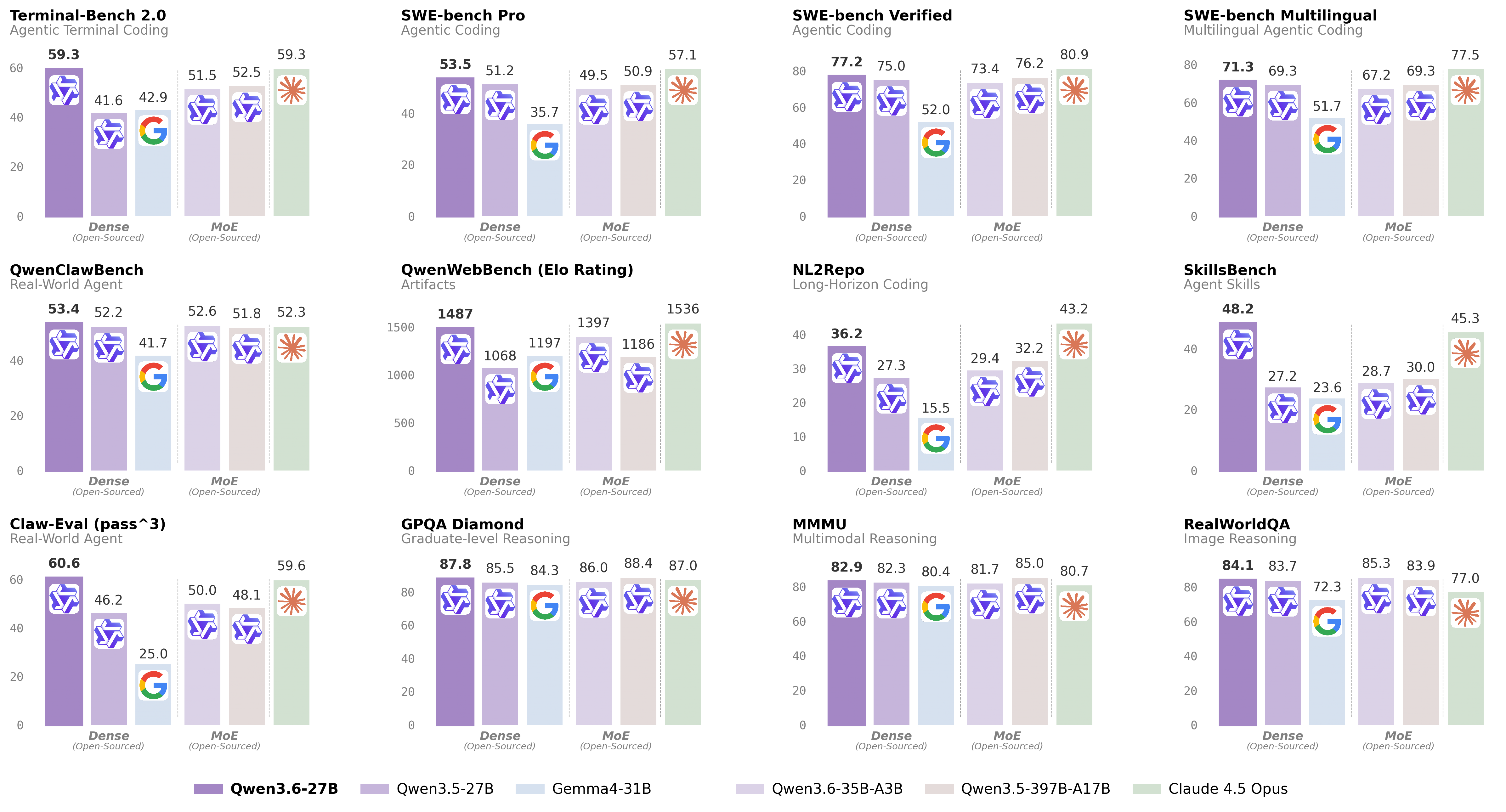
For more details, please refer to our blog post [Qwen3.6-27B](https://qwen.ai/blog?id=qwen3.6-27b).
## Model Overview
- Type: Causal Language Model with Vision Encoder
- Training Stage: Pre-training & Post-training
- Language Model
- Number of Parameters: 27B
- Hidden Dimension: 5120
- Token Embedding: 248320 (Padded)
- Number of Layers: 64
- Hidden Layout: 16 × (3 × (Gated DeltaNet → FFN) → 1 × (Gated Attention → FFN))
- Gated DeltaNet:
- Number of Linear Attention Heads: 48 for V and 16 for QK
- Head Dimension: 128
- Gated Attention:
- Number of Attention Heads: 24 for Q and 4 for KV
- Head Dimension: 256
- Rotary Position Embedding Dimension: 64
- Feed Forward Network:
- Intermediate Dimension: 17408
- LM Output: 248320 (Padded)
- MTP: trained with multi-steps
- Context Length: 262,144 natively and extensible up to 1,010,000 tokens.
## Benchmark Results
### Language
### Vision Language
## Quickstart
For streamlined integration, we recommend using Qwen3.6 via APIs. Below is a guide to use Qwen3.6 via OpenAI-compatible API.
### Serving Qwen3.6
Qwen3.6 can be served via APIs with popular inference frameworks.
In the following, we show example commands to launch OpenAI-Compatible API servers for Qwen3.6 models.
> [!Important]
> Inference efficiency and throughput vary significantly across frameworks.
> We recommend using the latest framework versions to ensure optimal performance and compatibility.
> For production workloads or high-throughput scenarios, dedicated serving engines such as SGLang, KTransformers or vLLM are strongly recommended.
> [!Important]
> The model has a default context length of 262,144 tokens.
> If you encounter out-of-memory (OOM) errors, consider reducing the context window.
> However, because Qwen3.6 leverages extended context for complex tasks, we advise maintaining a context length of at least 128K tokens to preserve thinking capabilities.
#### SGLang
[SGLang](https://github.com/sgl-project/sglang) is a fast serving framework for large language models and vision language models.
`sglang>=0.5.10` is recommended for Qwen3.6, which can be installed using the following command in a fresh environment:
```shell
uv pip install sglang[all]
```
See [its documentation](https://docs.sglang.ai/get_started/install.html) for more details.
The following will create API endpoints at `http://localhost:8000/v1`:
- **Standard Version**: The following command can be used to create an API endpoint with maximum context length 262,144 tokens using tensor parallel on 8 GPUs.
```shell
python -m sglang.launch_server --model-path Qwen/Qwen3.6-27B --port 8000 --tp-size 8 --mem-fraction-static 0.8 --context-length 262144 --reasoning-parser qwen3
```
- **Tool Use**: To support tool use, you can use the following command.
```shell
python -m sglang.launch_server --model-path Qwen/Qwen3.6-27B --port 8000 --tp-size 8 --mem-fraction-static 0.8 --context-length 262144 --reasoning-parser qwen3 --tool-call-parser qwen3_coder
```
- **Multi-Token Prediction (MTP)**: The following command is recommended for MTP:
```shell
python -m sglang.launch_server --model-path Qwen/Qwen3.6-27B --port 8000 --tp-size 8 --mem-fraction-static 0.8 --context-length 262144 --reasoning-parser qwen3 --speculative-algo NEXTN --speculative-num-steps 3 --speculative-eagle-topk 1 --speculative-num-draft-tokens 4
```
For detailed deployment guide, see the [SGLang Qwen3.5 Cookbook](https://lmsysorg.mintlify.app/cookbook/llm/Qwen/Qwen3.5).
#### vLLM
[vLLM](https://github.com/vllm-project/vllm) is a high-throughput and memory-efficient inference and serving engine for LLMs.
`vllm>=0.19.0` is recommended for Qwen3.6, which can be installed using the following command in a fresh environment:
```shell
uv pip install vllm --torch-backend=auto
```
See [its documentation](https://docs.vllm.ai/en/stable/getting_started/installation/index.html) for more details.
The following will create API endpoints at `http://localhost:8000/v1`:
- **Standard Version**: The following command can be used to create an API endpoint with maximum context length 262,144 tokens using tensor parallel on 8 GPUs.
```shell
vllm serve Qwen/Qwen3.6-27B --port 8000 --tensor-parallel-size 8 --max-model-len 262144 --reasoning-parser qwen3
```
- **Tool Call**: To support tool use, you can use the following command.
```shell
vllm serve Qwen/Qwen3.6-27B --port 8000 --tensor-parallel-size 8 --max-model-len 262144 --reasoning-parser qwen3 --enable-auto-tool-choice --tool-call-parser qwen3_coder
```
- **Multi-Token Prediction (MTP)**: The following command is recommended for MTP:
```shell
vllm serve Qwen/Qwen3.6-27B --port 8000 --tensor-parallel-size 8 --max-model-len 262144 --reasoning-parser qwen3 --speculative-config '{"method":"qwen3_next_mtp","num_speculative_tokens":2}'
```
- **Text-Only**: The following command skips the vision encoder and multimodal profiling to free up memory for additional KV cache:
```shell
vllm serve Qwen/Qwen3.6-27B --port 8000 --tensor-parallel-size 8 --max-model-len 262144 --reasoning-parser qwen3 --language-model-only
```
For detailed deployment guide, see the [vLLM Qwen3.5 Recipe](https://docs.vllm.ai/projects/recipes/en/latest/Qwen/Qwen3.5.html).
#### KTransformers
[KTransformers](https://github.com/kvcache-ai/ktransformers) is a flexible framework for experiencing cutting-edge LLM inference optimizations with CPU-GPU heterogeneous computing.
For running Qwen3.6 with KTransformers, see the [KTransformers Deployment Guide](https://github.com/kvcache-ai/ktransformers/blob/main/doc/en/Qwen3.5.md).
#### Hugging Face Transformers
Hugging Face Transformers contains a _lightweight_ server which can be used for quick testing and moderate load deployment.
The latest `transformers` is required for Qwen3.6:
```shell
pip install "transformers[serving]"
```
See [its documentation](https://huggingface.co/docs/transformers/main/serving) for more details. Please also make sure torchvision and pillow are installed.
Then, run `transformers serve` to launch a server with API endpoints at `http://localhost:8000/v1`; it will place the model on accelerators if available:
```shell
transformers serve Qwen/Qwen3.6-27B --port 8000 --continuous-batching
```
### Using Qwen3.6 via the Chat Completions API
The chat completions API is accessible via standard HTTP requests or OpenAI SDKs.
Here, we show examples using the OpenAI Python SDK.
Before starting, make sure it is installed and the API key and the API base URL is configured, e.g.:
```shell
pip install -U openai
# Set the following accordingly
export OPENAI_BASE_URL="http://localhost:8000/v1"
export OPENAI_API_KEY="EMPTY"
```
> [!Tip]
> We recommend using the following set of sampling parameters for generation
> - Thinking mode for general tasks: `temperature=1.0, top_p=0.95, top_k=20, min_p=0.0, presence_penalty=0.0, repetition_penalty=1.0`
> - Thinking mode for precise coding tasks (e.g. WebDev): `temperature=0.6, top_p=0.95, top_k=20, min_p=0.0, presence_penalty=0.0, repetition_penalty=1.0`
> - Instruct (or non-thinking) mode: `temperature=0.7, top_p=0.80, top_k=20, min_p=0.0, presence_penalty=1.5, repetition_penalty=1.0`
>
> Please note that the support for sampling parameters varies according to inference frameworks.
> [!Important]
> Qwen3.6 models operate in thinking mode by default, generating thinking content signified by `<think>\n...</think>\n\n` before producing the final responses.
> To disable thinking content and obtain direct response, refer to the examples [here](#instruct-or-non-thinking-mode).
#### Text-Only Input
```python
from openai import OpenAI
# Configured by environment variables
client = OpenAI()
messages = [
{"role": "user", "content": "Type \"I love Qwen3.6\" backwards"},
]
chat_response = client.chat.completions.create(
model="Qwen/Qwen3.6-27B",
messages=messages,
max_tokens=81920,
temperature=1.0,
top_p=0.95,
presence_penalty=0.0,
extra_body={
"top_k": 20,
},
)
print("Chat response:", chat_response)
```
#### Image Input
```python
from openai import OpenAI
# Configured by environment variables
client = OpenAI()
messages = [
{
"role": "user",
"content": [
{
"type": "image_url",
"image_url": {
"url": "https://qianwen-res.oss-accelerate.aliyuncs.com/Qwen3.5/demo/CI_Demo/mathv-1327.jpg"
}
},
{
"type": "text",
"text": "The centres of the four illustrated circles are in the corners of the square. The two big circles touch each other and also the two little circles. With which factor do you have to multiply the radii of the little circles to obtain the radius of the big circles?\nChoices:\n(A) $\\frac{2}{9}$\n(B) $\\sqrt{5}$\n(C) $0.8 \\cdot \\pi$\n(D) 2.5\n(E) $1+\\sqrt{2}$"
}
]
}
]
response = client.chat.completions.create(
model="Qwen/Qwen3.6-27B",
messages=messages,
max_tokens=81920,
temperature=1.0,
top_p=0.95,
presence_penalty=0.0,
extra_body={
"top_k": 20,
},
)
print("Chat response:", chat_response)
```
#### Video Input
```python
from openai import OpenAI
# Configured by environment variables
client = OpenAI()
messages = [
{
"role": "user",
"content": [
{
"type": "video_url",
"video_url": {
"url": "https://qianwen-res.oss-accelerate.aliyuncs.com/Qwen3.5/demo/video/N1cdUjctpG8.mp4"
}
},
{
"type": "text",
"text": "How many porcelain jars were discovered in the niches located in the primary chamber of the tomb?"
}
]
}
]
# When vLLM is launched with `--media-io-kwargs '{"video": {"num_frames": -1}}'`,
# video frame sampling can be configured via `extra_body` (e.g., by setting `fps`).
# This feature is currently supported only in vLLM.
#
# By default, `fps=2` and `do_sample_frames=True`.
# With `do_sample_frames=True`, you can customize the `fps` value to set your desired video sampling rate.
response = client.chat.completions.create(
model="Qwen/Qwen3.6-27B",
messages=messages,
max_tokens=81920,
temperature=1.0,
top_p=0.95,
presence_penalty=0.0,
extra_body={
"top_k": 20,
"mm_processor_kwargs": {"fps": 2, "do_sample_frames": True},
},
)
print("Chat response:", chat_response)
```
#### Instruct (or Non-Thinking) Mode
> [!Important]
> Qwen3.6 does not officially support the soft switch of Qwen3, i.e., `/think` and `/nothink`.
Qwen3.6 will think by default before response.
You can obtain direct response from the model without thinking by configuring the API parameters.
For example,
```python
from openai import OpenAI
# Configured by environment variables
client = OpenAI()
messages = [
{
"role": "user",
"content": [
{
"type": "image_url",
"image_url": {
"url": "https://qianwen-res.oss-accelerate.aliyuncs.com/Qwen3.6/demo/RealWorld/RealWorld-04.png"
}
},
{
"type": "text",
"text": "Where is this?"
}
]
}
]
chat_response = client.chat.completions.create(
model="Qwen/Qwen3.6-27B",
messages=messages,
max_tokens=32768,
temperature=1.0,
top_p=1.0,
presence_penalty=2.0,
extra_body={
"top_k": 40,
"chat_template_kwargs": {"enable_thinking": False},
},
)
print("Chat response:", chat_response)
```
> [!Note]
> If you are using APIs from Alibaba Cloud Model Studio, in addition to changing `model`, please use `"enable_thinking": False` instead of `"chat_template_kwargs": {"enable_thinking": False}`.
#### Preserve Thinking
By default, only the thinking blocks generated in handling the latest user message is retained, resulting in a pattern commonly as interleaved thinking.
Qwen3.6 has been additionally trained to preserve and leverage thinking traces from historical messages.
You can enable this behavior by setting the `preserve_thinking` option:
```python
from openai import OpenAI
# Configured by environment variables
client = OpenAI()
messages = [...]
chat_response = client.chat.completions.create(
model="Qwen/Qwen3.6-27B",
messages=messages,
max_tokens=32768,
temperature=0.6,
top_p=0.95,
presence_penalty=0.0,
extra_body={
"top_k": 20,
"chat_template_kwargs": {"preserve_thinking": True},
},
)
print("Chat response:", chat_response)
```
> [!Note]
> If you are using APIs from Alibaba Cloud Model Studio, in addition to changing `model`, please use `"preserve_thinking": True` instead of `"chat_template_kwargs": {"preserve_thinking": False}`.
This capability is particularly beneficial for agent scenarios, where maintaining full reasoning context can enhance decision consistency and, in many cases, reduce overall token consumption by minimizing redundant reasoning. Additionally, it can improve KV cache utilization, optimizing inference efficiency in both thinking and non-thinking modes.
## Agentic Usage
Qwen3.6 excels in tool calling capabilities.
### Qwen-Agent
We recommend using [Qwen-Agent](https://github.com/QwenLM/Qwen-Agent) to quickly build Agent applications with Qwen3.6.
To define the available tools, you can use the MCP configuration file, use the integrated tool of Qwen-Agent, or integrate other tools by yourself.
```python
import os
from qwen_agent.agents import Assistant
# Define LLM
# Using Alibaba Cloud Model Studio
llm_cfg = {
# Use the OpenAI-compatible model service provided by DashScope:
'model': 'Qwen3.6-27B',
'model_type': 'qwenvl_oai',
'model_server': 'https://dashscope.aliyuncs.com/compatible-mode/v1',
'api_key': os.getenv('DASHSCOPE_API_KEY'),
'generate_cfg': {
'use_raw_api': True,
# When using Dash Scope OAI API, pass the parameter of whether to enable thinking mode in this way
'extra_body': {
'enable_thinking': True,
'preserve_thinking': True,
},
},
}
# Using OpenAI-compatible API endpoint.
# functionality of the deployment frameworks and let Qwen-Agent automate the related operations.
#
# llm_cfg = {
# # Use your own model service compatible with OpenAI API by vLLM/SGLang:
# 'model': 'Qwen/Qwen3.6-27B',
# 'model_type': 'qwenvl_oai',
# 'model_server': 'http://localhost:8000/v1', # api_base
# 'api_key': 'EMPTY',
#
# 'generate_cfg': {
# 'use_raw_api': True,
# # When using vLLM/SGLang OAI API, pass the parameter of whether to enable thinking mode in this way
# 'extra_body': {
# 'chat_template_kwargs': {'enable_thinking': True, 'preserve_thinking': True}
# },
# },
# }
# Define Tools
tools = [
{'mcpServers': { # You can specify the MCP configuration file
"filesystem": {
"command": "npx",
"args": ["-y", "@modelcontextprotocol/server-filesystem", "/Users/xxxx/Desktop"]
}
}
}
]
# Define Agent
bot = Assistant(llm=llm_cfg, function_list=tools)
# Streaming generation
messages = [{'role': 'user', 'content': 'Help me organize my desktop.'}]
for responses in bot.run(messages=messages):
pass
print(responses)
# Streaming generation
messages = [{'role': 'user', 'content': 'Develop a dog website and save it on the desktop'}]
for responses in bot.run(messages=messages):
pass
print(responses)
```
### Qwen Code
[Qwen Code](https://github.com/QwenLM/qwen-code) is an open-source AI agent for the terminal, optimized for Qwen models. It helps you understand large codebases, automate tedious work, and ship faster.
For more information, please refer to [Qwen Code](https://qwenlm.github.io/qwen-code-docs/).
## Processing Ultra-Long Texts
Qwen3.6 natively supports context lengths of up to 262,144 tokens.
For long-horizon tasks where the total length (including both input and output) exceeds this limit, we recommend using RoPE scaling techniques to handle long texts effectively., e.g., YaRN.
YaRN is currently supported by several inference frameworks, e.g., `transformers`, `vllm`, `ktransformers` and `sglang`.
In general, there are two approaches to enabling YaRN for supported frameworks:
- Modifying the model configuration file:
In the `config.json` file, change the `rope_parameters` fields in `text_config` to:
```json
{
"mrope_interleaved": true,
"mrope_section": [
11,
11,
10
],
"rope_type": "yarn",
"rope_theta": 10000000,
"partial_rotary_factor": 0.25,
"factor": 4.0,
"original_max_position_embeddings": 262144,
}
```
- Passing command line arguments:
For `vllm`, you can use
```shell
VLLM_ALLOW_LONG_MAX_MODEL_LEN=1 vllm serve ... --hf-overrides '{"text_config": {"rope_parameters": {"mrope_interleaved": true, "mrope_section": [11, 11, 10], "rope_type": "yarn", "rope_theta": 10000000, "partial_rotary_factor": 0.25, "factor": 4.0, "original_max_position_embeddings": 262144}}}' --max-model-len 1010000
```
For `sglang` and `ktransformers`, you can use
```shell
SGLANG_ALLOW_OVERWRITE_LONGER_CONTEXT_LEN=1 python -m sglang.launch_server ... --json-model-override-args '{"text_config": {"rope_parameters": {"mrope_interleaved": true, "mrope_section": [11, 11, 10], "rope_type": "yarn", "rope_theta": 10000000, "partial_rotary_factor": 0.25, "factor": 4.0, "original_max_position_embeddings": 262144}}}' --context-length 1010000
```
> [!NOTE]
> All the notable open-source frameworks implement static YaRN, which means the scaling factor remains constant regardless of input length, **potentially impacting performance on shorter texts.**
> We advise modifying the `rope_parameters` configuration only when processing long contexts is required.
> It is also recommended to modify the `factor` as needed. For example, if the typical context length for your application is 524,288 tokens, it would be better to set `factor` as 2.0.
## Best Practices
To achieve optimal performance, we recommend the following settings:
1. **Sampling Parameters**:
- We suggest using the following sets of sampling parameters depending on the mode and task type:
- **Thinking mode for general tasks**:
`temperature=1.0`, `top_p=0.95`, `top_k=20`, `min_p=0.0`, `presence_penalty=0.0`, `repetition_penalty=1.0`
- **Thinking mode for precise coding tasks (e.g., WebDev)**:
`temperature=0.6`, `top_p=0.95`, `top_k=20`, `min_p=0.0`, `presence_penalty=0.0`, `repetition_penalty=1.0`
- **Instruct (or non-thinking) mode**:
`temperature=0.7`, `top_p=0.80`, `top_k=20`, `min_p=0.0`, `presence_penalty=1.5`, `repetition_penalty=1.0`
- For supported frameworks, you can adjust the `presence_penalty` parameter between 0 and 2 to reduce endless repetitions. However, using a higher value may occasionally result in language mixing and a slight decrease in model performance.
2. **Adequate Output Length**: We recommend using an output length of 32,768 tokens for most queries. For benchmarking on highly complex problems, such as those found in math and programming competitions, we suggest setting the max output length to 81,920 tokens. This provides the model with sufficient space to generate detailed and comprehensive responses, thereby enhancing its overall performance.
3. **Standardize Output Format**: We recommend using prompts to standardize model outputs when benchmarking.
- **Math Problems**: Include "Please reason step by step, and put your final answer within \boxed{}." in the prompt.
- **Multiple-Choice Questions**: Add the following JSON structure to the prompt to standardize responses: "Please show your choice in the `answer` field with only the choice letter, e.g., `"answer": "C"`."
4. **Long Video Understanding**: To optimize inference efficiency for plain text and images, the `size` parameter in the released `video_preprocessor_config.json` is conservatively configured. It is recommended to set the `longest_edge` parameter in the video_preprocessor_config file to 469,762,048 (corresponding to 224k video tokens) to enable higher frame-rate sampling for hour-scale videos and thereby achieve superior performance. For example,
```json
{"longest_edge": 469762048, "shortest_edge": 4096}
```
Alternatively, override the default values via engine startup parameters. For implementation details, refer to: [vLLM](https://github.com/vllm-project/vllm/pull/34330) / [SGLang](https://github.com/sgl-project/sglang/pull/18467).
### Citation
If you find our work helpful, feel free to give us a cite.
```bibtex
@misc{Qwen3.6-27B,
title = {{Qwen3.6-27B}: Flagship-Level Coding in a {27B} Dense Model},
author = {{Qwen Team}},
month = {April},
year = {2026},
url = {https://qwen.ai/blog?id=qwen3.6-27b}
}
``` |