

File size: 7,888 Bytes
c140963 | 1 2 3 4 5 6 7 8 9 10 11 12 13 14 15 16 17 18 19 20 21 22 23 24 25 26 27 28 29 30 31 32 33 34 35 36 37 38 39 40 41 42 43 44 45 46 47 48 49 50 51 52 53 54 55 56 57 58 59 60 61 62 63 64 65 66 67 68 69 70 71 72 73 74 75 76 77 78 79 80 81 82 83 84 85 86 87 88 89 90 91 92 93 94 95 96 97 98 99 100 101 102 103 104 105 106 107 108 109 110 111 112 113 114 115 116 117 118 119 120 121 122 123 124 125 126 127 128 129 130 131 132 133 134 135 136 137 138 139 140 141 142 143 144 145 146 147 148 149 150 151 152 153 154 155 156 157 158 159 160 161 162 163 164 165 166 167 168 169 170 171 172 173 174 175 176 177 178 179 180 181 182 183 184 185 186 187 188 189 190 191 192 193 194 195 196 197 198 199 200 201 202 203 204 205 206 207 208 209 210 211 212 213 214 215 216 217 218 219 220 221 222 223 224 225 226 227 228 229 230 231 232 233 | ---
library_name: transformers
license: apache-2.0
license_link: https://huggingface.co/Qwen/Qwen3.6-27B/blob/main/LICENSE
pipeline_tag: image-text-to-text
base_model: Qwen/Qwen3.6-27B
tags:
- nvfp4
- quantized
- compressed-tensors
- blackwell
- qwen3.6
- vlm
- vllm
quantized_by: vrfai
---
# Qwen3.6-27B-NVFP4
NVFP4 quantized version of [Qwen/Qwen3.6-27B](https://huggingface.co/Qwen/Qwen3.6-27B) by [vrfai](https://huggingface.co/vrfai) using [llm-compressor](https://github.com/vllm-project/llm-compressor).
Tested and deployed on **2× NVIDIA RTX 5090** with full tensor-parallel inference via vLLM.
## NVFP4 Quantization Details
| | |
|---|---|
| **Base model** | [Qwen/Qwen3.6-27B](https://huggingface.co/Qwen/Qwen3.6-27B) |
| **Quantization** | NVFP4 — weights FP4, activations FP4 (dynamic local), scales FP8 |
| **Format** | `compressed-tensors` (native vLLM support) |
| **Tool** | [vllm-project/llm-compressor](https://github.com/vllm-project/llm-compressor) |
| **Requires** | NVIDIA Blackwell GPU (SM 120+), vLLM ≥ 0.19 |
### What's Quantized / What's Not
The quantization strategy carefully preserves the most sensitive components in BF16 while aggressively compressing the compute-heavy stable layers:
| Component | Precision | Reason |
|---|---|---|
| FFN / MLP — all 64 transformer layers | **NVFP4** | High parameter density, stable under quantization |
| Full-attention projections (q/k/v/o) — 16 GQA layers | **NVFP4** | Standard attention, tolerant to 4-bit |
| DeltaNet / Linear-attention projections — 48 layers | **BF16** | Gated linear recurrence is sensitive to numerical errors |
| Vision encoder — all 27 blocks + merger | **BF16** | Vision tower preserved to maintain multimodal quality |
| `lm_head` | **BF16** | Output logits preserved for generation stability |
> The architecture of Qwen3.6-27B interleaves 3 × DeltaNet (linear attention) layers with 1 × full GQA attention every 4 layers (16 such groups × 4 = 64 layers total). Only the full-attention group and all FFN layers are quantized; the DeltaNet recurrent cores are untouched.
### Quantization Config (llm-compressor)
```yaml
# recipe.yaml
QuantizationModifier:
targets: [Linear]
scheme: NVFP4
ignore:
- lm_head
# Vision encoder — all 27 blocks (attn + mlp) + merger
- re:model\.visual\.blocks\.\d+\..*
- model.visual.merger.linear_fc1
- model.visual.merger.linear_fc2
# DeltaNet / Linear-attention layers (layers 0–2, 4–6, 8–10, ..., 60–62)
- re:model\.language_model\.layers\.\d+\.linear_attn\..*
```
---
## Quick Start (vLLM)
```bash
vllm serve vrfai/Qwen3.6-27B-NVFP4 \
--max-model-len 8192 \
--gpu-memory-utilization 0.9 \
--dtype auto \
--trust-remote-code \
--tensor-parallel-size 2
```
For single-GPU Blackwell (e.g., RTX 5090 with 32 GB):
```bash
vllm serve vrfai/Qwen3.6-27B-NVFP4 \
--max-model-len 8192 \
--gpu-memory-utilization 0.92 \
--dtype auto \
--trust-remote-code
```
### Python (Transformers)
```python
from transformers import AutoModelForCausalLM, AutoTokenizer
model_name = "vrfai/Qwen3.6-27B-NVFP4"
tokenizer = AutoTokenizer.from_pretrained(model_name, trust_remote_code=True)
model = AutoModelForCausalLM.from_pretrained(
model_name,
torch_dtype="auto",
device_map="auto",
trust_remote_code=True,
)
messages = [{"role": "user", "content": "Explain quantization in one paragraph."}]
text = tokenizer.apply_chat_template(messages, tokenize=False, add_generation_prompt=True)
inputs = tokenizer(text, return_tensors="pt").to(model.device)
outputs = model.generate(**inputs, max_new_tokens=512)
print(tokenizer.decode(outputs[0][inputs.input_ids.shape[1]:], skip_special_tokens=True))
```
### OpenAI-compatible API
```python
from openai import OpenAI
client = OpenAI(base_url="http://localhost:8000/v1", api_key="EMPTY")
response = client.chat.completions.create(
model="vrfai/Qwen3.6-27B-NVFP4",
messages=[{"role": "user", "content": "Hello!"}],
temperature=0.7,
max_tokens=512,
)
print(response.choices[0].message.content)
```
---
## Tested Environment
| Component | Version |
|-----------|---------|
| vLLM | 0.19.1 |
| Transformers | 5.6.0 |
| PyTorch | 2.10.0+cu128 |
| CUDA | 12.8 (nvcc 12.8.61) |
| llm-compressor | compressed-tensors 0.14.0.1 |
| GPU | 2× NVIDIA RTX 5090 (tensor-parallel-size 2) |
| OS | Ubuntu 24 |
---
## Best Practices
**Sampling parameters:**
| Mode | temperature | top_p | top_k | presence_penalty |
|------|-------------|-------|-------|------------------|
| Thinking — general | 1.0 | 0.95 | 20 | 0.0 |
| Thinking — coding (WebDev) | 0.6 | 0.95 | 20 | 0.0 |
| Non-thinking / instruct | 0.7 | 0.80 | 20 | 1.5 |
**Output length:** Recommend `max_new_tokens=32768` for most tasks; up to 81920 for complex math/coding benchmarks.
**Thinking mode** (enable via chat template):
```python
text = tokenizer.apply_chat_template(
messages,
tokenize=False,
add_generation_prompt=True,
chat_template_kwargs={"enable_thinking": True},
)
```
---
## Credits
- **Original model:** [Qwen Team](https://huggingface.co/Qwen) (Alibaba Group)
- **NVFP4 quantization:** [vrfai](https://huggingface.co/vrfai)
- **Quantization framework:** [vllm-project/llm-compressor](https://github.com/vllm-project/llm-compressor)
---
*Below is the original model card from [Qwen/Qwen3.6-27B](https://huggingface.co/Qwen/Qwen3.6-27B):*
---
<img width="400px" src="https://qianwen-res.oss-accelerate.aliyuncs.com/Qwen3.6/logo.png">
[](https://chat.qwen.ai)
> [!Note]
> This repository contains model weights and configuration files for the post-trained model in the Hugging Face Transformers format.
>
> These artifacts are compatible with Hugging Face Transformers, vLLM, SGLang, KTransformers, etc.
Following the February release of the Qwen3.5 series, we're pleased to share the first open-weight variant of Qwen3.6. Built on direct feedback from the community, Qwen3.6 prioritizes stability and real-world utility, offering developers a more intuitive, responsive, and genuinely productive coding experience.
## Qwen3.6 Highlights
This release delivers substantial upgrades, particularly in
- **Agentic Coding:** the model now handles frontend workflows and repository-level reasoning with greater fluency and precision.
- **Thinking Preservation:** we've introduced a new option to retain reasoning context from historical messages, streamlining iterative development and reducing overhead.
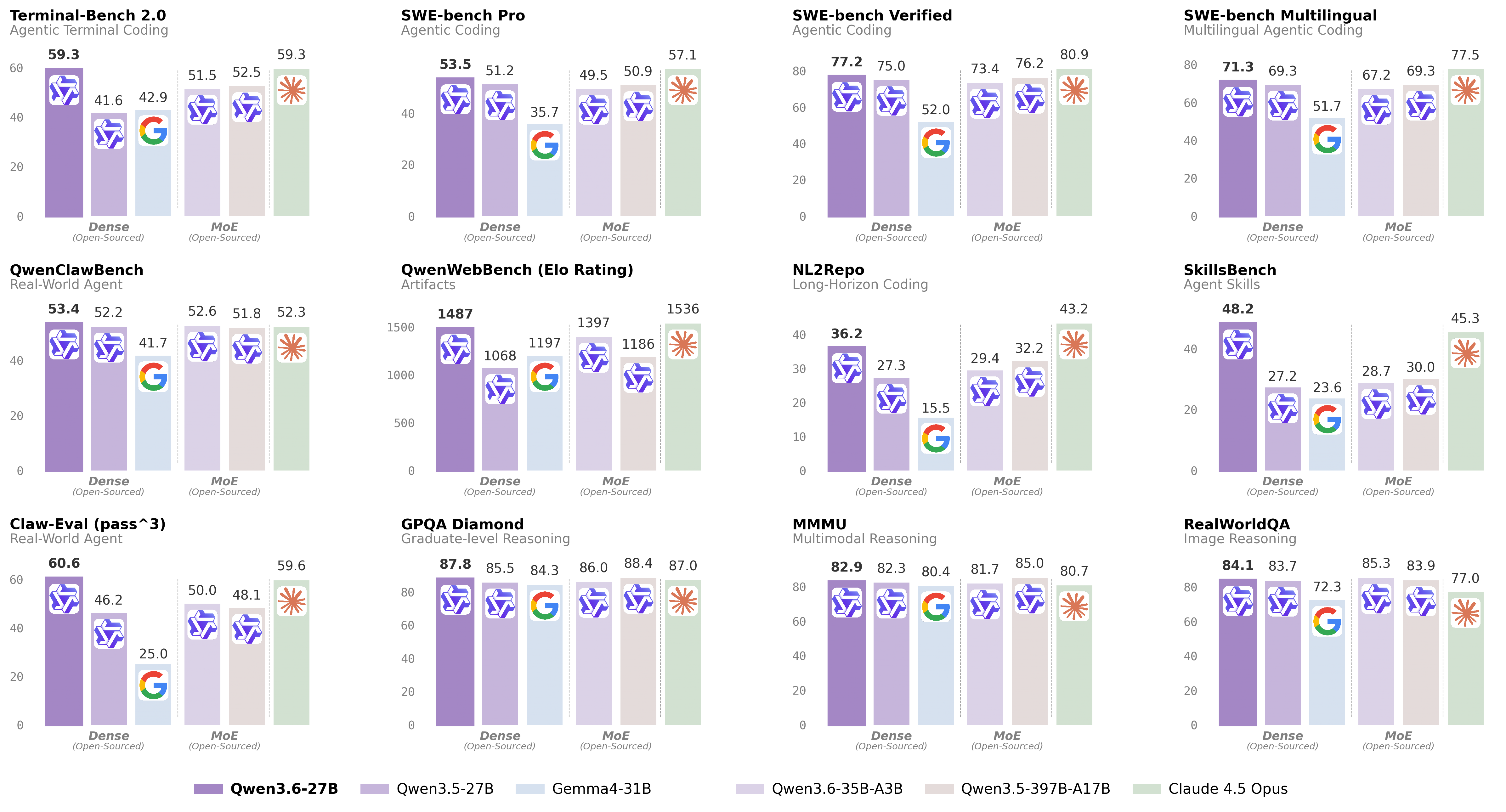
For more details, please refer to our blog post [Qwen3.6-27B](https://qwen.ai/blog?id=qwen3.6-27b).
## Model Overview
- Type: Causal Language Model with Vision Encoder
- Training Stage: Pre-training & Post-training
- Language Model
- Number of Parameters: 27B
- Hidden Dimension: 5120
- Token Embedding: 248320 (Padded)
- Number of Layers: 64
- Hidden Layout: 16 × (3 × (Gated DeltaNet → FFN) → 1 × (Gated Attention → FFN))
- Gated DeltaNet:
- Number of Linear Attention Heads: 48 for V and 16 for QK
- Head Dimension: 128
- Gated Attention:
- Number of Attention Heads: 24 for Q and 4 for KV
- Head Dimension: 256
- Rotary Position Embedding Dimension: 64
- Feed Forward Network:
- Intermediate Dimension: 17408
- LM Output: 248320 (Padded)
- MTP: trained with multi-steps
- Context Length: 262,144 natively and extensible up to 1,010,000 tokens.
### Citation
```bibtex
@misc{qwen3.6-27b,
title = {{Qwen3.6-27B}: Flagship-Level Coding in a {27B} Dense Model},
author = {{Qwen Team}},
month = {April},
year = {2026},
url = {https://qwen.ai/blog?id=qwen3.6-27b}
}
```
|