| --- |
| license: apache-2.0 |
| base_model: |
| - p-e-w/Qwen3-4B-Instruct-2507-heretic |
| --- |
| Quants of https://huggingface.co/p-e-w/Qwen3-4B-Instruct-2507-heretic |
|
|
|
|
| # Qwen3-4B-Instruct-2507 |
| <a href="https://chat.qwen.ai" target="_blank" style="margin: 2px;"> |
| <img alt="Chat" src="https://img.shields.io/badge/%F0%9F%92%9C%EF%B8%8F%20Qwen%20Chat%20-536af5" style="display: inline-block; vertical-align: middle;"/> |
| </a> |
| ## Highlights |
| |
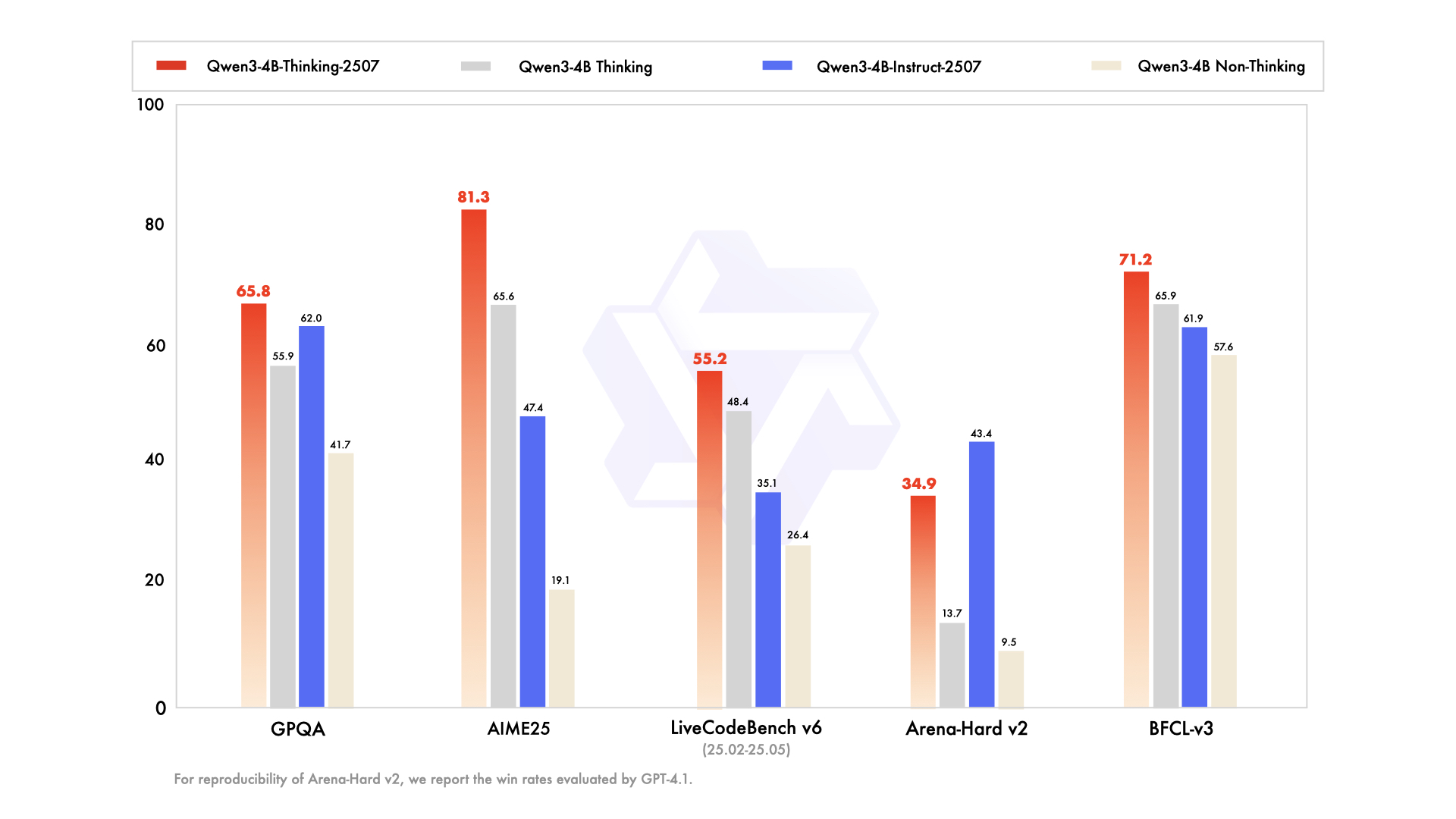
| We introduce the updated version of the **Qwen3-4B non-thinking mode**, named **Qwen3-4B-Instruct-2507**, featuring the following key enhancements: |
|
|
| - **Significant improvements** in general capabilities, including **instruction following, logical reasoning, text comprehension, mathematics, science, coding and tool usage**. |
| - **Substantial gains** in long-tail knowledge coverage across **multiple languages**. |
| - **Markedly better alignment** with user preferences in **subjective and open-ended tasks**, enabling more helpful responses and higher-quality text generation. |
| - **Enhanced capabilities** in **256K long-context understanding**. |
|
|
|  |
|
|
| ## Model Overview |
|
|
| **Qwen3-4B-Instruct-2507** has the following features: |
| - Type: Causal Language Models |
| - Training Stage: Pretraining & Post-training |
| - Number of Parameters: 4.0B |
| - Number of Paramaters (Non-Embedding): 3.6B |
| - Number of Layers: 36 |
| - Number of Attention Heads (GQA): 32 for Q and 8 for KV |
| - Context Length: **262,144 natively**. |
|
|
| **NOTE: This model supports only non-thinking mode and does not generate ``<think></think>`` blocks in its output. Meanwhile, specifying `enable_thinking=False` is no longer required.** |
| For more details, including benchmark evaluation, hardware requirements, and inference performance, please refer to our [blog](https://qwenlm.github.io/blog/qwen3/), [GitHub](https://github.com/QwenLM/Qwen3), and [Documentation](https://qwen.readthedocs.io/en/latest/). |
| ## Performance |
| | | GPT-4.1-nano-2025-04-14 | Qwen3-30B-A3B Non-Thinking | Qwen3-4B Non-Thinking | Qwen3-4B-Instruct-2507 | |
| |--- | --- | --- | --- | --- | |
| | **Knowledge** | | | | |
| | MMLU-Pro | 62.8 | 69.1 | 58.0 | **69.6** | |
| | MMLU-Redux | 80.2 | 84.1 | 77.3 | **84.2** | |
| | GPQA | 50.3 | 54.8 | 41.7 | **62.0** | |
| | SuperGPQA | 32.2 | 42.2 | 32.0 | **42.8** | |
| | **Reasoning** | | | | |
| | AIME25 | 22.7 | 21.6 | 19.1 | **47.4** | |
| | HMMT25 | 9.7 | 12.0 | 12.1 | **31.0** | |
| | ZebraLogic | 14.8 | 33.2 | 35.2 | **80.2** | |
| | LiveBench 20241125 | 41.5 | 59.4 | 48.4 | **63.0** | |
| | **Coding** | | | | |
| | LiveCodeBench v6 (25.02-25.05) | 31.5 | 29.0 | 26.4 | **35.1** | |
| | MultiPL-E | 76.3 | 74.6 | 66.6 | **76.8** | |
| | Aider-Polyglot | 9.8 | **24.4** | 13.8 | 12.9 | |
| | **Alignment** | | | | |
| | IFEval | 74.5 | **83.7** | 81.2 | 83.4 | |
| | Arena-Hard v2* | 15.9 | 24.8 | 9.5 | **43.4** | |
| | Creative Writing v3 | 72.7 | 68.1 | 53.6 | **83.5** | |
| | WritingBench | 66.9 | 72.2 | 68.5 | **83.4** | |
| | **Agent** | | | | |
| | BFCL-v3 | 53.0 | 58.6 | 57.6 | **61.9** | |
| | TAU1-Retail | 23.5 | 38.3 | 24.3 | **48.7** | |
| | TAU1-Airline | 14.0 | 18.0 | 16.0 | **32.0** | |
| | TAU2-Retail | - | 31.6 | 28.1 | **40.4** | |
| | TAU2-Airline | - | 18.0 | 12.0 | **24.0** | |
| | TAU2-Telecom | - | **18.4** | 17.5 | 13.2 | |
| | **Multilingualism** | | | | |
| | MultiIF | 60.7 | **70.8** | 61.3 | 69.0 | |
| | MMLU-ProX | 56.2 | **65.1** | 49.6 | 61.6 | |
| | INCLUDE | 58.6 | **67.8** | 53.8 | 60.1 | |
| | PolyMATH | 15.6 | 23.3 | 16.6 | **31.1** | |
| *: For reproducibility, we report the win rates evaluated by GPT-4.1. |
| ## Quickstart |
| The code of Qwen3 has been in the latest Hugging Face `transformers` and we advise you to use the latest version of `transformers`. |
| With `transformers<4.51.0`, you will encounter the following error: |
| ``` |
| KeyError: 'qwen3' |
| ``` |
| The following contains a code snippet illustrating how to use the model generate content based on given inputs. |
| ```python |
| from transformers import AutoModelForCausalLM, AutoTokenizer |
| model_name = "Qwen/Qwen3-4B-Instruct-2507" |
| # load the tokenizer and the model |
| tokenizer = AutoTokenizer.from_pretrained(model_name) |
| model = AutoModelForCausalLM.from_pretrained( |
| model_name, |
| torch_dtype="auto", |
| device_map="auto" |
| ) |
| # prepare the model input |
| prompt = "Give me a short introduction to large language model." |
| messages = [ |
| {"role": "user", "content": prompt} |
| ] |
| text = tokenizer.apply_chat_template( |
| messages, |
| tokenize=False, |
| add_generation_prompt=True, |
| ) |
| model_inputs = tokenizer([text], return_tensors="pt").to(model.device) |
| # conduct text completion |
| generated_ids = model.generate( |
| **model_inputs, |
| max_new_tokens=16384 |
| ) |
| output_ids = generated_ids[0][len(model_inputs.input_ids[0]):].tolist() |
| content = tokenizer.decode(output_ids, skip_special_tokens=True) |
| print("content:", content) |
| ``` |
| For deployment, you can use `sglang>=0.4.6.post1` or `vllm>=0.8.5` or to create an OpenAI-compatible API endpoint: |
| - SGLang: |
| ```shell |
| python -m sglang.launch_server --model-path Qwen/Qwen3-4B-Instruct-2507 --context-length 262144 |
| ``` |
| - vLLM: |
| ```shell |
| vllm serve Qwen/Qwen3-4B-Instruct-2507 --max-model-len 262144 |
| ``` |
| **Note: If you encounter out-of-memory (OOM) issues, consider reducing the context length to a shorter value, such as `32,768`.** |
|
|
| For local use, applications such as Ollama, LMStudio, MLX-LM, llama.cpp, and KTransformers have also supported Qwen3. |
|
|
| ## Agentic Use |
|
|
| Qwen3 excels in tool calling capabilities. We recommend using [Qwen-Agent](https://github.com/QwenLM/Qwen-Agent) to make the best use of agentic ability of Qwen3. Qwen-Agent encapsulates tool-calling templates and tool-calling parsers internally, greatly reducing coding complexity. |
|
|
| To define the available tools, you can use the MCP configuration file, use the integrated tool of Qwen-Agent, or integrate other tools by yourself. |
| ```python |
| from qwen_agent.agents import Assistant |
| # Define LLM |
| llm_cfg = { |
| 'model': 'Qwen3-4B-Instruct-2507', |
| # Use a custom endpoint compatible with OpenAI API: |
| 'model_server': 'http://localhost:8000/v1', # api_base |
| 'api_key': 'EMPTY', |
| } |
| # Define Tools |
| tools = [ |
| {'mcpServers': { # You can specify the MCP configuration file |
| 'time': { |
| 'command': 'uvx', |
| 'args': ['mcp-server-time', '--local-timezone=Asia/Shanghai'] |
| }, |
| "fetch": { |
| "command": "uvx", |
| "args": ["mcp-server-fetch"] |
| } |
| } |
| }, |
| 'code_interpreter', # Built-in tools |
| ] |
| # Define Agent |
| bot = Assistant(llm=llm_cfg, function_list=tools) |
| # Streaming generation |
| messages = [{'role': 'user', 'content': 'https://qwenlm.github.io/blog/ Introduce the latest developments of Qwen'}] |
| for responses in bot.run(messages=messages): |
| pass |
| print(responses) |
| ``` |
|
|
| ## Best Practices |
|
|
| To achieve optimal performance, we recommend the following settings: |
|
|
| 1. **Sampling Parameters**: |
| - We suggest using `Temperature=0.7`, `TopP=0.8`, `TopK=20`, and `MinP=0`. |
| - For supported frameworks, you can adjust the `presence_penalty` parameter between 0 and 2 to reduce endless repetitions. However, using a higher value may occasionally result in language mixing and a slight decrease in model performance. |
|
|
| 2. **Adequate Output Length**: We recommend using an output length of 16,384 tokens for most queries, which is adequate for instruct models. |
|
|
| 3. **Standardize Output Format**: We recommend using prompts to standardize model outputs when benchmarking. |
| - **Math Problems**: Include "Please reason step by step, and put your final answer within \boxed{}." in the prompt. |
| - **Multiple-Choice Questions**: Add the following JSON structure to the prompt to standardize responses: "Please show your choice in the `answer` field with only the choice letter, e.g., `"answer": "C"`." |
|
|
| ### Citation |
|
|
| If you find our work helpful, feel free to give us a cite. |
|
|
| ``` |
| @misc{qwen3technicalreport, |
| title={Qwen3 Technical Report}, |
| author={Qwen Team}, |
| year={2025}, |
| eprint={2505.09388}, |
| archivePrefix={arXiv}, |
| primaryClass={cs.CL}, |
| url={https://arxiv.org/abs/2505.09388}, |
| } |
| ``` |

