

ONE-SHOT: Compositional Human-Environment Video Synthesis via Spatial-Decoupled Motion Injection and Hybrid Context Integration
Paper • 2604.01043 • Published • 9


Official inference code for ONE-SHOT: Compositional Human-Environment Video Synthesis via Spatial-Decoupled Motion Injection and Hybrid Context Integration.
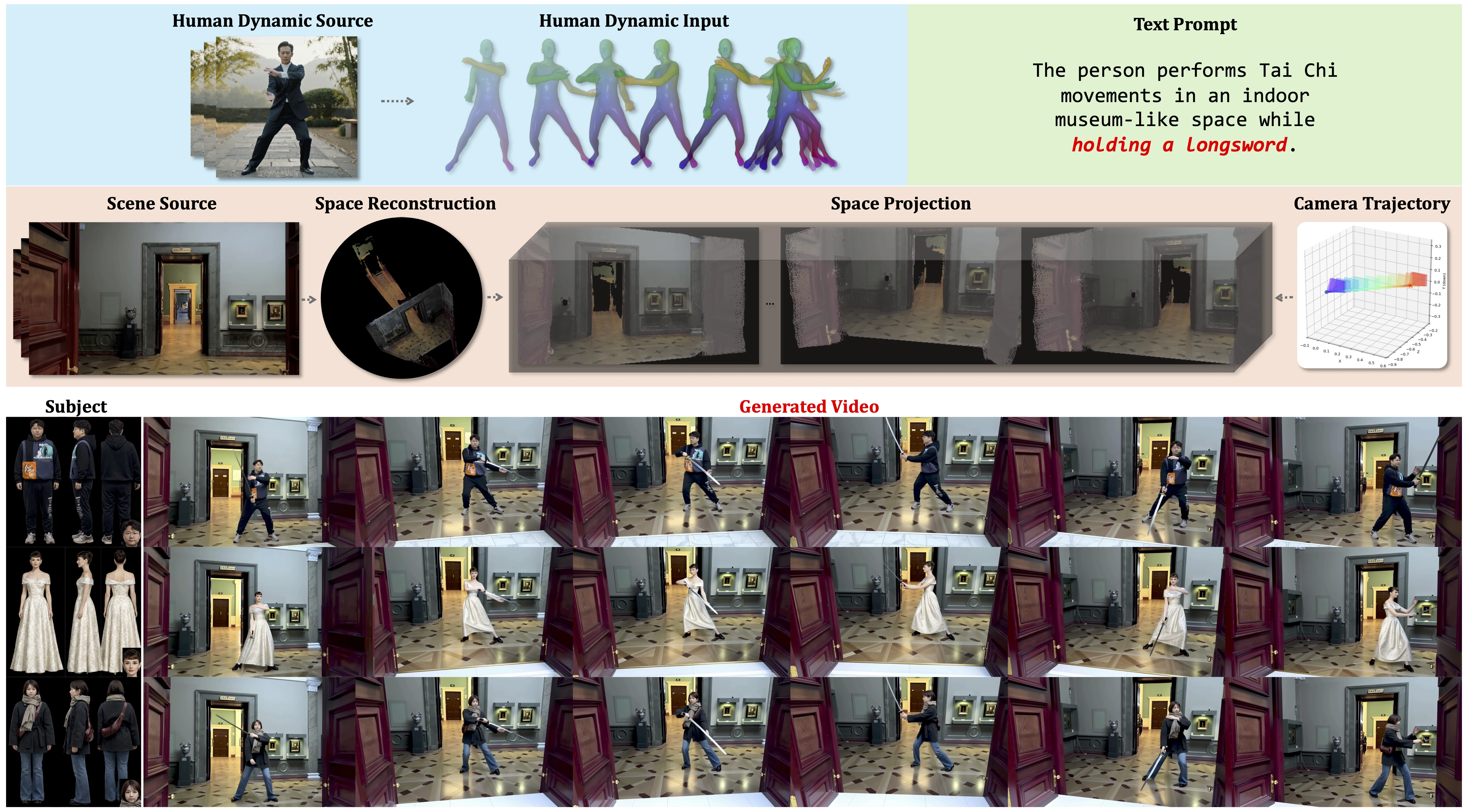
ONE-SHOT is a parameter-efficient framework for controllable human-environment video synthesis. It supports independent control over subject identity, human motion, scene context, and camera trajectory while preserving persistent identity and stable interactions in long generations.
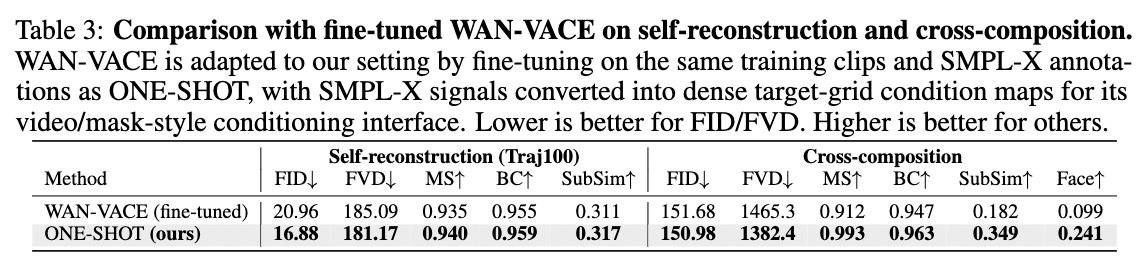
Recent advances in Video Foundation Models (VFMs) have revolutionized human-centric video synthesis, yet fine-grained and independent editing of subjects and scenes remains a critical challenge. We introduce ONE-SHOT, a parameter-efficient framework built upon pre-trained VFMs that achieves high-fidelity synthesis of human-environment videos with independent control over subject appearance, human dynamics, spatial environments, and camera trajectories. By optimizing only a sparse set of parameters, it achieves precise control while preserving responsiveness to textual instructions. A canonical-space motion injection mechanism mitigates conditioning competition between rigid human priors and text prompts. By anchoring static and dynamic context, ONE-SHOT ensures persistent subject identity and stable human-environment interactions across minute-scale generations. Extensive experiments demonstrate that ONE-SHOT significantly outperforms existing methods in structural control and creative diversity.
2026/05/31: The ONE-SHOT-14B diffusers checkpoint can be downloaded from Hugging Face.2026/04/01: The ONE-SHOT paper is available on arXiv.2026/04/01: ONE-SHOT project materials are available on the project page.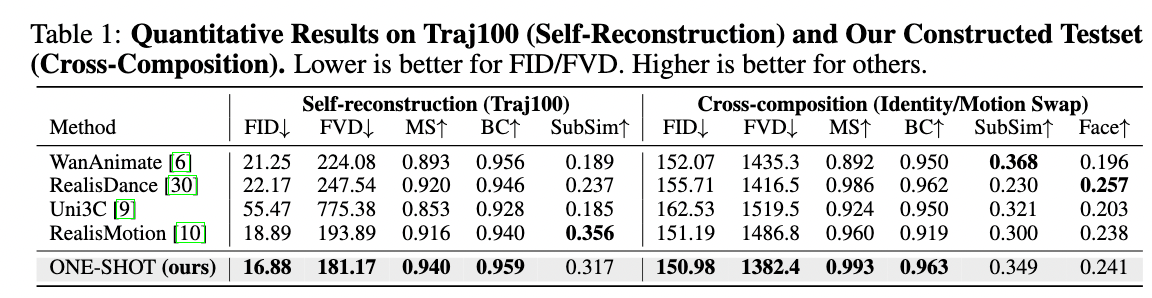
Recommended environment:
ffmpeg with libx264 supportgit clone https://github.com/MartaYang/ONE-SHOT-code.git
cd ONE-SHOT-code
bash install.sh
conda activate oneshot
The installer creates the oneshot conda environment, installs a GPL-enabled ffmpeg, installs PyTorch 2.5.1+cu121, installs the vendored PyTorch3D wheel, and then installs requirements.txt.
conda create -n oneshot python=3.12 -y
conda activate oneshot

conda install 'ffmpeg=*=*gpl*' -y

pip install --index-url https://download.pytorch.org/whl/cu121 \
    torch==2.5.1+cu121 torchvision==0.20.1+cu121 torchaudio==2.5.1+cu121

pip install Preprocessing/third_party/wheels/pytorch3d-0.7.9-cp312-cp312-manylinux_2_31_x86_64.whl
pip install -r requirements.txt
Download the released checkpoint and set ONESHOT_MODEL_DIR:
hf download MartaYang007/ONE-SHOT-14B \
    --local-dir pretrained_models/ONESHOT-14B-diffusers

export ONESHOT_MODEL_DIR=pretrained_models/ONESHOT-14B-diffusers
A recommended local checkpoint layout is:
pretrained_models/
└── ONESHOT-14B-diffusers/
    ├── transformer/
    ├── vae/
    ├── text_encoder/
    ├── tokenizer/
    ├── scheduler/
    ├── model_index.json
    ├── preprocess/
    │   ├── human3r.pth
    │   ├── DA3NESTED-GIANT-LARGE-1.1/
    │   ├── smpl_models/
    │   │   └── smplx/
    │   │       └── SMPLX_NEUTRAL.npz     # YOU MUST DOWNLOAD THIS — see below
    │   └── torch_hub/
    └── demo/
The SMPL-X license prohibits third-party redistribution, so SMPLX_NEUTRAL.npz
is not included in the Hugging Face checkpoint.
Register at https://smpl-x.is.tue.mpg.de/ and accept the model license.
From the Downloads page, fetch the latest SMPL-X (NPZ format) release.
Place the file at:
$ONESHOT_MODEL_DIR/preprocess/smpl_models/smplx/SMPLX_NEUTRAL.npz
If the file is missing at runtime, the pipeline fails fast with an error pointing back to this section.
The end-to-end entrypoint is:
bash scripts/run_pipeline.sh <id_swap|motion_swap|scene_swap> [task arguments]
Supported tasks:
| Task | Required inputs | Description |
|---|---|---|
id_swap |
source video, identity profile video or identity profile images, prompt | Replace the actor identity while preserving the source motion and scene. |
motion_swap |
source video, motion video, prompt | Apply a new motion to the original subject and scene. |
scene_swap |
source video, scene video, prompt | Place the person into a different environment. |
Example commands:
bash scripts/run_pipeline.sh id_swap \
    --video_path "$ONESHOT_MODEL_DIR/demo/walkinforest.mp4" \
    --id_profile_video "$ONESHOT_MODEL_DIR/demo/WillSmith.mp4" \
    --prompt "A sunlit forest trail with dense green trees and soft natural light filtering through the leaves. Will Smith, wearing a black suit, walks steadily along the forest path while holding a wooden walking stick, looking slightly upward as he moves forward."

# --id_profile_video: recommended — video with multi-angle coverage of the target person
#   (front + side + other angles) for best identity fidelity.
# Alternative: --id_profile_dir <dir> with 4 images named exactly:
#   ref1.png (front view)  ref2.png (back / 3/4 view)  ref3.png (side view)  face.png (face crop)
--id_profile_video is recommended when the identity reference contains multi-angle coverage. Alternatively, provide --id_profile_dir <dir> with ref1.png, ref2.png, ref3.png, and face.png.
bash scripts/run_pipeline.sh motion_swap \
    --video_path "$ONESHOT_MODEL_DIR/demo/museum4_human.mp4" \
    --motion_video_path "$ONESHOT_MODEL_DIR/demo/taiji.mp4" \
    --prompt "An indoor space resembling the interior of a museum. A man in a suit is performing tai chi movements."

# to also swap identity: add --id_profile_video $ONESHOT_MODEL_DIR/demo/WillSmith.mp4
# Note: update the prompt accordingly (e.g., gender, name) to match the new identity and avoid conflicts with the video content.
To also swap identity, add --id_profile_video "$ONESHOT_MODEL_DIR/demo/WillSmith.mp4" and update the prompt so the identity description does not conflict with the video content.
bash scripts/run_pipeline.sh scene_swap \
    --video_path "$ONESHOT_MODEL_DIR/demo/palace_human.mp4" \
    --scene_video_path "$ONESHOT_MODEL_DIR/demo/museum4_scene.mp4" \
    --id_profile_video "$ONESHOT_MODEL_DIR/demo/WillSmith.mp4" \
    --prompt "An indoor space resembling the interior of a museum. Will Smith is walking, wearing a black suit."

# --scene_video_path: must be a pure background video (no human subjects).
#   Strongly recommended to choose a background video whose depth-of-field
#   matches the person in --video_path for best generation quality.
# to also swap identity: add --id_profile_video $ONESHOT_MODEL_DIR/demo/WillSmith.mp4
# Note: update the prompt accordingly (e.g., gender, name) to match the new identity and avoid conflicts with the video content.
To preserve the original identity, omit --id_profile_video and update the prompt accordingly.
Generated videos are saved to:
exp/<scheduler>_<task>_<timestamp>/<save_name>.mp4
For example:
exp/lcm_id_swap_20260527_221947/ID_WillSmith-SMPLX_clip_000-006-Scene_C01_gen_xxx_ourGen81.mp4
| Model | Status | Link |
|---|---|---|
| ONE-SHOT-14B | Available | MartaYang007/ONE-SHOT-14B |
scripts/run_pipeline.sh builds a task CSV, selects available GPUs with the most free memory, and launches scripts/inference_short.sh.ONESHOT_ENV if your conda environment name is not oneshot.ONE-SHOT-code/
├── install.sh # one-shot conda environment installer
├── requirements.txt
├── tools/
│ ├── inference_short.py # short-video inference entrypoint
│ └── inference_long.py # long-video inference with scene memory
├── scripts/
│ ├── run_pipeline.sh # preprocessing + inference pipeline
│ ├── inference_short.sh
│ └── inference_long.sh
├── Preprocessing/
│ ├── preprocess_video.py # per-video preprocessing
│ ├── build_csv.py # task CSV builder
│ ├── make_scene_masked_dilate.py
│ └── third_party/ # vendored DUSt3R, Human3R, CroCo, and utilities
├── oneshot_diffusers/ # ONE-SHOT diffusers overrides
│ ├── transformer_wan_oneshot.py
│ ├── pipeline_wan_oneshot.py
│ └── oneshot_util.py
├── utils/ # ODE solvers and video I/O helpers
└── datasets/ # DWPose drawing and data utilities
This project builds on:
@misc{yang2026oneshot,
  title={ONE-SHOT: Compositional Human-Environment Video Synthesis via Spatial-Decoupled Motion Injection and Hybrid Context Integration},
  author={Fengyuan Yang and Luying Huang and Jiazhi Guan and Quanwei Yang and Dongwei Pan and Jianglin Fu and Haocheng Feng and Wei He and Kaisiyuan Wang and Hang Zhou and Angela Yao},
  year={2026},
  eprint={2604.01043},
  archivePrefix={arXiv},
  primaryClass={cs.CV},
  url={https://arxiv.org/abs/2604.01043}
}