Instructions to use Mediocreatmybest/instructblip-vicuna-13b_8bit with libraries, inference providers, notebooks, and local apps. Follow these links to get started.
- Libraries
- Transformers
How to use Mediocreatmybest/instructblip-vicuna-13b_8bit with Transformers:
# Use a pipeline as a high-level helper from transformers import pipeline pipe = pipeline("image-text-to-text", model="Mediocreatmybest/instructblip-vicuna-13b_8bit")# Load model directly from transformers import AutoProcessor, AutoModelForMultimodalLM processor = AutoProcessor.from_pretrained("Mediocreatmybest/instructblip-vicuna-13b_8bit") model = AutoModelForMultimodalLM.from_pretrained("Mediocreatmybest/instructblip-vicuna-13b_8bit", device_map="auto") - Notebooks
- Google Colab
- Kaggle
- Local Apps Settings
- vLLM
How to use Mediocreatmybest/instructblip-vicuna-13b_8bit with vLLM:
Install from pip and serve model
# Install vLLM from pip: pip install vllm # Start the vLLM server: vllm serve "Mediocreatmybest/instructblip-vicuna-13b_8bit" # Call the server using curl (OpenAI-compatible API): curl -X POST "http://localhost:8000/v1/completions" \ -H "Content-Type: application/json" \ --data '{ "model": "Mediocreatmybest/instructblip-vicuna-13b_8bit", "prompt": "Once upon a time,", "max_tokens": 512, "temperature": 0.5 }'Use Docker
docker model run hf.co/Mediocreatmybest/instructblip-vicuna-13b_8bit
- SGLang
How to use Mediocreatmybest/instructblip-vicuna-13b_8bit with SGLang:
Install from pip and serve model
# Install SGLang from pip: pip install sglang # Start the SGLang server: python3 -m sglang.launch_server \ --model-path "Mediocreatmybest/instructblip-vicuna-13b_8bit" \ --host 0.0.0.0 \ --port 30000 # Call the server using curl (OpenAI-compatible API): curl -X POST "http://localhost:30000/v1/completions" \ -H "Content-Type: application/json" \ --data '{ "model": "Mediocreatmybest/instructblip-vicuna-13b_8bit", "prompt": "Once upon a time,", "max_tokens": 512, "temperature": 0.5 }'Use Docker images
docker run --gpus all \ --shm-size 32g \ -p 30000:30000 \ -v ~/.cache/huggingface:/root/.cache/huggingface \ --env "HF_TOKEN=<secret>" \ --ipc=host \ lmsysorg/sglang:latest \ python3 -m sglang.launch_server \ --model-path "Mediocreatmybest/instructblip-vicuna-13b_8bit" \ --host 0.0.0.0 \ --port 30000 # Call the server using curl (OpenAI-compatible API): curl -X POST "http://localhost:30000/v1/completions" \ -H "Content-Type: application/json" \ --data '{ "model": "Mediocreatmybest/instructblip-vicuna-13b_8bit", "prompt": "Once upon a time,", "max_tokens": 512, "temperature": 0.5 }' - Docker Model Runner
How to use Mediocreatmybest/instructblip-vicuna-13b_8bit with Docker Model Runner:
docker model run hf.co/Mediocreatmybest/instructblip-vicuna-13b_8bit
Input type (float) and bias type (struct c10::Half) should be the same
Hi, I'm trying to use your quantized version but i'm stuck on the following error.
"Input type (float) and bias type (struct c10::Half) should be the same"
In "outputs = model.generate("
I guess some kind of normalization is needed. can you help me? This is my code:
from transformers import InstructBlipProcessor, InstructBlipForConditionalGeneration
import torch
from PIL import Image
import requests
model = InstructBlipForConditionalGeneration.from_pretrained("Mediocreatmybest/instructblip-vicuna-13b_8bit")
processor = InstructBlipProcessor.from_pretrained("Mediocreatmybest/instructblip-vicuna-13b_8bit")
device = "cuda" if torch.cuda.is_available() else "cpu"
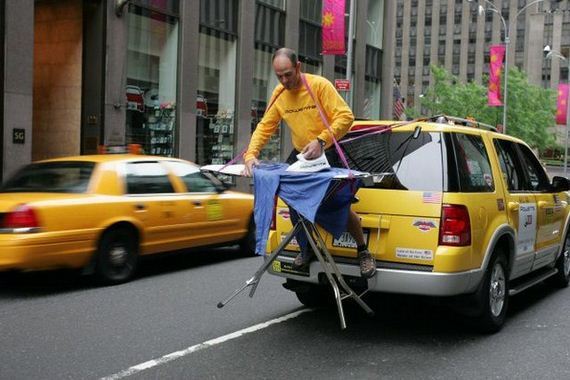
url = "https://raw.githubusercontent.com/salesforce/LAVIS/main/docs/_static/Confusing-Pictures.jpg"
image = Image.open(requests.get(url, stream=True).raw).convert("RGB")
prompt = "What is unusual about this image?"
inputs = processor(images=image, text=prompt, return_tensors="pt").to(device)
outputs = model.generate(
**inputs,
do_sample=False,
num_beams=5,
max_length=256,
min_length=1,
top_p=0.9,
repetition_penalty=1.5,
length_penalty=1.0,
temperature=1,
)
generated_text = processor.batch_decode(outputs, skip_special_tokens=True)[0].strip()
print(generated_text)
Awesome, sorry missed the question due to notifications. Glad you got it working :)

There was an update to transformers that fixed this previously when using bitsandbytes.
Not sure if that was the same issue you were having?