Instructions to use Mungert/MinerU2.5-2509-1.2B-GGUF with libraries, inference providers, notebooks, and local apps. Follow these links to get started.
- Libraries
- Transformers
How to use Mungert/MinerU2.5-2509-1.2B-GGUF with Transformers:
# Use a pipeline as a high-level helper from transformers import pipeline pipe = pipeline("image-text-to-text", model="Mungert/MinerU2.5-2509-1.2B-GGUF") messages = [ { "role": "user", "content": [ {"type": "image", "url": "https://huggingface.co/datasets/huggingface/documentation-images/resolve/main/p-blog/candy.JPG"}, {"type": "text", "text": "What animal is on the candy?"} ] }, ] pipe(text=messages)# Load model directly from transformers import AutoModel model = AutoModel.from_pretrained("Mungert/MinerU2.5-2509-1.2B-GGUF", dtype="auto") - llama-cpp-python
How to use Mungert/MinerU2.5-2509-1.2B-GGUF with llama-cpp-python:
# !pip install llama-cpp-python from llama_cpp import Llama llm = Llama.from_pretrained( repo_id="Mungert/MinerU2.5-2509-1.2B-GGUF", filename="MinerU2.5-2509-1.2B-bf16.gguf", )
llm.create_chat_completion( messages = [ { "role": "user", "content": [ { "type": "text", "text": "Describe this image in one sentence." }, { "type": "image_url", "image_url": { "url": "https://cdn.britannica.com/61/93061-050-99147DCE/Statue-of-Liberty-Island-New-York-Bay.jpg" } } ] } ] ) - Notebooks
- Google Colab
- Kaggle
- Local Apps Settings
- llama.cpp
How to use Mungert/MinerU2.5-2509-1.2B-GGUF with llama.cpp:
Install from brew
brew install llama.cpp # Start a local OpenAI-compatible server with a web UI: llama-server -hf Mungert/MinerU2.5-2509-1.2B-GGUF:Q4_K_M # Run inference directly in the terminal: llama-cli -hf Mungert/MinerU2.5-2509-1.2B-GGUF:Q4_K_M
Install from WinGet (Windows)
winget install llama.cpp # Start a local OpenAI-compatible server with a web UI: llama-server -hf Mungert/MinerU2.5-2509-1.2B-GGUF:Q4_K_M # Run inference directly in the terminal: llama-cli -hf Mungert/MinerU2.5-2509-1.2B-GGUF:Q4_K_M
Use pre-built binary
# Download pre-built binary from: # https://github.com/ggerganov/llama.cpp/releases # Start a local OpenAI-compatible server with a web UI: ./llama-server -hf Mungert/MinerU2.5-2509-1.2B-GGUF:Q4_K_M # Run inference directly in the terminal: ./llama-cli -hf Mungert/MinerU2.5-2509-1.2B-GGUF:Q4_K_M
Build from source code
git clone https://github.com/ggerganov/llama.cpp.git cd llama.cpp cmake -B build cmake --build build -j --target llama-server llama-cli # Start a local OpenAI-compatible server with a web UI: ./build/bin/llama-server -hf Mungert/MinerU2.5-2509-1.2B-GGUF:Q4_K_M # Run inference directly in the terminal: ./build/bin/llama-cli -hf Mungert/MinerU2.5-2509-1.2B-GGUF:Q4_K_M
Use Docker
docker model run hf.co/Mungert/MinerU2.5-2509-1.2B-GGUF:Q4_K_M
- LM Studio
- Jan
- vLLM
How to use Mungert/MinerU2.5-2509-1.2B-GGUF with vLLM:
Install from pip and serve model
# Install vLLM from pip: pip install vllm # Start the vLLM server: vllm serve "Mungert/MinerU2.5-2509-1.2B-GGUF" # Call the server using curl (OpenAI-compatible API): curl -X POST "http://localhost:8000/v1/chat/completions" \ -H "Content-Type: application/json" \ --data '{ "model": "Mungert/MinerU2.5-2509-1.2B-GGUF", "messages": [ { "role": "user", "content": [ { "type": "text", "text": "Describe this image in one sentence." }, { "type": "image_url", "image_url": { "url": "https://cdn.britannica.com/61/93061-050-99147DCE/Statue-of-Liberty-Island-New-York-Bay.jpg" } } ] } ] }'Use Docker
docker model run hf.co/Mungert/MinerU2.5-2509-1.2B-GGUF:Q4_K_M
- SGLang
How to use Mungert/MinerU2.5-2509-1.2B-GGUF with SGLang:
Install from pip and serve model
# Install SGLang from pip: pip install sglang # Start the SGLang server: python3 -m sglang.launch_server \ --model-path "Mungert/MinerU2.5-2509-1.2B-GGUF" \ --host 0.0.0.0 \ --port 30000 # Call the server using curl (OpenAI-compatible API): curl -X POST "http://localhost:30000/v1/chat/completions" \ -H "Content-Type: application/json" \ --data '{ "model": "Mungert/MinerU2.5-2509-1.2B-GGUF", "messages": [ { "role": "user", "content": [ { "type": "text", "text": "Describe this image in one sentence." }, { "type": "image_url", "image_url": { "url": "https://cdn.britannica.com/61/93061-050-99147DCE/Statue-of-Liberty-Island-New-York-Bay.jpg" } } ] } ] }'Use Docker images
docker run --gpus all \ --shm-size 32g \ -p 30000:30000 \ -v ~/.cache/huggingface:/root/.cache/huggingface \ --env "HF_TOKEN=<secret>" \ --ipc=host \ lmsysorg/sglang:latest \ python3 -m sglang.launch_server \ --model-path "Mungert/MinerU2.5-2509-1.2B-GGUF" \ --host 0.0.0.0 \ --port 30000 # Call the server using curl (OpenAI-compatible API): curl -X POST "http://localhost:30000/v1/chat/completions" \ -H "Content-Type: application/json" \ --data '{ "model": "Mungert/MinerU2.5-2509-1.2B-GGUF", "messages": [ { "role": "user", "content": [ { "type": "text", "text": "Describe this image in one sentence." }, { "type": "image_url", "image_url": { "url": "https://cdn.britannica.com/61/93061-050-99147DCE/Statue-of-Liberty-Island-New-York-Bay.jpg" } } ] } ] }' - Ollama
How to use Mungert/MinerU2.5-2509-1.2B-GGUF with Ollama:
ollama run hf.co/Mungert/MinerU2.5-2509-1.2B-GGUF:Q4_K_M
- Unsloth Studio
How to use Mungert/MinerU2.5-2509-1.2B-GGUF with Unsloth Studio:
Install Unsloth Studio (macOS, Linux, WSL)
curl -fsSL https://unsloth.ai/install.sh | sh # Run unsloth studio unsloth studio -H 0.0.0.0 -p 8888 # Then open http://localhost:8888 in your browser # Search for Mungert/MinerU2.5-2509-1.2B-GGUF to start chatting
Install Unsloth Studio (Windows)
irm https://unsloth.ai/install.ps1 | iex # Run unsloth studio unsloth studio -H 0.0.0.0 -p 8888 # Then open http://localhost:8888 in your browser # Search for Mungert/MinerU2.5-2509-1.2B-GGUF to start chatting
Using HuggingFace Spaces for Unsloth
# No setup required # Open https://huggingface.co/spaces/unsloth/studio in your browser # Search for Mungert/MinerU2.5-2509-1.2B-GGUF to start chatting
- Atomic Chat new
- Docker Model Runner
How to use Mungert/MinerU2.5-2509-1.2B-GGUF with Docker Model Runner:
docker model run hf.co/Mungert/MinerU2.5-2509-1.2B-GGUF:Q4_K_M
- Lemonade
How to use Mungert/MinerU2.5-2509-1.2B-GGUF with Lemonade:
Pull the model
# Download Lemonade from https://lemonade-server.ai/ lemonade pull Mungert/MinerU2.5-2509-1.2B-GGUF:Q4_K_M
Run and chat with the model
lemonade run user.MinerU2.5-2509-1.2B-GGUF-Q4_K_M
List all available models
lemonade list
Use Docker
docker model run hf.co/Mungert/MinerU2.5-2509-1.2B-GGUF:MinerU2.5-2509-1.2B GGUF Models
Model Generation Details
This model was generated using llama.cpp at commit ee09828cb.

Click here to get info on choosing the right GGUF model format
MinerU2.5: A Decoupled Vision-Language Model for Efficient High-Resolution Document Parsing
Introduction
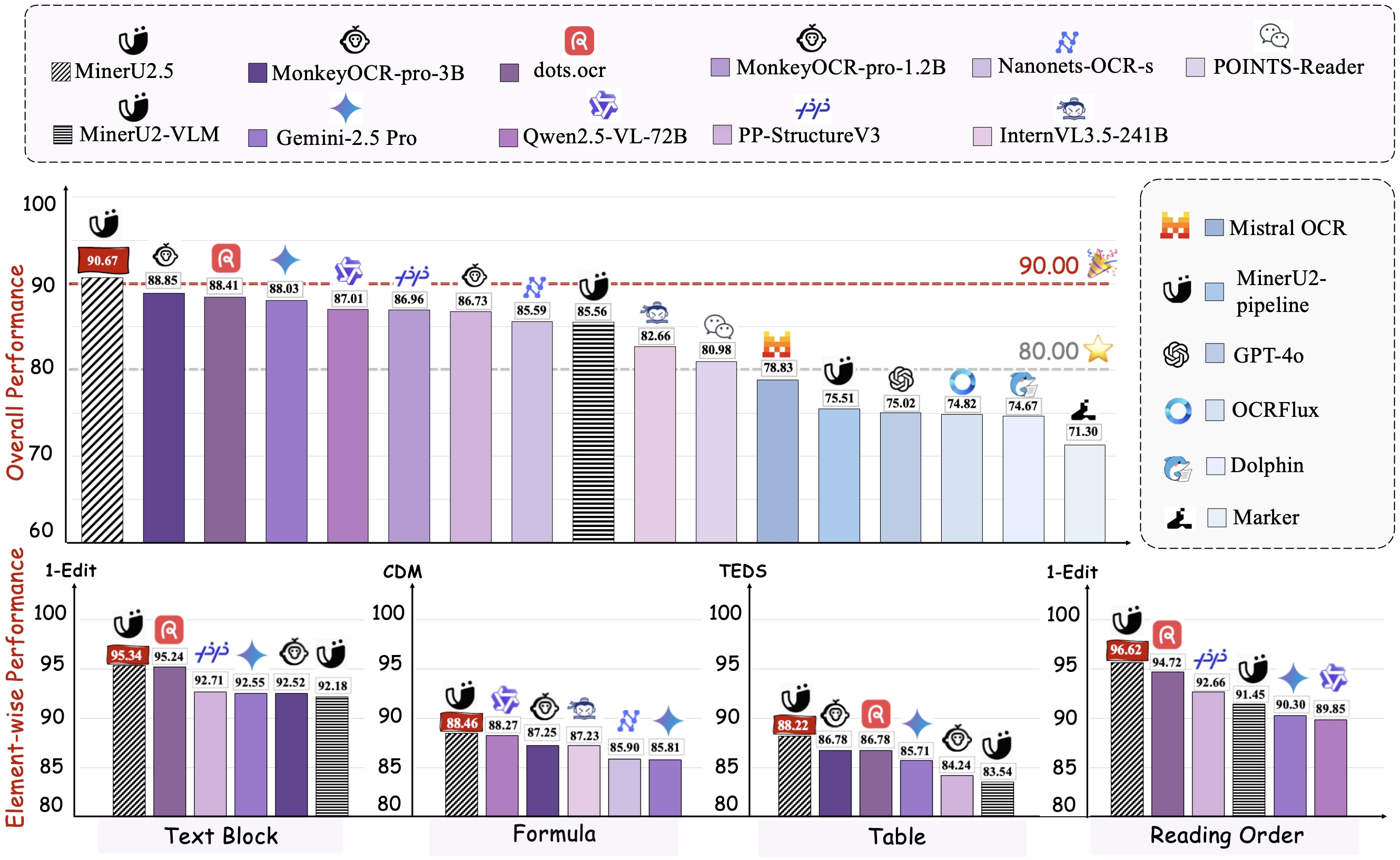
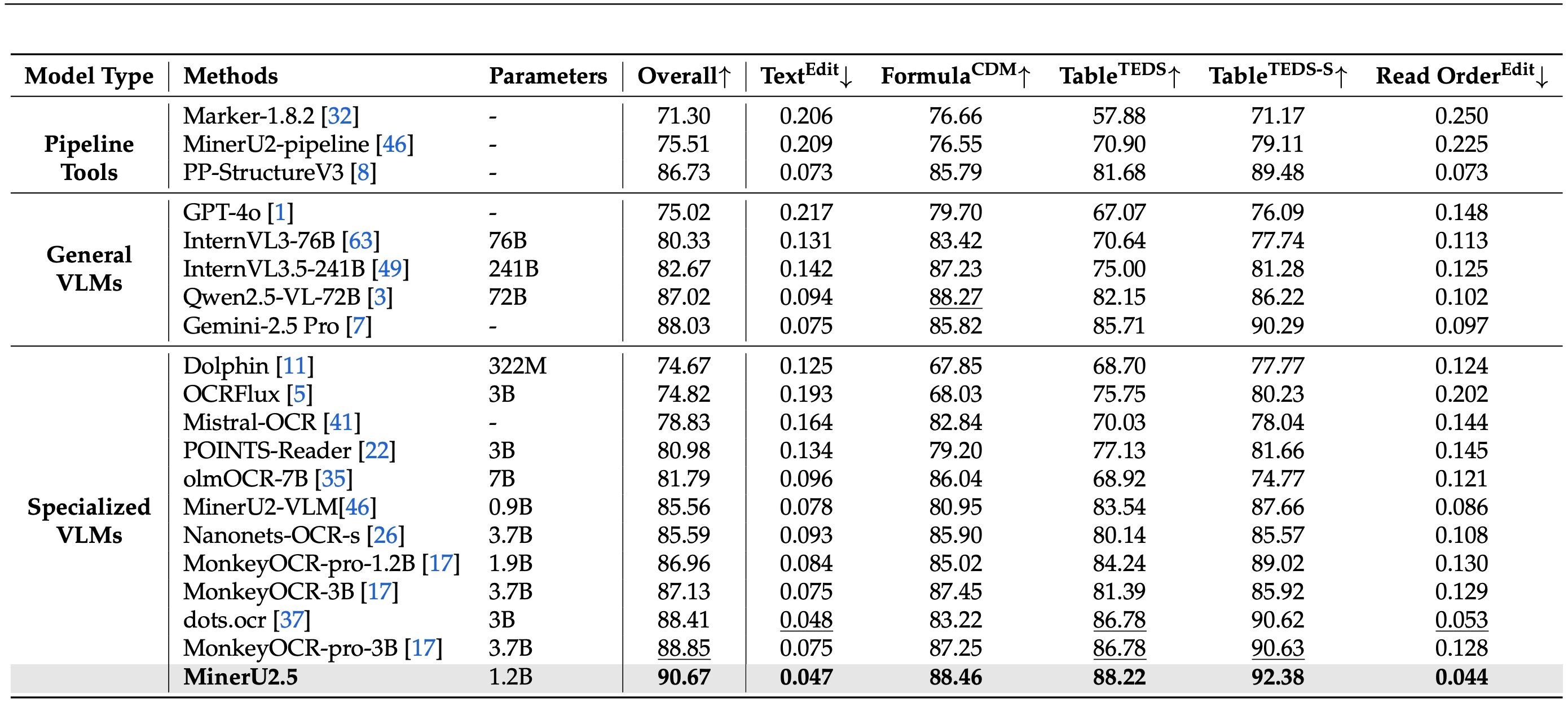
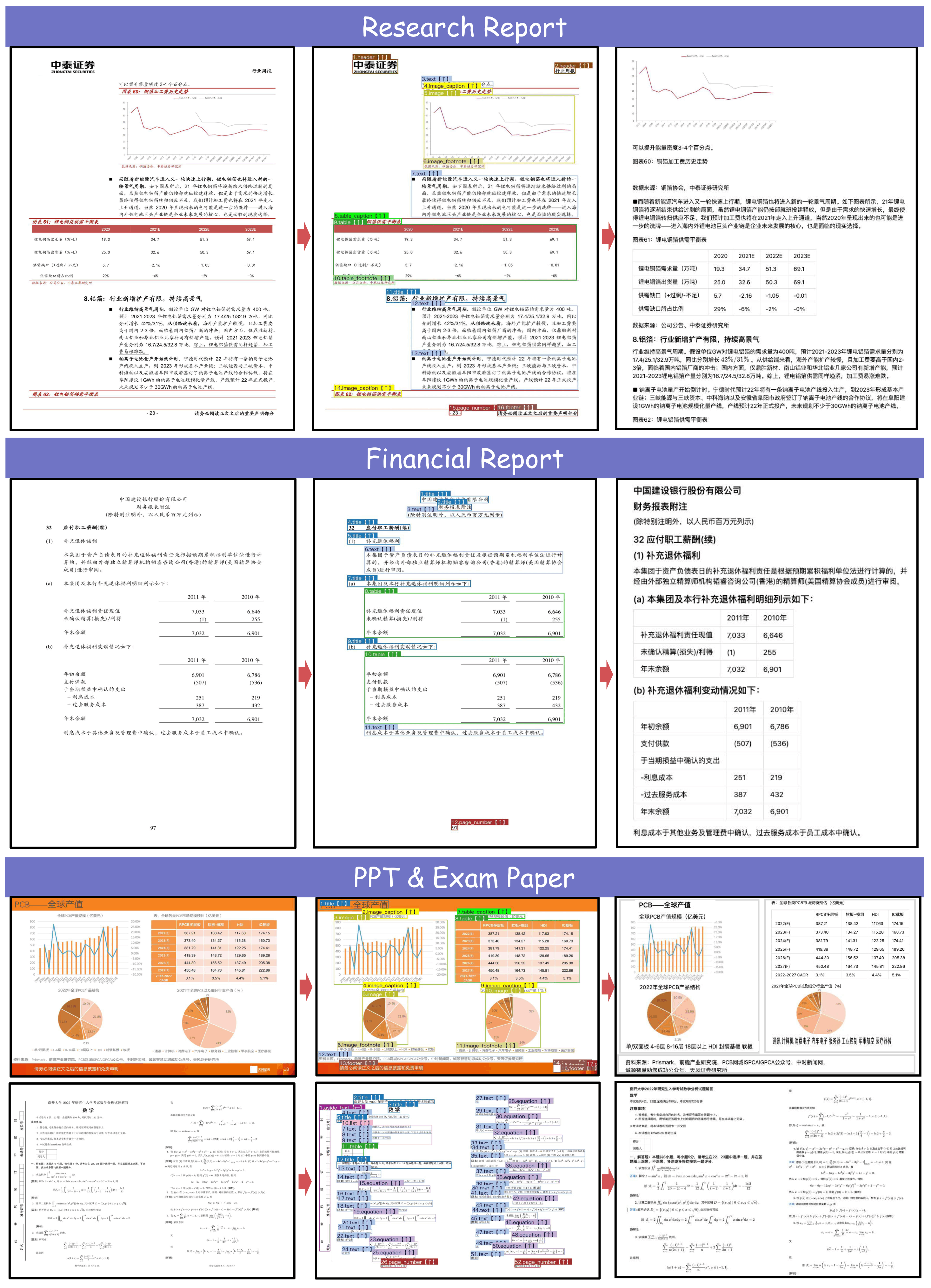
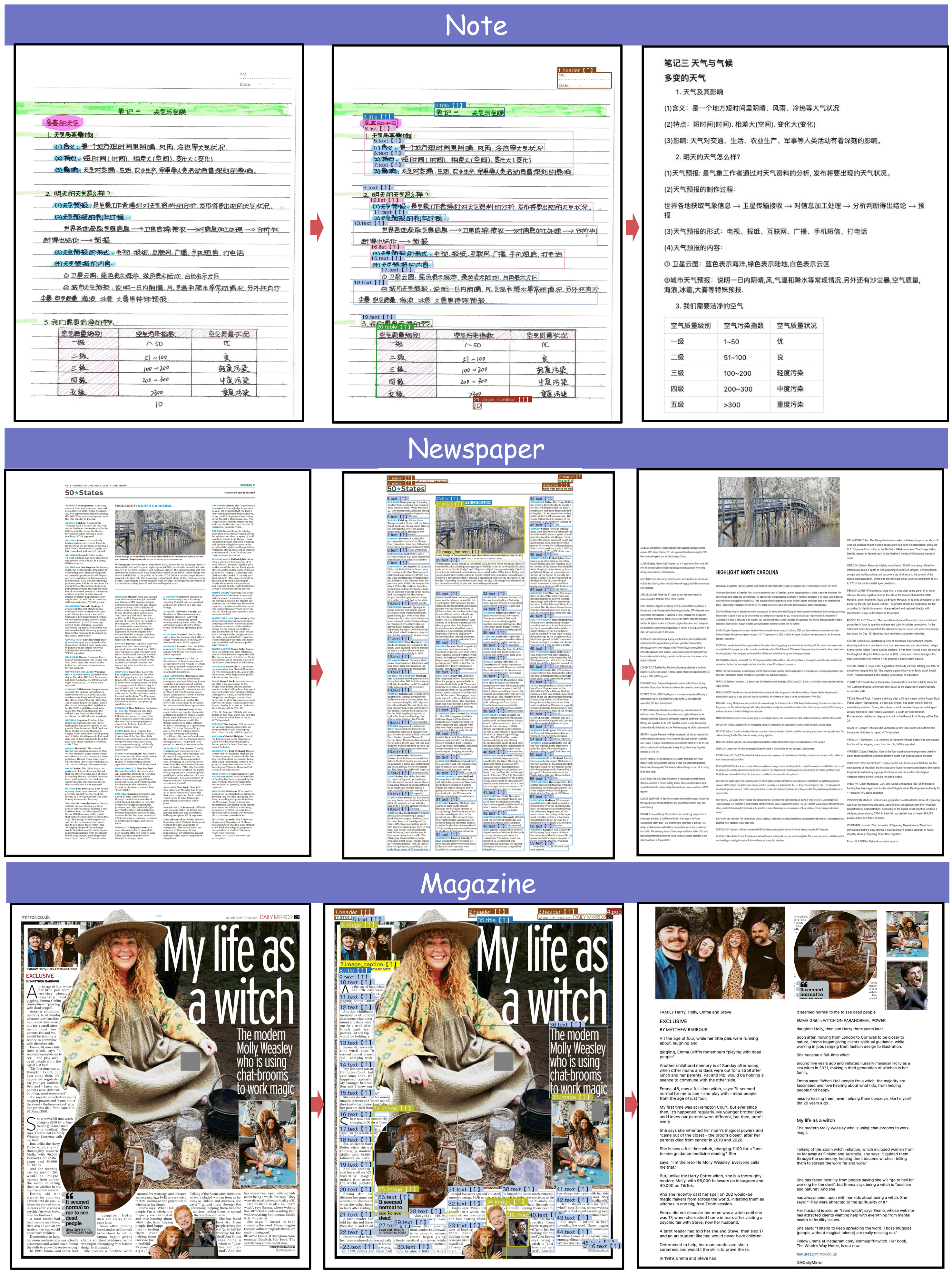
MinerU2.5 is a 1.2B-parameter vision-language model for document parsing that achieves state-of-the-art accuracy with high computational efficiency. It adopts a two-stage parsing strategy: first conducting efficient global layout analysis on downsampled images, then performing fine-grained content recognition on native-resolution crops for text, formulas, and tables. Supported by a large-scale, diverse data engine for pretraining and fine-tuning, MinerU2.5 consistently outperforms both general-purpose and domain-specific models across multiple benchmarks while maintaining low computational overhead.
Key Improvements
- Comprehensive and Granular Layout Analysis: It not only preserves non-body elements like headers, footers, and page numbers to ensure full content integrity, but also employs a refined and standardized labeling schema. This enables a clearer, more structured representation of elements such as lists, references, and code blocks.
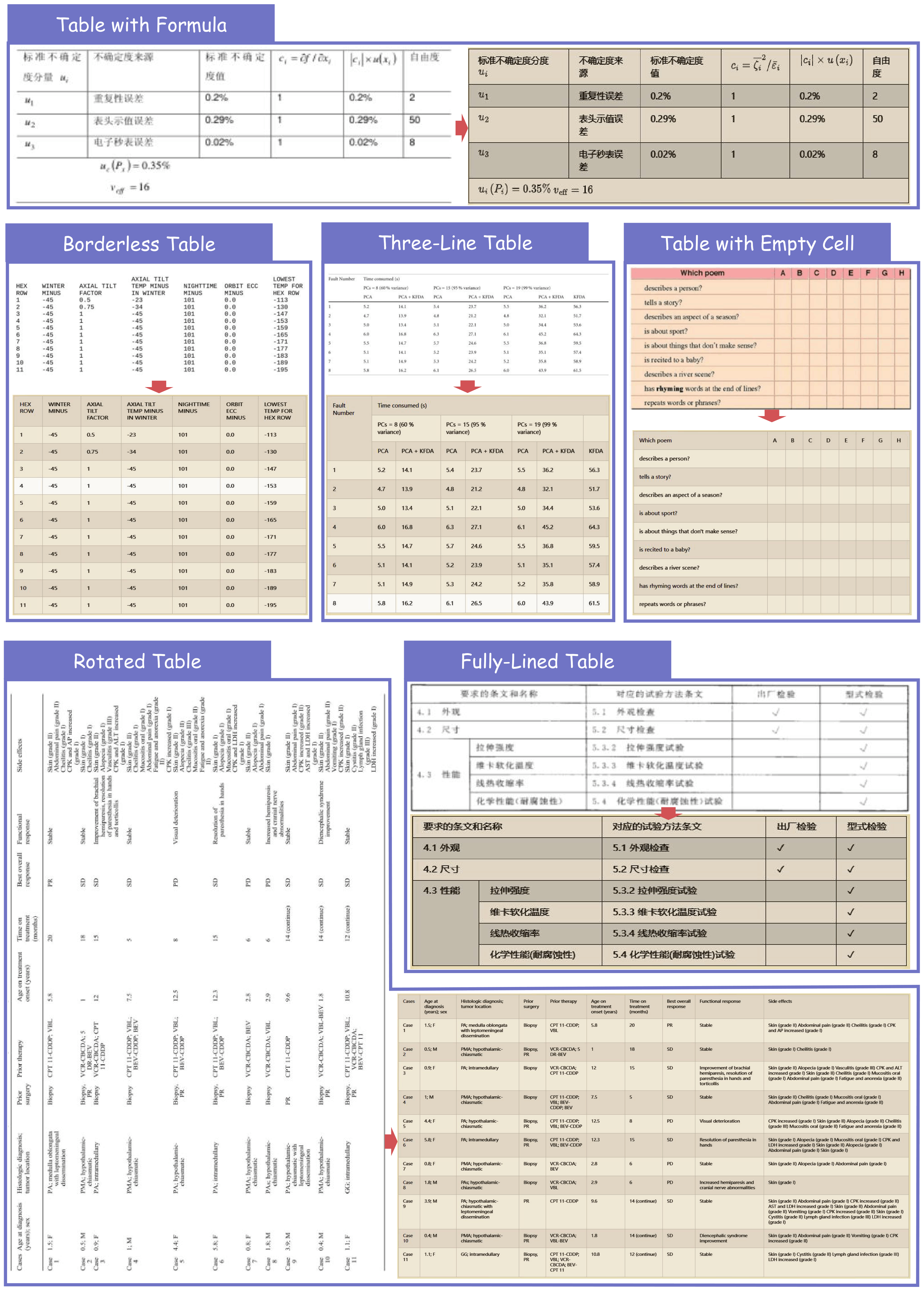
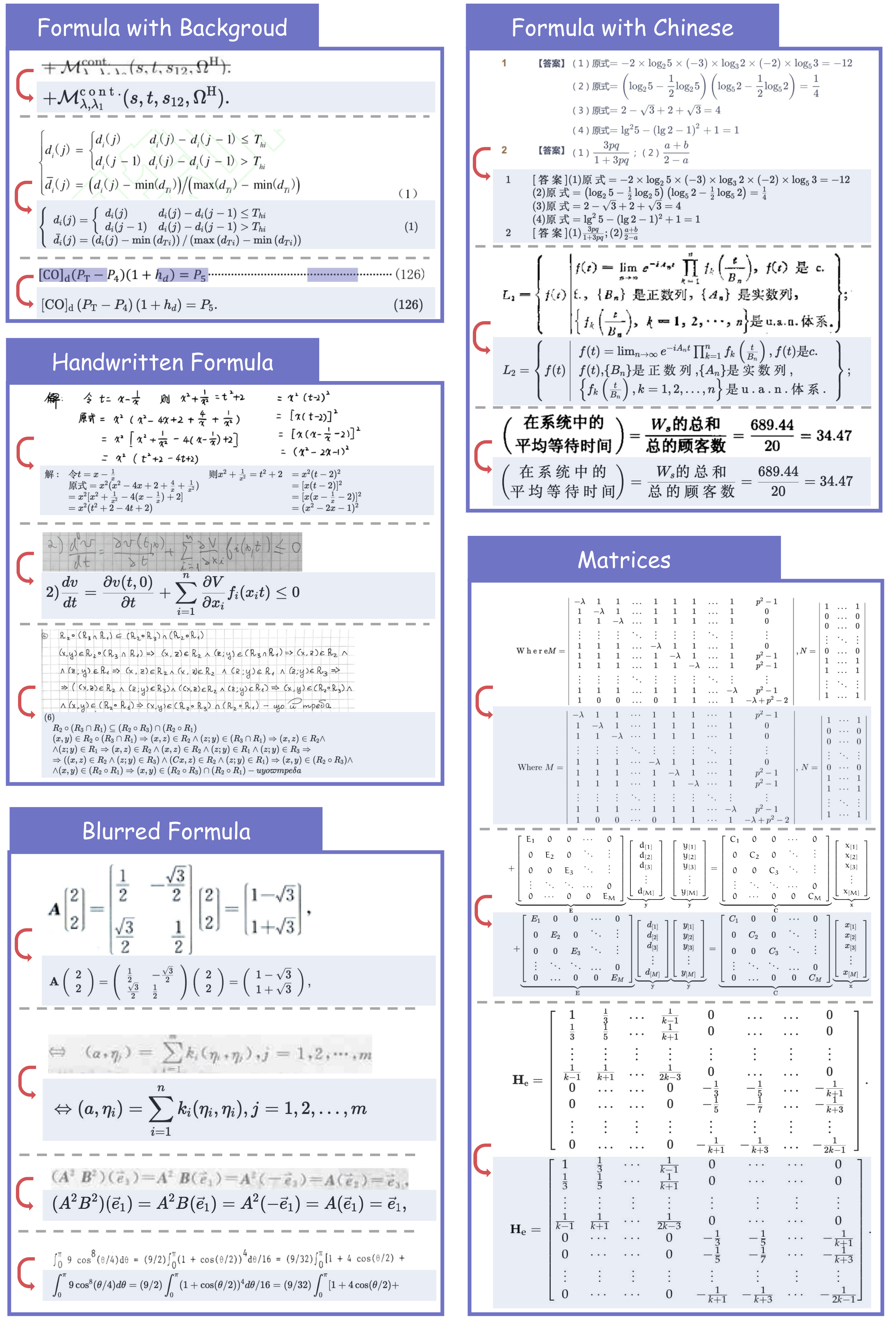
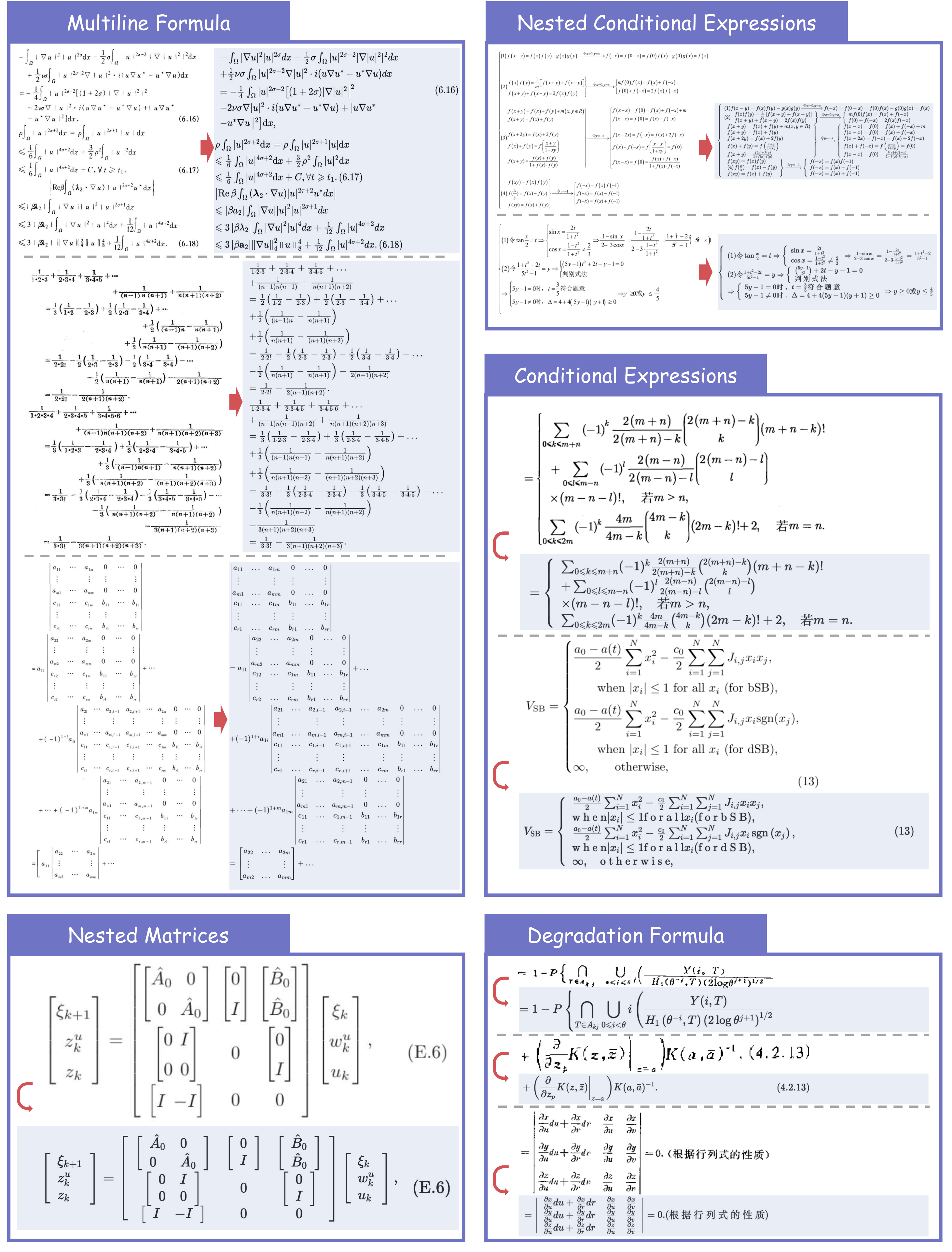
- Breakthroughs in Formula Parsing: Delivers high-quality parsing of complex, lengthy mathematical formulae and accurately recognizes mixed-language (Chinese-English) equations.
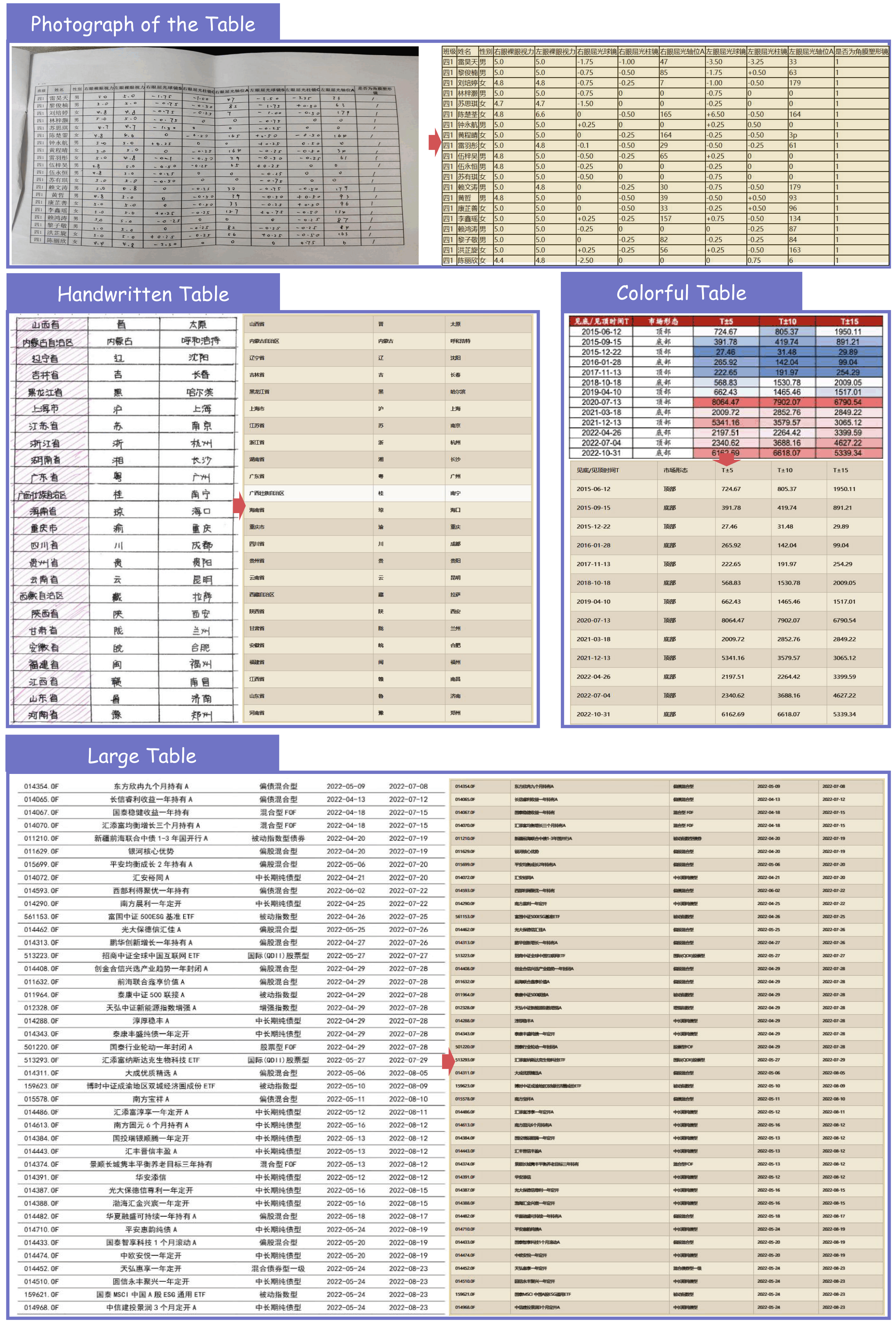
- Enhanced Robustness in Table Parsing: Effortlessly handles challenging cases, including rotated tables, borderless tables, and tables with partial borders.
Quick Start
For convenience, we provide mineru-vl-utils, a Python package that simplifies the process of sending requests and handling responses from MinerU2.5 Vision-Language Model. Here we give some examples to use MinerU2.5. For more information and usages, please refer to mineru-vl-utils.
๐ We strongly recommend using vllm for inference, as the vllm-async-engine can achieve a concurrent inference speed of 2.12 fps on one A100.
Install packages
# For `transformers` backend
pip install "mineru-vl-utils[transformers]"
# For `vllm-engine` and `vllm-async-engine` backend
pip install "mineru-vl-utils[vllm]"
transformers Example
from transformers import AutoProcessor, Qwen2VLForConditionalGeneration
from PIL import Image
from mineru_vl_utils import MinerUClient
# for transformers>=4.56.0
model = Qwen2VLForConditionalGeneration.from_pretrained(
"opendatalab/MinerU2.5-2509-1.2B",
dtype="auto", # use `torch_dtype` instead of `dtype` for transformers<4.56.0
device_map="auto"
)
processor = AutoProcessor.from_pretrained(
"opendatalab/MinerU2.5-2509-1.2B",
use_fast=True
)
client = MinerUClient(
backend="transformers",
model=model,
processor=processor
)
image = Image.open("/path/to/the/test/image.png")
extracted_blocks = client.two_step_extract(image)
print(extracted_blocks)
vllm-engine Example (Recommended!)
from vllm import LLM
from PIL import Image
from mineru_vl_utils import MinerUClient
from mineru_vl_utils import MinerULogitsProcessor # if vllm>=0.10.1
llm = LLM(
model="opendatalab/MinerU2.5-2509-1.2B",
logits_processors=[MinerULogitsProcessor] # if vllm>=0.10.1
)
client = MinerUClient(
backend="vllm-engine",
vllm_llm=llm
)
image = Image.open("/path/to/the/test/image.png")
extracted_blocks = client.two_step_extract(image)
print(extracted_blocks)
vllm-async-engine Example (Recommended!)
import io
import asyncio
import aiofiles
from vllm.v1.engine.async_llm import AsyncLLM
from vllm.engine.arg_utils import AsyncEngineArgs
from PIL import Image
from mineru_vl_utils import MinerUClient
from mineru_vl_utils import MinerULogitsProcessor # if vllm>=0.10.1
async_llm = AsyncLLM.from_engine_args(
AsyncEngineArgs(
model="opendatalab/MinerU2.5-2509-1.2B",
logits_processors=[MinerULogitsProcessor] # if vllm>=0.10.1
)
)
client = MinerUClient(
backend="vllm-async-engine",
vllm_async_llm=async_llm,
)
async def main():
image_path = "/path/to/the/test/image.png"
async with aiofiles.open(image_path, "rb") as f:
image_data = await f.read()
image = Image.open(io.BytesIO(image_data))
extracted_blocks = await client.aio_two_step_extract(image)
print(extracted_blocks)
asyncio.run(main())
async_llm.shutdown()
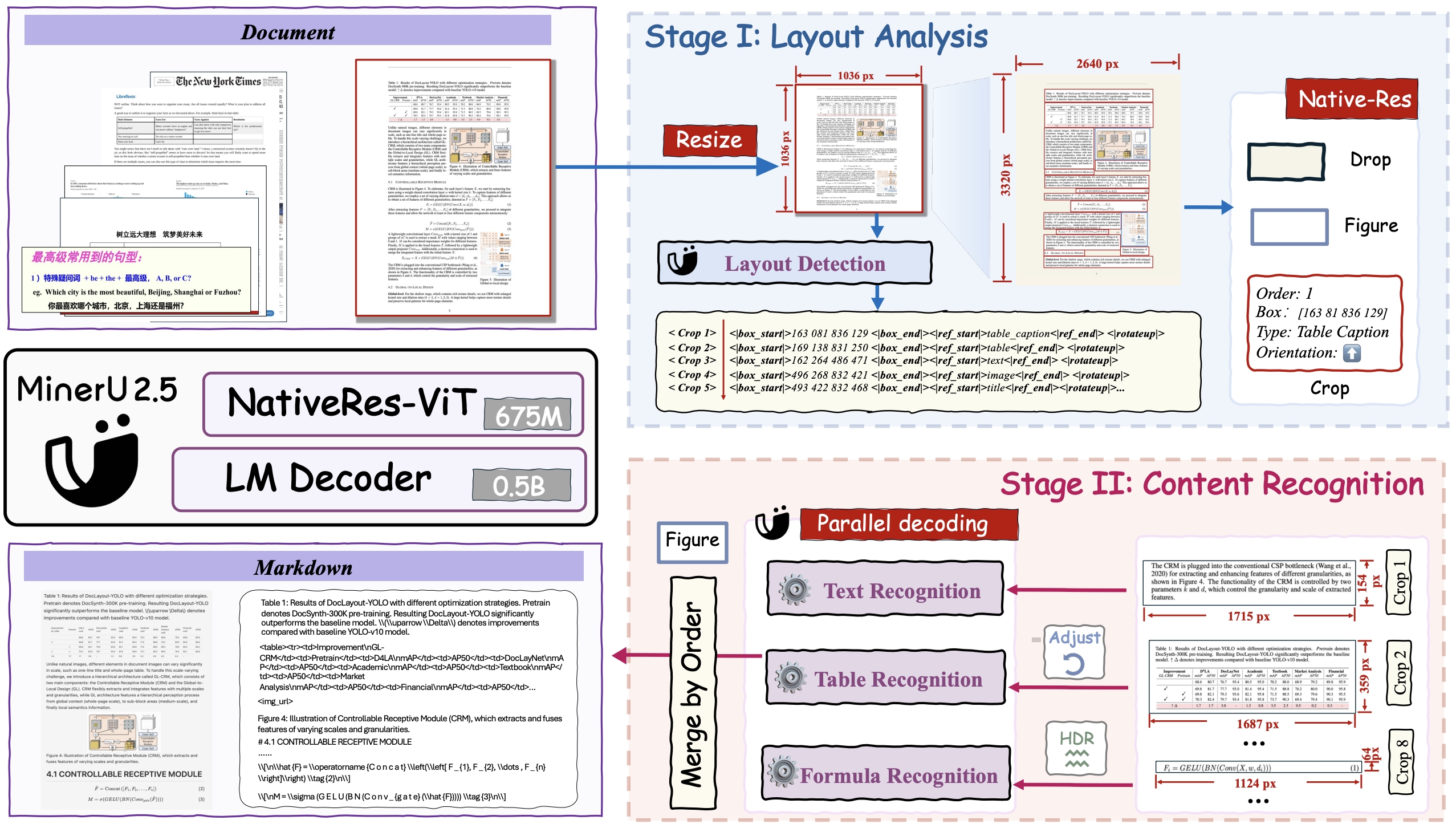
Model Architecture
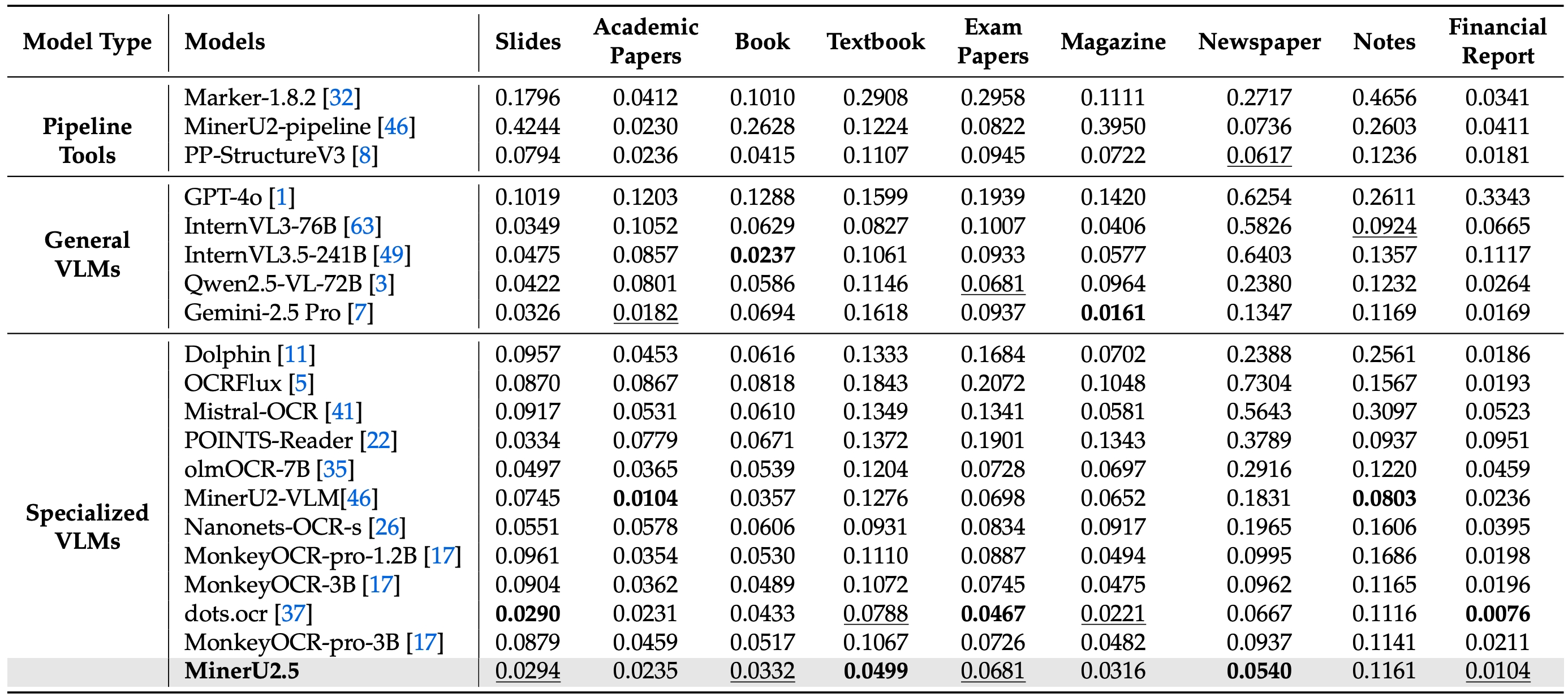
Performance on OmniDocBench
Across Different Elements
Across Various Document Types
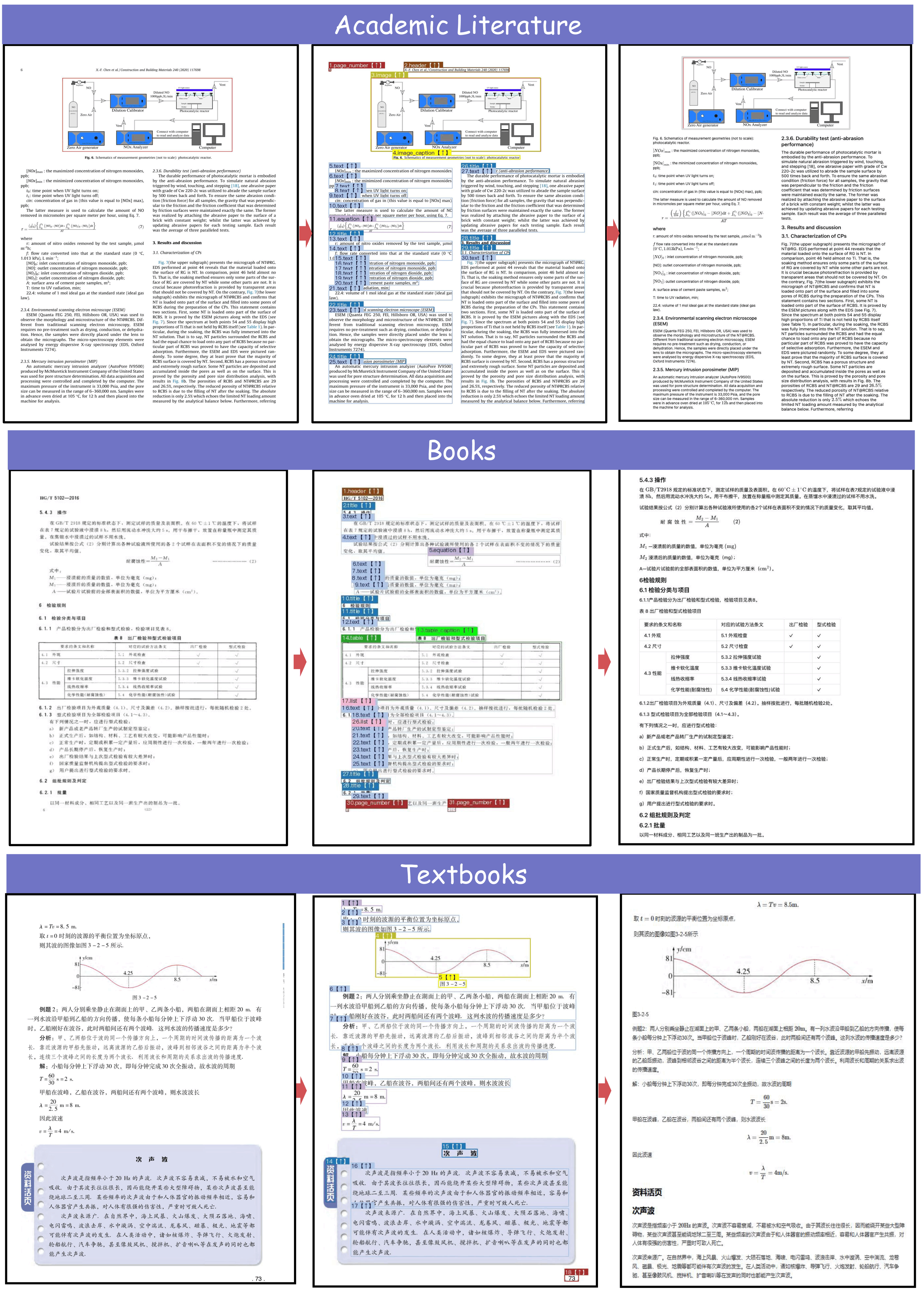
Case Demonstration
Full-Document Parsing across Various Doc-Types
Table Recognition
Formula Recognition
Acknowledgements
We would like to thank Qwen Team, vLLM, OmniDocBench, UniMERNet, PaddleOCR, DocLayout-YOLO for providing valuable code and models. We also appreciate everyone's contribution to this open-source project!
Citation
If you find our work useful in your research, please consider giving a star โญ and citation ๐ :
@misc{niu2025mineru25decoupledvisionlanguagemodel,
title={MinerU2.5: A Decoupled Vision-Language Model for Efficient High-Resolution Document Parsing},
author={Junbo Niu and Zheng Liu and Zhuangcheng Gu and Bin Wang and Linke Ouyang and Zhiyuan Zhao and Tao Chu and Tianyao He and Fan Wu and Qintong Zhang and Zhenjiang Jin and others},
year={2025},
eprint={2509.22186},
archivePrefix={arXiv},
primaryClass={cs.CV},
url={https://arxiv.org/abs/2509.22186},
}
๐ If you find these models useful
Help me test my AI-Powered Quantum Network Monitor Assistant with quantum-ready security checks:
The full Open Source Code for the Quantum Network Monitor Service available at my github repos ( repos with NetworkMonitor in the name) : Source Code Quantum Network Monitor. You will also find the code I use to quantize the models if you want to do it yourself GGUFModelBuilder
๐ฌ How to test:
Choose an AI assistant type:
TurboLLM(GPT-4.1-mini)HugLLM(Hugginface Open-source models)TestLLM(Experimental CPU-only)
What Iโm Testing
Iโm pushing the limits of small open-source models for AI network monitoring, specifically:
- Function calling against live network services
- How small can a model go while still handling:
- Automated Nmap security scans
- Quantum-readiness checks
- Network Monitoring tasks
๐ก TestLLM โ Current experimental model (llama.cpp on 2 CPU threads on huggingface docker space):
- โ Zero-configuration setup
- โณ 30s load time (slow inference but no API costs) . No token limited as the cost is low.
- ๐ง Help wanted! If youโre into edge-device AI, letโs collaborate!
Other Assistants
๐ข TurboLLM โ Uses gpt-4.1-mini :
- **It performs very well but unfortunatly OpenAI charges per token. For this reason tokens usage is limited.
- Create custom cmd processors to run .net code on Quantum Network Monitor Agents
- Real-time network diagnostics and monitoring
- Security Audits
- Penetration testing (Nmap/Metasploit)
๐ต HugLLM โ Latest Open-source models:
- ๐ Runs on Hugging Face Inference API. Performs pretty well using the lastest models hosted on Novita.
๐ก Example commands you could test:
"Give me info on my websites SSL certificate""Check if my server is using quantum safe encyption for communication""Run a comprehensive security audit on my server"- '"Create a cmd processor to .. (what ever you want)" Note you need to install a Quantum Network Monitor Agent to run the .net code on. This is a very flexible and powerful feature. Use with caution!
Final Word
I fund the servers used to create these model files, run the Quantum Network Monitor service, and pay for inference from Novita and OpenAIโall out of my own pocket. All the code behind the model creation and the Quantum Network Monitor project is open source. Feel free to use whatever you find helpful.
If you appreciate the work, please consider buying me a coffee โ. Your support helps cover service costs and allows me to raise token limits for everyone.
I'm also open to job opportunities or sponsorship.
Thank you! ๐
- Downloads last month
- 366
Install from pip and serve model
# Install vLLM from pip: pip install vllm# Start the vLLM server: vllm serve "Mungert/MinerU2.5-2509-1.2B-GGUF"# Call the server using curl (OpenAI-compatible API): curl -X POST "http://localhost:8000/v1/chat/completions" \ -H "Content-Type: application/json" \ --data '{ "model": "Mungert/MinerU2.5-2509-1.2B-GGUF", "messages": [ { "role": "user", "content": [ { "type": "text", "text": "Describe this image in one sentence." }, { "type": "image_url", "image_url": { "url": "https://cdn.britannica.com/61/93061-050-99147DCE/Statue-of-Liberty-Island-New-York-Bay.jpg" } } ] } ] }'