Text Generation
GGUF
English
qwen2
abliterated
uncensored
code
qwen2.5
llama.cpp
ollama
conversational
Instructions to use TobiasLogic/Qwen2.5-Coder-32B-abliterated-GGUF with libraries, inference providers, notebooks, and local apps. Follow these links to get started.
- Notebooks
- Google Colab
- Kaggle
- Local Apps Settings
- llama.cpp
How to use TobiasLogic/Qwen2.5-Coder-32B-abliterated-GGUF with llama.cpp:
Install (macOS, Linux)
curl -LsSf https://llama.app/install.sh | sh # Start a local OpenAI-compatible server with a web UI: llama serve -hf TobiasLogic/Qwen2.5-Coder-32B-abliterated-GGUF:Q4_K_M # Run inference directly in the terminal: llama cli -hf TobiasLogic/Qwen2.5-Coder-32B-abliterated-GGUF:Q4_K_M
Install from WinGet (Windows)
winget install llama.cpp # Start a local OpenAI-compatible server with a web UI: llama serve -hf TobiasLogic/Qwen2.5-Coder-32B-abliterated-GGUF:Q4_K_M # Run inference directly in the terminal: llama cli -hf TobiasLogic/Qwen2.5-Coder-32B-abliterated-GGUF:Q4_K_M
Use pre-built binary
# Download pre-built binary from: # https://github.com/ggerganov/llama.cpp/releases # Start a local OpenAI-compatible server with a web UI: ./llama-server -hf TobiasLogic/Qwen2.5-Coder-32B-abliterated-GGUF:Q4_K_M # Run inference directly in the terminal: ./llama-cli -hf TobiasLogic/Qwen2.5-Coder-32B-abliterated-GGUF:Q4_K_M
Build from source code
git clone https://github.com/ggerganov/llama.cpp.git cd llama.cpp cmake -B build cmake --build build -j --target llama-server llama-cli # Start a local OpenAI-compatible server with a web UI: ./build/bin/llama-server -hf TobiasLogic/Qwen2.5-Coder-32B-abliterated-GGUF:Q4_K_M # Run inference directly in the terminal: ./build/bin/llama-cli -hf TobiasLogic/Qwen2.5-Coder-32B-abliterated-GGUF:Q4_K_M
Use Docker
docker model run hf.co/TobiasLogic/Qwen2.5-Coder-32B-abliterated-GGUF:Q4_K_M
- LM Studio
- Jan
- vLLM
How to use TobiasLogic/Qwen2.5-Coder-32B-abliterated-GGUF with vLLM:
Install from pip and serve model
# Install vLLM from pip: pip install vllm # Start the vLLM server: vllm serve "TobiasLogic/Qwen2.5-Coder-32B-abliterated-GGUF" # Call the server using curl (OpenAI-compatible API): curl -X POST "http://localhost:8000/v1/chat/completions" \ -H "Content-Type: application/json" \ --data '{ "model": "TobiasLogic/Qwen2.5-Coder-32B-abliterated-GGUF", "messages": [ { "role": "user", "content": "What is the capital of France?" } ] }'Use Docker
docker model run hf.co/TobiasLogic/Qwen2.5-Coder-32B-abliterated-GGUF:Q4_K_M
- Ollama
How to use TobiasLogic/Qwen2.5-Coder-32B-abliterated-GGUF with Ollama:
ollama run hf.co/TobiasLogic/Qwen2.5-Coder-32B-abliterated-GGUF:Q4_K_M
- Unsloth Studio
How to use TobiasLogic/Qwen2.5-Coder-32B-abliterated-GGUF with Unsloth Studio:
Install Unsloth Studio (macOS, Linux, WSL)
curl -fsSL https://unsloth.ai/install.sh | sh # Run unsloth studio unsloth studio -H 0.0.0.0 -p 8888 # Then open http://localhost:8888 in your browser # Search for TobiasLogic/Qwen2.5-Coder-32B-abliterated-GGUF to start chatting
Install Unsloth Studio (Windows)
irm https://unsloth.ai/install.ps1 | iex # Run unsloth studio unsloth studio -H 0.0.0.0 -p 8888 # Then open http://localhost:8888 in your browser # Search for TobiasLogic/Qwen2.5-Coder-32B-abliterated-GGUF to start chatting
Using HuggingFace Spaces for Unsloth
# No setup required # Open https://huggingface.co/spaces/unsloth/studio in your browser # Search for TobiasLogic/Qwen2.5-Coder-32B-abliterated-GGUF to start chatting
- Pi
How to use TobiasLogic/Qwen2.5-Coder-32B-abliterated-GGUF with Pi:
Start the llama.cpp server
# Install llama.cpp: brew install llama.cpp # Start a local OpenAI-compatible server: llama serve -hf TobiasLogic/Qwen2.5-Coder-32B-abliterated-GGUF:Q4_K_M
Configure the model in Pi
# Install Pi: npm install -g @mariozechner/pi-coding-agent # Add to ~/.pi/agent/models.json: { "providers": { "llama-cpp": { "baseUrl": "http://localhost:8080/v1", "api": "openai-completions", "apiKey": "none", "models": [ { "id": "TobiasLogic/Qwen2.5-Coder-32B-abliterated-GGUF:Q4_K_M" } ] } } }Run Pi
# Start Pi in your project directory: pi
- Hermes Agent new
How to use TobiasLogic/Qwen2.5-Coder-32B-abliterated-GGUF with Hermes Agent:
Start the llama.cpp server
# Install llama.cpp: brew install llama.cpp # Start a local OpenAI-compatible server: llama serve -hf TobiasLogic/Qwen2.5-Coder-32B-abliterated-GGUF:Q4_K_M
Configure Hermes
# Install Hermes: curl -fsSL https://hermes-agent.nousresearch.com/install.sh | bash hermes setup # Point Hermes at the local server: hermes config set model.provider custom hermes config set model.base_url http://127.0.0.1:8080/v1 hermes config set model.default TobiasLogic/Qwen2.5-Coder-32B-abliterated-GGUF:Q4_K_M
Run Hermes
hermes
- Atomic Chat new
- OpenClaw new
How to use TobiasLogic/Qwen2.5-Coder-32B-abliterated-GGUF with OpenClaw:
Start the llama.cpp server
# Install llama.cpp: brew install llama.cpp # Start a local OpenAI-compatible server: llama serve -hf TobiasLogic/Qwen2.5-Coder-32B-abliterated-GGUF:Q4_K_M
Configure OpenClaw
# Install OpenClaw: npm install -g openclaw@latest # Register the local server and set it as the default model: openclaw onboard --non-interactive --mode local \ --auth-choice custom-api-key \ --custom-base-url http://127.0.0.1:8080/v1 \ --custom-model-id "TobiasLogic/Qwen2.5-Coder-32B-abliterated-GGUF:Q4_K_M" \ --custom-provider-id llama-cpp \ --custom-compatibility openai \ --custom-text-input \ --accept-risk \ --skip-health
Run OpenClaw
openclaw agent --local --agent main --message "Hello from Hugging Face"
- Docker Model Runner
How to use TobiasLogic/Qwen2.5-Coder-32B-abliterated-GGUF with Docker Model Runner:
docker model run hf.co/TobiasLogic/Qwen2.5-Coder-32B-abliterated-GGUF:Q4_K_M
- Lemonade
How to use TobiasLogic/Qwen2.5-Coder-32B-abliterated-GGUF with Lemonade:
Pull the model
# Download Lemonade from https://lemonade-server.ai/ lemonade pull TobiasLogic/Qwen2.5-Coder-32B-abliterated-GGUF:Q4_K_M
Run and chat with the model
lemonade run user.Qwen2.5-Coder-32B-abliterated-GGUF-Q4_K_M
List all available models
lemonade list
| license: apache-2.0 | |
| base_model: TobiasLogic/Qwen2.5-Coder-32B-abliterated | |
| tags: | |
| - abliterated | |
| - uncensored | |
| - code | |
| - qwen2.5 | |
| - gguf | |
| - llama.cpp | |
| - ollama | |
| pipeline_tag: text-generation | |
| language: | |
| - en | |
| # Qwen2.5-Coder-32B-abliterated β GGUF (Q4_K_M) | |
| `Q4_K_M` GGUF quantization of | |
| [`TobiasLogic/Qwen2.5-Coder-32B-abliterated`](https://huggingface.co/TobiasLogic/Qwen2.5-Coder-32B-abliterated), | |
| an **abliterated** (uncensored) build of | |
| [`Qwen/Qwen2.5-Coder-32B-Instruct`](https://huggingface.co/Qwen/Qwen2.5-Coder-32B-Instruct). | |
| The refusal direction (Arditi et al. 2024, *"Refusal in LLMs is mediated by a | |
| single direction"*) was orthogonalized out of every residual-writing weight in | |
| the fp16 model, then quantized to GGUF with llama.cpp. Runs on CPU or GPU via | |
| Ollama / llama.cpp; ~20 GB, fits comfortably in 24 GB VRAM. | |
| ## Refusal rate (held-out harmful eval, measured on the fp16 model) | |
| | | refusal rate | | |
| |--|--| | |
| | base `Qwen2.5-Coder-32B-Instruct` | **96.9%** | | |
| | abliterated | **0.0%** | | |
| ## Benchmarks | |
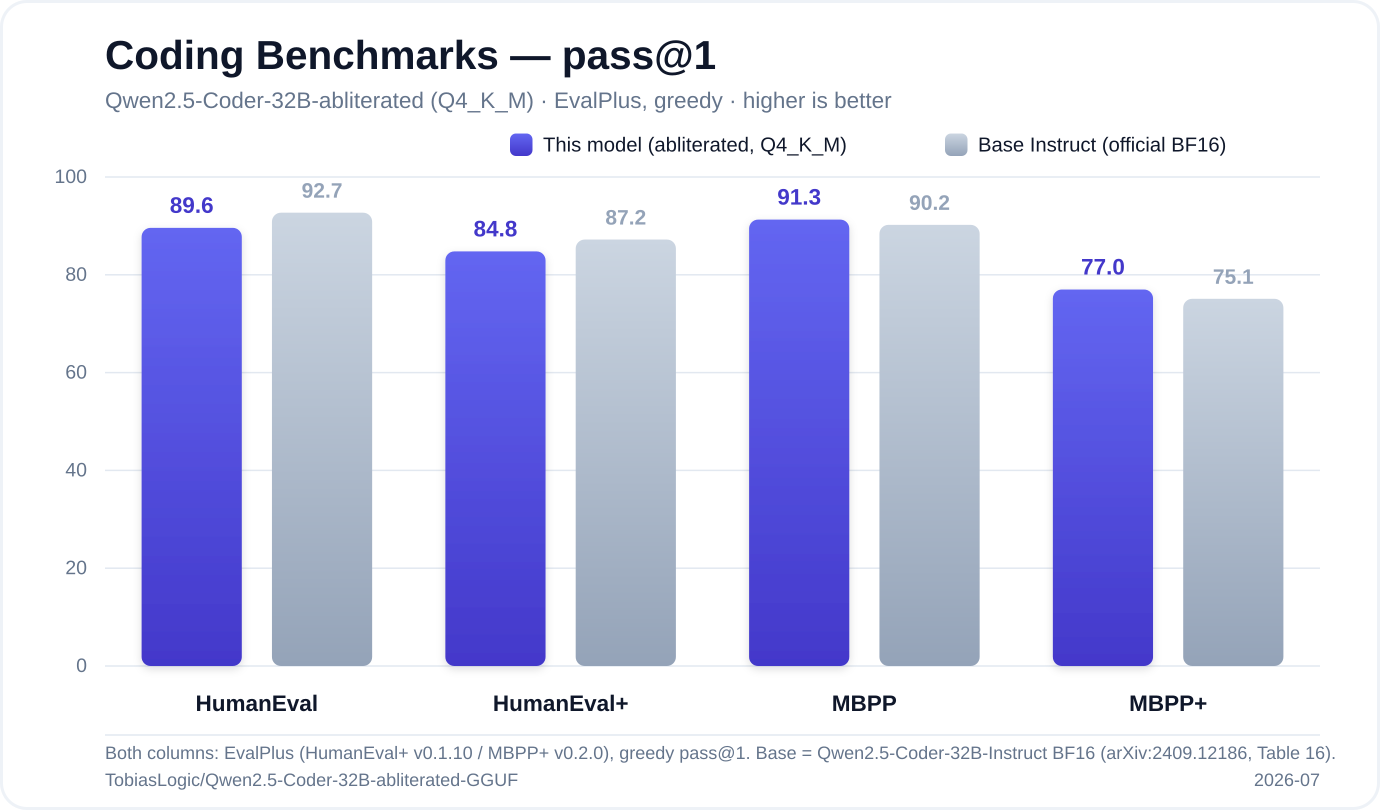
| Coding capability scored with the official [EvalPlus](https://github.com/evalplus/evalplus) harness β greedy decoding, pass@1, every solution executed against unit tests. Both columns use the same harness, so it's a true apples-to-apples comparison against the full-precision base model. | |
|  | |
| | Benchmark | This model (abliterated, Q4_K_M) | Base Instruct (official BF16) | | |
| |-----------|:--------------------------------:|:-----------------------------:| | |
| | **HumanEval** | 89.6% | 92.7% | | |
| | **HumanEval+** | 84.8% | 87.2% | | |
| | **MBPP** | **91.3%** | 90.2% | | |
| | **MBPP+** | **77.0%** | 75.1% | | |
| **Abliteration removed refusals without breaking coding ability.** The uncensored 4-bit build stays within ~3 points of the base on HumanEval and **beats it on both MBPP variants** β average delta β **β0.6 points** across the four benchmarks. Not bad for a 19 GB GGUF you can run on a single 24 GB GPU. | |
| <sub>Base numbers: Qwen2.5-Coder-32B-Instruct, [tech report](https://arxiv.org/abs/2409.12186) Table 16. Measured 2026-07, Q4_K_M via Ollama.</sub> | |
| ## Usage | |
| **Ollama** (a `Modelfile` is included in this repo): | |
| ```bash | |
| # after downloading qwen2.5-coder-32b-abliterated-Q4_K_M.gguf and Modelfile: | |
| ollama create qwen-coder-abliterated -f Modelfile | |
| ollama run qwen-coder-abliterated | |
| ``` | |
| **llama.cpp**: | |
| ```bash | |
| llama-cli -m qwen2.5-coder-32b-abliterated-Q4_K_M.gguf \ | |
| -p "Write a port scanner in Python." -c 8192 | |
| ``` | |
| ## Links | |
| - fp16 weights: [`TobiasLogic/Qwen2.5-Coder-32B-abliterated`](https://huggingface.co/TobiasLogic/Qwen2.5-Coder-32B-abliterated) | |
| - Reproducible pipeline: [github.com/TobiasLogic/Qwen2.5-Coder-Abliterate](https://github.com/TobiasLogic/Qwen2.5-Coder-Abliterate) | |
| ## License | |
| Apache-2.0, inherited from the base model. You are responsible for how you use | |
| this model and for complying with applicable law. | |