

The dataset viewer is not available for this split.
Error code:   FeaturesError
Exception:    ArrowInvalid
Message:      JSON parse error: Invalid value. in row 0
Traceback:    Traceback (most recent call last):
                File "/usr/local/lib/python3.12/site-packages/datasets/packaged_modules/json/json.py", line 270, in _generate_tables
                  df = pandas_read_json(f)
                       ^^^^^^^^^^^^^^^^^^^
                File "/usr/local/lib/python3.12/site-packages/datasets/packaged_modules/json/json.py", line 34, in pandas_read_json
                  return pd.read_json(path_or_buf, **kwargs)
                         ^^^^^^^^^^^^^^^^^^^^^^^^^^^^^^^^^^^
                File "/usr/local/lib/python3.12/site-packages/pandas/io/json/_json.py", line 791, in read_json
                  json_reader = JsonReader(
                                ^^^^^^^^^^^
                File "/usr/local/lib/python3.12/site-packages/pandas/io/json/_json.py", line 905, in __init__
                  self.data = self._preprocess_data(data)
                              ^^^^^^^^^^^^^^^^^^^^^^^^^^^
                File "/usr/local/lib/python3.12/site-packages/pandas/io/json/_json.py", line 917, in _preprocess_data
                  data = data.read()
                         ^^^^^^^^^^^
                File "/usr/local/lib/python3.12/site-packages/datasets/utils/file_utils.py", line 844, in read_with_retries
                  out = read(*args, **kwargs)
                        ^^^^^^^^^^^^^^^^^^^^^
                File "<frozen codecs>", line 322, in decode
              UnicodeDecodeError: 'utf-8' codec can't decode byte 0xff in position 0: invalid start byte

              During handling of the above exception, another exception occurred:

              Traceback (most recent call last):
                File "/src/services/worker/src/worker/job_runners/split/first_rows.py", line 243, in compute_first_rows_from_streaming_response
                  iterable_dataset = iterable_dataset._resolve_features()
                                     ^^^^^^^^^^^^^^^^^^^^^^^^^^^^^^^^^^^^
                File "/usr/local/lib/python3.12/site-packages/datasets/iterable_dataset.py", line 4195, in _resolve_features
                  features = _infer_features_from_batch(self.with_format(None)._head())
                                                        ^^^^^^^^^^^^^^^^^^^^^^^^^^^^^^
                File "/usr/local/lib/python3.12/site-packages/datasets/iterable_dataset.py", line 2533, in _head
                  return next(iter(self.iter(batch_size=n)))
                         ^^^^^^^^^^^^^^^^^^^^^^^^^^^^^^^^^^^
                File "/usr/local/lib/python3.12/site-packages/datasets/iterable_dataset.py", line 2711, in iter
                  for key, pa_table in ex_iterable.iter_arrow():
                                       ^^^^^^^^^^^^^^^^^^^^^^^^
                File "/usr/local/lib/python3.12/site-packages/datasets/iterable_dataset.py", line 2249, in _iter_arrow
                  yield from self.ex_iterable._iter_arrow()
                File "/usr/local/lib/python3.12/site-packages/datasets/iterable_dataset.py", line 494, in _iter_arrow
                  for key, pa_table in iterator:
                                       ^^^^^^^^
                File "/usr/local/lib/python3.12/site-packages/datasets/iterable_dataset.py", line 384, in _iter_arrow
                  for key, pa_table in self.generate_tables_fn(**gen_kwags):
                                       ^^^^^^^^^^^^^^^^^^^^^^^^^^^^^^^^^^^^
                File "/usr/local/lib/python3.12/site-packages/datasets/packaged_modules/json/json.py", line 273, in _generate_tables
                  raise e
                File "/usr/local/lib/python3.12/site-packages/datasets/packaged_modules/json/json.py", line 236, in _generate_tables
                  pa_table = paj.read_json(
                             ^^^^^^^^^^^^^^
                File "pyarrow/_json.pyx", line 342, in pyarrow._json.read_json
                File "pyarrow/error.pxi", line 155, in pyarrow.lib.pyarrow_internal_check_status
                File "pyarrow/error.pxi", line 92, in pyarrow.lib.check_status
              pyarrow.lib.ArrowInvalid: JSON parse error: Invalid value. in row 0
Need help to make the dataset viewer work? Make sure to review how to configure the dataset viewer, and open a discussion for direct support.
PlantVillage Dataset


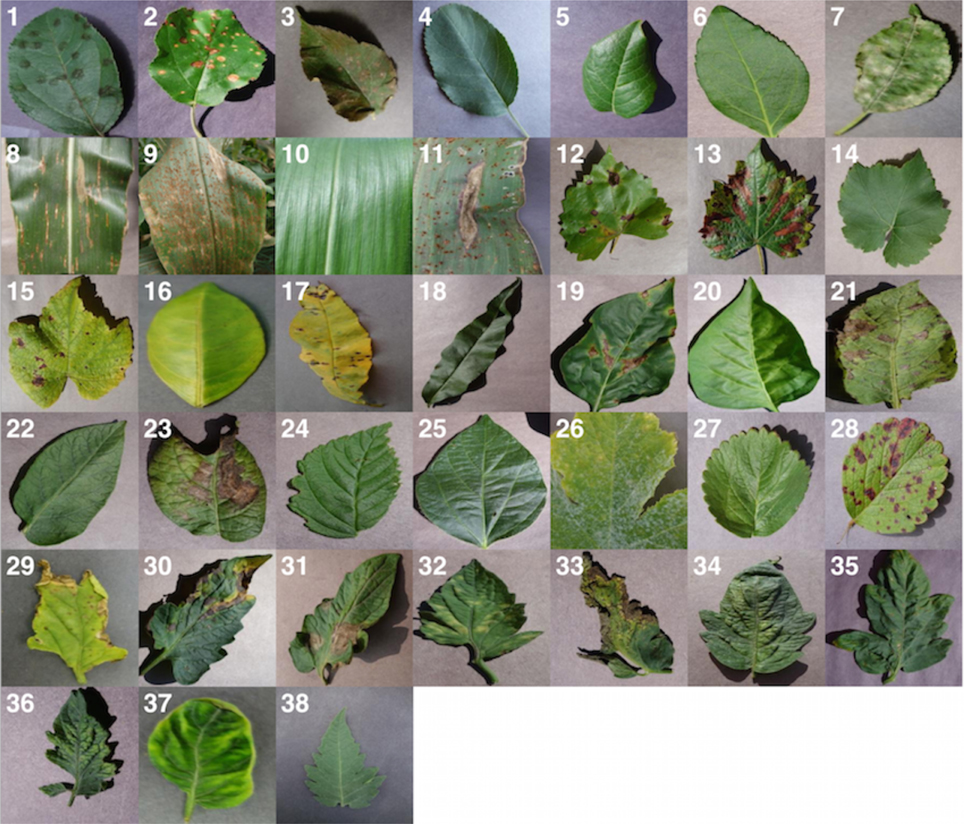
The PlantVillage Dataset is an open access repository of 54,306 images of healthy and diseased plant leaves, collected to advance research in automated plant disease diagnosis. It covers 14 crop species and 26 diseases.
This dataset was introduced in the paper "Using Deep Learning for Image-Based Plant Disease Detection" by Mohanty et al. (2016).
Quick Start
The dataset comes with pre-defined 80/20 train/test splits that preserve the leaf grouping logic (ensuring images of the same leaf do not appear in both sets).
from datasets import load_dataset

# Load the default configuration (color images)
# This automatically downloads the train and test splits.
dataset = load_dataset("mohanty/PlantVillage", "color")

print(dataset)
# DatasetDict({
#     train: Dataset({ features: [...], num_rows: 43596 }),
#     test: Dataset({ features: [...], num_rows: 10709 })
# })
Dataset Configurations
You can choose from three configurations depending on your needs:
| Configuration | Description | Usage |
|---|---|---|
color |
Original RGB images (Default) | load_dataset("mohanty/PlantVillage", "color") |
grayscale |
Grayscale versions | load_dataset("mohanty/PlantVillage", "grayscale") |
segmented |
Background removed, leaf segmented | load_dataset("mohanty/PlantVillage", "segmented") |
Advanced: Custom Splitting
Note: The dataset already includes a standard train/test split (as shown in Quick Start), which is recommended for benchmarking. The instructions below are only for advanced users who require custom cross-validation folds.
If you require a different split ratio or cross-validation scheme, you must strictly respect the leaf_id to prevent data leakage. Multiple images often capture the same physical leaf; separating them across train/test sets will bias your evaluation.
Here is a complete example of how to reshuffle and split the dataset 80/20:
import numpy as np
from datasets import load_dataset, concatenate_datasets

# 1. Load the full dataset (combining default train/test splits)
dataset = load_dataset("mohanty/PlantVillage", "color")
full_dataset = concatenate_datasets([dataset["train"], dataset["test"]])

# 2. Get unique leaf IDs representing physical leaves
all_leaf_ids = np.unique(full_dataset["leaf_id"])

# 3. Shuffle and Split Leaf IDs (e.g., 80% train, 20% test)
np.random.seed(42)
np.random.shuffle(all_leaf_ids)

split_ratio = 0.8
split_idx = int(len(all_leaf_ids) * split_ratio)

train_leaf_ids = set(all_leaf_ids[:split_idx])
test_leaf_ids = set(all_leaf_ids[split_idx:])

# 4. Filter the full dataset to create new splits
# This ensures all images of a specific leaf are exclusively in one split
custom_train = full_dataset.filter(lambda x: x["leaf_id"] in train_leaf_ids)
custom_test = full_dataset.filter(lambda x: x["leaf_id"] in test_leaf_ids)

print(f"Custom Train Size: {len(custom_train)}")
print(f"Custom Test Size: {len(custom_test)}")
Dataset Features
image: PIL Image.label: Class label (e.g.,Apple___Black_rot).leaf_id: Unique identifier for the physical leaf.crop: Crop name.disease: Disease name.
Citation
@article{Mohanty_Hughes_Salathé_2016,
    title   = {Using deep learning for image-based plant disease detection},
    volume  = {7},
    DOI     = {10.3389/fpls.2016.01419},
    journal = {Frontiers in Plant Science},
    author  = {Mohanty, Sharada P. and Hughes, David P. and Salathé, Marcel},
    year    = {2016},
    month   = {Sep}
}
Author
Sharada Mohanty sharada.mohanty@epfl.ch
Marcel Salathé Marcel.Salathe@epfl.ch
Digital Epidemiology Lab, EPFL
- Downloads last month
- 37