

Qwen3.6-35B-A3B
Collection
17 items • Updated • 3
# Install Pi:
npm install -g @mariozechner/pi-coding-agent# Add to ~/.pi/agent/models.json:
{
"providers": {
"mlx-lm": {
"baseUrl": "http://localhost:8080/v1",
"api": "openai-completions",
"apiKey": "none",
"models": [
{
"id": "deepsweet/Qwen3.6-35B-A3B-MLX-oQ5"
}
]
}
}
}# Start Pi in your project directory:
piThis model was converted to MLX format and quantized from Qwen3.6-35B-A3B using oMLX.
See "oQ: oMLX Universal Dynamic Quantization" for details.
| Text-Only | Vision-Language | Text-Only FP16 | Vision-Language FP16 |
|---|---|---|---|
| MLX-oQ8 | MLX-VL-oQ8 | MLX-oQ8-FP16 | MLX-VL-oQ8-FP16 |
| MLX-oQ6 | MLX-VL-oQ6 | MLX-oQ6-FP16 | MLX-VL-oQ6-FP16 |
| MLX-oQ5 | MLX-VL-oQ5 | MLX-oQ5-FP16 | MLX-VL-oQ5-FP16 |
| MLX-oQ4 | MLX-VL-oQ4 | MLX-oQ4-FP16 | MLX-VL-oQ4-FP16 |
See "Evaluation of various MLX quantizations" for details:
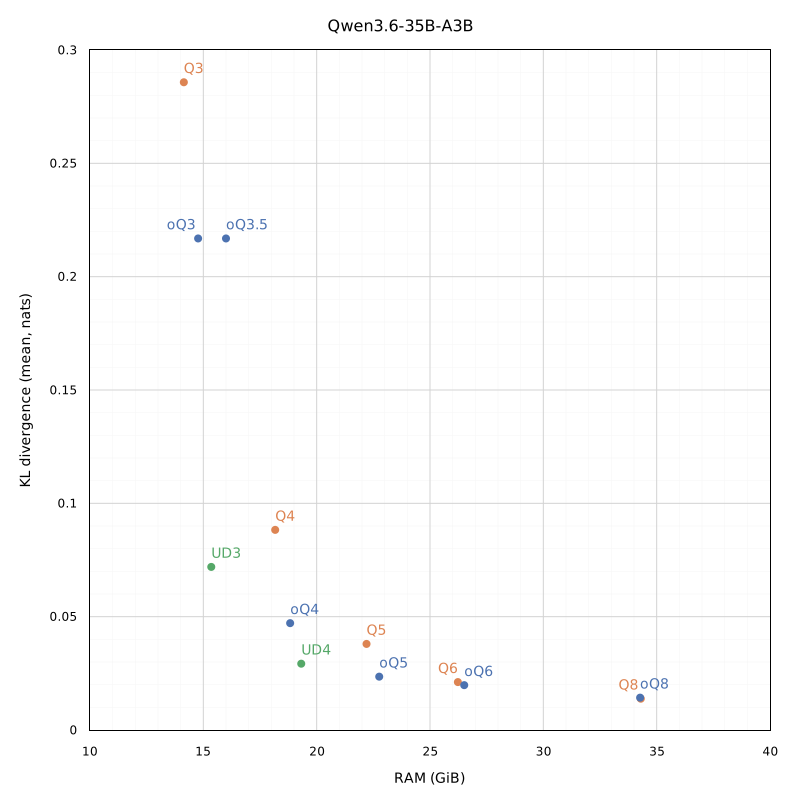
"VL" is Vision-Language, meaning quantization preserves the original model's multimodality.
No "VL" means quantization is Text-Only.
"FP16" is an M1/M2 Apple Silicon tweak that delivers a very noticeable prompt processing boost, because older M-series lack native BF16 hardware support. See "Metal FP32 Vs BF16 Vs FP16 benchmark" for details.
No "FP16" means quantization is better suited for M3+ Apple Silicon.
5-bit
Base model
Qwen/Qwen3.6-35B-A3B
Start the MLX server
# Install MLX LM: uv tool install mlx-lm# Start a local OpenAI-compatible server: mlx_lm.server --model "deepsweet/Qwen3.6-35B-A3B-MLX-oQ5"