

jina-embeddings-v5-omni
Collection
Multimodal (text + image + video + audio) embedding models aligned with jina-embeddings-v5-text-*. Two sizes, four task variants each. • 27 items • Updated • 36

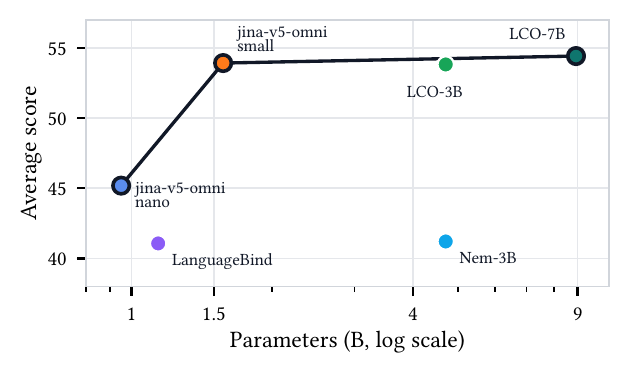
Average score vs. parameter count across image (MIEB-Lite), video (MMEB-V), and audio (MAEB) benchmarks — jina-v5-omni-nano and jina-v5-omni-small define the open-weight frontier (Table 1 in the ArXiv report).

GGUF + multimodal-projector build of
jinaai/jina-embeddings-v5-omni-small-clustering for
llama.cpp. Accepts text,
images, video, and audio and produces 1024-dim embeddings in the
same vector space as the torch reference and as
jinaai/jina-embeddings-v5-text-small-clustering at the same task —
index with text and query with any modality, no reindexing. For a more compact alternative, see jinaai/jina-embeddings-v5-omni-nano-clustering-GGUF.
This is the clustering-targeted variant of the jina-embeddings-v5-omni-small GGUF family. The umbrella with all GGUF variants and cross-repo benchmarks is jina-ai/jina-embeddings-v5-omni-gguf.
| Feature | Value |
|---|---|
| Parameters | ~1.56B (text + vision + audio towers) |
| Embedding Dimension | 1024 |
| Supported Tasks | clustering |
| Max Sequence Length | 32768 |
| Pooling Strategy | Last-token |
| Supported Inputs | text, image, video, audio |
| Supported File Types | images: .jpg, .jpeg, .png, .gif, .webp, .bmp, .tif, .tiff, .avif, .heic, .svg; video: .mp4, .avi, .mov, .mkv, .webm, .flv, .wmv; audio: .wav, .mp3, .flac, .ogg, .m4a, .opus; documents: .pdf |
| Matryoshka Dimensions | 32, 64, 128, 256, 512, 768, 1024 |
| Quantization | text: F16 + 13 imatrix-calibrated int-quant levels; mmprojs: F16 |
Cross-repo docs: benchmarks (NDCG@5 on NanoBEIR, tokens/sec, peak VRAM, file size), the full per-variant numerical-parity tables, and runtime caveats live in the v5-omni-gguf umbrella.
The fastest way to use v5-omni in production. Elastic Inference Service (EIS) provides managed embedding inference with built-in scaling, so you can generate embeddings directly within your Elastic deployment.
# Retrieve the configuration of the preconfigured omni-small inference endpoint
GET /_inference/embedding/.jina-embeddings-v5-omni-small

# Generate an embedding for a single piece of text using the predefined endpoint
POST _inference/embedding/.jina-embeddings-v5-omni-small
{
  "input": [
    "This is a test"
  ]
}

# Fuse a text description and an image into a single embedding via a multimodal content block
POST _inference/embedding/.jina-embeddings-v5-omni-small
{
  "input": [
    {
      "content": [
        { "type": "text",  "value": "A small blue square" },
        { "type": "image", "format": "base64", "value": "<BASE64_IMAGE_DATA>" }
      ]
    }
  ]
}

# Create a custom endpoint that truncates omni-small embeddings to 32 dimensions
PUT _inference/embedding/jina-omni-small-32d
{
  "service": "elastic",
  "service_settings": {
    "model_id": "jina-embeddings-v5-omni-small",
    "dimensions": 32
  }
}
See the Elastic Inference Service documentation for setup details.
| File | Purpose |
|---|---|
jina-embeddings-v5-omni-small-clustering-F16.gguf (and 13 *-Q*.gguf quants) |
text-tower GGUF (with vocab + tokenizer) |
jina-embeddings-v5-omni-small-clustering-vision-mmproj-F16.gguf |
vision multimodal projector (Qwen3-VL ViT + merger) |
jina-embeddings-v5-omni-small-clustering-audio-mmproj-F16.gguf |
audio multimodal projector (Qwen2.5-Omni audio encoder + Linear) |
llama.cpp loads --mmproj to enable image / video / audio inputs on top
of the text GGUF. The two mmprojs are independent — load whichever
modality you need, or pass --mmproj twice to serve both from one
process (see "Selective modality loading" below).
This model relies on the Jina v5 omni patches (audio chunked attention,
qwen3vl video temporal-pair, encoder combined-decode, etc.) — they are
not yet upstream. Build from the feat-v5-omni fork:
git clone https://github.com/jina-ai/llama.cpp.git
cd llama.cpp
git checkout feat-v5-omni
cmake -B build && cmake --build build --config Release -j
For CUDA: pass -DGGML_CUDA=ON to the configure step.
H100 / Hopper note. On Hopper GPUs (H100, H200), set
GGML_CUDA_DISABLE_GRAPHS=1before launchingllama-server. Without it, the CUDA-graph capture/replay path crashes withcudaMemcpyAsync … illegal instructionduring embedding extraction. CPU, Metal, Vulkan, and pre-Hopper CUDA (e.g. L4, A100) are unaffected.
llama-embedding
./build/bin/llama-embedding \
    -hf jinaai/jina-embeddings-v5-omni-small-clustering-GGUF:Q4_K_M \
    --pooling last --embd-normalize 2 \
    -p "A cute cat sitting on a mat."
The -hf shortcut downloads + caches the requested quant from this repo
on first use. Q4_K_M is the recommended CPU default; Q8_0 for highest
fidelity; IQ2_*/IQ1_* for very tight memory budgets.
No prefix convention. Clustering text is embedded verbatim — no Query: / Document: prefixes are needed (unlike the retrieval variant). Both sides of any pair go in unprefixed.
No custom pooling or padding code needed — --pooling last and --embedding are the only flags required; min_pixels / max_pixels / temporal_patch_size are baked into the GGUF metadata and the mmproj.
llama-server
Start the server with the vision mmproj:
./build/bin/llama-server \
    -m jina-embeddings-v5-omni-small-clustering-Q4_K_M.gguf \
    --mmproj jina-embeddings-v5-omni-small-clustering-vision-mmproj-F16.gguf \
    --embedding --pooling last \
    --host 127.0.0.1 --port 8080
POST to /embeddings with the v5-omni image prompt template:
import base64, requests

with open("photo.jpg", "rb") as f:
    img_b64 = base64.b64encode(f.read()).decode()

# text query
q = requests.post("http://127.0.0.1:8080/embeddings", json={
    "content": [{"prompt_string": "A cute cat sitting on a mat."}]
}).json()[0]["embedding"]

# image embedding (one base64-encoded image per <__media__> marker)
i = requests.post("http://127.0.0.1:8080/embeddings", json={
    "content": [{
        "prompt_string": "<__media__>",
        "multimodal_data": [img_b64],
    }]
}).json()[0]["embedding"]
The <__media__> placeholder is replaced server-side with the right
sequence of image tokens.
llama-server
Same vision mmproj, but use videopair_data to pass frame pairs
(temporal_patch_size=2, matching torch's 3D conv with kt=2):
import base64, imageio.v3 as iio, requests

frames = list(iio.imiter("clip.mp4"))     # decode video → list of HxWx3 frames
def b64(arr):
    import io, numpy as np
    from PIL import Image
    buf = io.BytesIO(); Image.fromarray(np.asarray(arr)).convert("RGB").save(buf, "PNG")
    return base64.b64encode(buf.getvalue()).decode()

# group consecutive frames into pairs
pairs = [(b64(frames[i]), b64(frames[i+1])) for i in range(0, len(frames) - 1, 2)]
prompt = "<__media__>" * len(pairs)       # one marker per logical (paired) frame

v = requests.post("http://127.0.0.1:8080/embeddings", json={
    "content": [{"prompt_string": prompt, "videopair_data": pairs}]
}).json()[0]["embedding"]
llama-server
Start a server with the audio mmproj (or run a second instance on a different port if you already have a vision server up):
./build/bin/llama-server \
    -m jina-embeddings-v5-omni-small-clustering-Q4_K_M.gguf \
    --mmproj jina-embeddings-v5-omni-small-clustering-audio-mmproj-F16.gguf \
    --embedding --pooling last \
    -b 4096 -ub 4096 \
    --host 127.0.0.1 --port 8081
The -b 4096 -ub 4096 flags bump the physical batch size since audio
prompts can expand to ~750 tokens for a 30s clip.
import base64, requests
with open("speech.wav", "rb") as f:
    a_b64 = base64.b64encode(f.read()).decode()

a = requests.post("http://127.0.0.1:8081/embeddings", json={
    "content": [{
        "prompt_string": "<__media__>",
        "multimodal_data": [a_b64],
    }]
}).json()[0]["embedding"]
WAV / MP3 / FLAC are accepted; audio is resampled internally to 16kHz mono. For an 11s clip the runtime emits 275 audio tokens; for a 30s clip, 750.
Mirrors the HF modality= argument. Pass at most one vision mmproj and
at most one audio mmproj — the fork accepts --mmproj more than once:
modality= |
flags |
|---|---|
"text" |
-m jina-embeddings-v5-omni-small-clustering-Q4_K_M.gguf |
"vision" |
-m jina-embeddings-v5-omni-small-clustering-Q4_K_M.gguf --mmproj jina-embeddings-v5-omni-small-clustering-vision-mmproj-F16.gguf |
"audio" |
-m jina-embeddings-v5-omni-small-clustering-Q4_K_M.gguf --mmproj jina-embeddings-v5-omni-small-clustering-audio-mmproj-F16.gguf |
"omni" |
-m jina-embeddings-v5-omni-small-clustering-Q4_K_M.gguf --mmproj jina-embeddings-v5-omni-small-clustering-vision-mmproj-F16.gguf --mmproj jina-embeddings-v5-omni-small-clustering-audio-mmproj-F16.gguf |
Combined invocation:
./build/bin/llama-server \
    -m         jina-embeddings-v5-omni-small-clustering-Q4_K_M.gguf \
    --mmproj   jina-embeddings-v5-omni-small-clustering-vision-mmproj-F16.gguf \
    --mmproj   jina-embeddings-v5-omni-small-clustering-audio-mmproj-F16.gguf \
    --embedding --pooling last \
    --host 127.0.0.1 --port 8080 \
    -b 8192 -ub 8192
Vision and audio embeddings produced this way are bit-identical to the single-mmproj invocations — the encoder graph is the same regardless of whether the other modality's projector is also loaded.
Any prefix of the output vector is itself a valid embedding once
L2-renormalized. Supported prefix dims: {32, 64, 128, 256, 512, 768, 1024}. Verified
end-to-end through the GGUF encode pipeline: prefix dims produce
vectors with cos-vs-torch matching the full vector to within
quantization noise (max prefix-vs-full drift: +0.0000 at F16,
+0.0008 at Q4_K_M for this small model).
import numpy as np
full = np.asarray(v)
truncated = full[:256]
truncated /= np.linalg.norm(truncated)
F16 + 13 int-quant levels, imatrix-calibrated against a multilingual
text corpus (calibration_data_v5_rc.txt). Numbers below are min cos
vs torch fp32 across the 7-input reference set in
ref_small_clustering.json, bucketed by token length
(very_short = 2-4 tokens, short = 5-15, medium = 16-30):
| Level | very_short | short | medium |
|---|---|---|---|
| F16 | 0.9999 | 1.0000 | 1.0000 |
| Q8_0 | 0.9986 | 0.9998 | 0.9997 |
| Q6_K | 0.9951 | 0.9990 | 0.9984 |
| Q5_K_M | 0.9938 | 0.9985 | 0.9976 |
| Q5_K_S | 0.9910 | 0.9979 | 0.9971 |
| Q4_K_M | 0.9856 | 0.9960 | 0.9936 |
| IQ4_NL | 0.9833 | 0.9932 | 0.9897 |
| IQ4_XS | 0.9802 | 0.9924 | 0.9887 |
| Q3_K_M | 0.9686 | 0.9896 | 0.9858 |
| Q2_K | 0.8212 | 0.9575 | 0.9375 |
| IQ2_M | 0.8144 | 0.9532 | 0.9334 |
| IQ2_XXS | 0.7750 | 0.8553 | 0.8160 |
| IQ1_M | 0.3100 | 0.7767 | 0.6790 |
| IQ1_S | 0.5355 | 0.7312 | 0.3854 |
Recommendation: Q4_K_M is the production CPU default for small. Higher levels (Q5_K_M / Q6_K / Q8_0) are conservative choices when very-short or multilingual inputs (titles, single-word queries) dominate. IQ-quants and Q2_K and below break down on tiny inputs — use only for memory-constrained testing.
The vision and audio mmprojs ship in F16 only — quantization beyond F16 on the projector tensors causes large parity loss and is not worth the disk savings.
llama-server's /embeddings endpoint accepts a list of inputs in the content array — one forward pass per element, returned as separate embeddings:
import requests
batch = requests.post("http://127.0.0.1:8080/embeddings", json={
    "content": [
        {"prompt_string": "A cute cat sitting on a mat."},
        {"prompt_string": "A red sports car parked under a tree."},
    ]
}).json()
# batch[0]["embedding"], batch[1]["embedding"]
Multimodal inputs are forwarded per-sample (one pass per image / video / audio). Long text-only batches benefit most from -b 8192 -ub 8192. For high-throughput multimodal serving, prefer the vLLM path on the torch base model.
Verified on the same fork build that produces this repo:
| Modality | small-clustering |
|---|---|
| Text | 7/7 inputs ≥ 0.999 |
| Image (car) | 0.9981 |
| Image (cat) | 0.9991 |
| Audio (JFK 11s) | 0.9999 |
| PDF (2-page fused) | 0.9997 |
| Video (4-frame, 512²) | 0.9965 |
Cross-variant comparison: see the v5-omni-gguf umbrella.
Same vector space as:
jinaai/jina-embeddings-v5-text-small-clustering — text-onlyjinaai/jina-embeddings-v5-omni-small-clustering — multimodal (transformers / ST / vLLM)Q4_K_M or higher for the text quantization;
the mmprojs ship F16 only.<image> token is shared between image and video inputs; video
uses image_grid_thw=[T,H,W] with T=2 (the Qwen3-VL ViT's Conv3d
patch_embed handles the temporal dimension). The GGUF videopair_data
API is identical for image and video paths.CC BY-NC 4.0. For commercial use, contact us.
1-bit
2-bit
3-bit
4-bit
5-bit
6-bit
8-bit
16-bit
Base model
jinaai/jina-embeddings-v5-omni-small