


Install from WinGet (Windows)
winget install llama.cpp
# Start a local OpenAI-compatible server with a web UI:
llama serve -hf joseshpj/Llama-3.1-8B-Stheno-v3.4-GGUF-IQ-Imatrix:# Run inference directly in the terminal:
llama cli -hf joseshpj/Llama-3.1-8B-Stheno-v3.4-GGUF-IQ-Imatrix:Use pre-built binary
# Download pre-built binary from:
# https://github.com/ggerganov/llama.cpp/releases# Start a local OpenAI-compatible server with a web UI:
./llama-server -hf joseshpj/Llama-3.1-8B-Stheno-v3.4-GGUF-IQ-Imatrix:# Run inference directly in the terminal:
./llama-cli -hf joseshpj/Llama-3.1-8B-Stheno-v3.4-GGUF-IQ-Imatrix:Build from source code
git clone https://github.com/ggerganov/llama.cpp.git
cd llama.cpp
cmake -B build
cmake --build build -j --target llama-server llama-cli# Start a local OpenAI-compatible server with a web UI:
./build/bin/llama-server -hf joseshpj/Llama-3.1-8B-Stheno-v3.4-GGUF-IQ-Imatrix:# Run inference directly in the terminal:
./build/bin/llama-cli -hf joseshpj/Llama-3.1-8B-Stheno-v3.4-GGUF-IQ-Imatrix:Use Docker
docker model run hf.co/joseshpj/Llama-3.1-8B-Stheno-v3.4-GGUF-IQ-Imatrix:Quants for Sao10K/Llama-3.1-8B-Stheno-v3.4.
Q4_0 ARM/Mobile quants here: Llama-3.1-8B-Stheno-v3.4-GGUF-ARM-Imatrix-Supplementary.
I recommend checking their page for feedback and support.
Quantization process:
Imatrix data was generated from the FP16-GGUF and conversions directly from the BF16-GGUF.
This hopefully avoids losses during conversion.
To run this model, please use the latest version of KoboldCpp.
If you noticed any issues let me know in the discussions.
Presets:
Some compatible SillyTavern presets can be found here (Virt's Roleplay Presets - v1.9).
Check discussions such as this one and this one for other presets and samplers recommendations.
Lower temperatures are recommended by the authors, so make sure to experiment.General usage with KoboldCpp:
For 8GB VRAM GPUs, I recommend the Q4_K_M-imat (4.89 BPW) quant for up to 12288 context sizes without the use of--quantkv.
Using--quantkv 1(≈Q8) or even--quantkv 2(≈Q4) can get you to 32K context sizes with the caveat of not being compatible with Context Shifting, only relevant if you can manage to fill up that much context.
Read more about it in the release here.

Click here for the original model card information.

Thanks to Backyard.ai for the compute to train this. :)
Llama-3.1-8B-Stheno-v3.4
This model has went through a multi-stage finetuning process.
- 1st, over a multi-turn Conversational-Instruct
- 2nd, over a Creative Writing / Roleplay along with some Creative-based Instruct Datasets.
- - Dataset consists of a mixture of Human and Claude Data.
Prompting Format:
- Use the L3 Instruct Formatting - Euryale 2.1 Preset Works Well
- Temperature + min_p as per usual, I recommend 1.4 Temp + 0.2 min_p.
- Has a different vibe to previous versions. Tinker around.
Changes since previous Stheno Datasets:
- Included Multi-turn Conversation-based Instruct Datasets to boost multi-turn coherency. # This is a seperate set, not the ones made by Kalomaze and Nopm, that are used in Magnum. They're completely different data.
- Replaced Single-Turn Instruct with Better Prompts and Answers by Claude 3.5 Sonnet and Claude 3 Opus.
- Removed c2 Samples -> Underway of re-filtering and masking to use with custom prefills. TBD
- Included 55% more Roleplaying Examples based of [Gryphe's](https://huggingface.co/datasets/Gryphe/Sonnet3.5-Charcard-Roleplay) Charcard RP Sets. Further filtered and cleaned on.
- Included 40% More Creative Writing Examples.
- Included Datasets Targeting System Prompt Adherence.
- Included Datasets targeting Reasoning / Spatial Awareness.
- Filtered for the usual errors, slop and stuff at the end. Some may have slipped through, but I removed nearly all of it.
Personal Opinions:
- Llama3.1 was more disappointing, in the Instruct Tune? It felt overbaked, atleast. Likely due to the DPO being done after their SFT Stage.
- Tuning on L3.1 base did not give good results, unlike when I tested with Nemo base. unfortunate.
- Still though, I think I did an okay job. It does feel a bit more distinctive.
- It took a lot of tinkering, like a LOT to wrangle this.
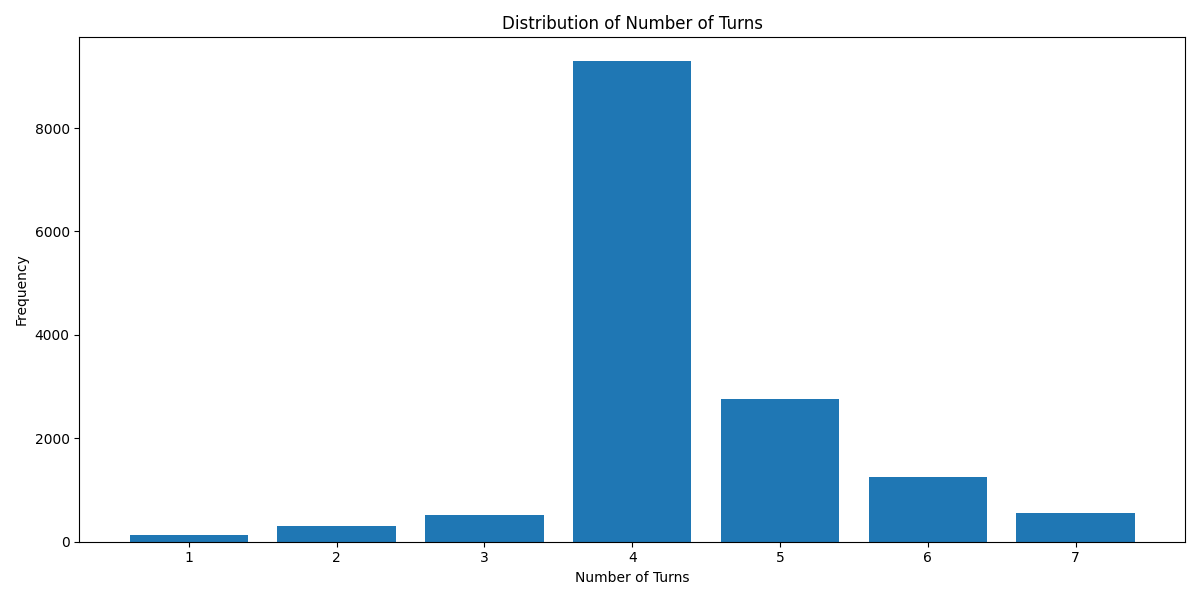
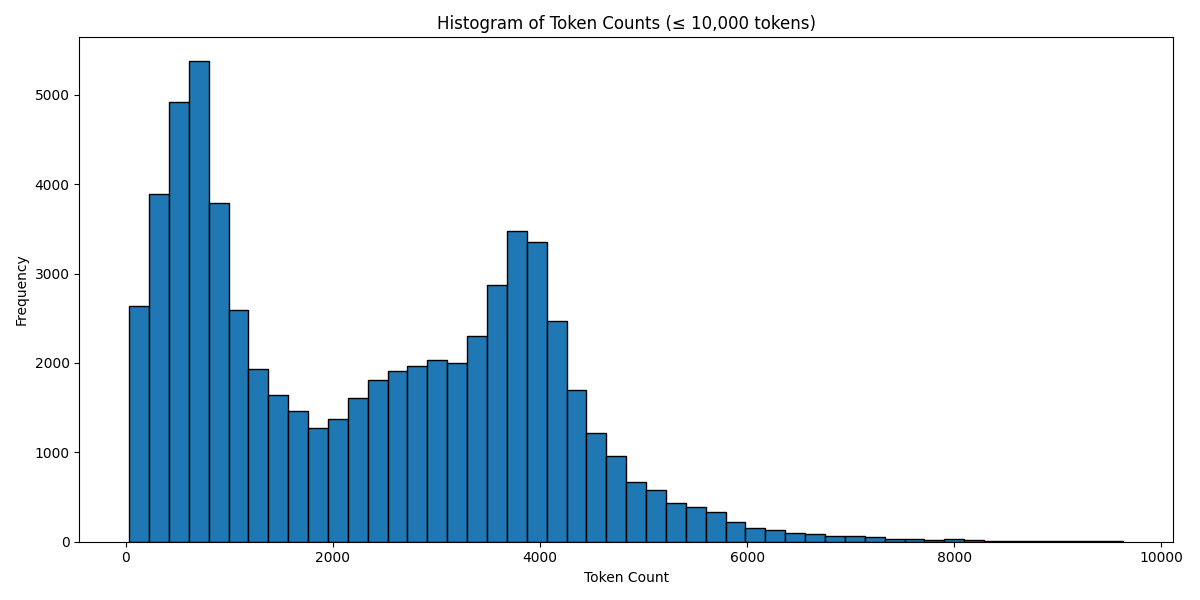
Below are some graphs and all for you to observe.
Turn Distribution # 1 Turn is considered as 1 combined Human/GPT pair in a ShareGPT format. 4 Turns means 1 System Row + 8 Human/GPT rows in total.
Token Count Histogram # Based on the Llama 3 Tokenizer
Have a good one.
Source Image: https://www.pixiv.net/en/artworks/91689070

</details>
- Downloads last month
- 225
3-bit
4-bit
5-bit
6-bit
8-bit
16-bit
Model tree for joseshpj/Llama-3.1-8B-Stheno-v3.4-GGUF-IQ-Imatrix
Base model
Sao10K/Llama-3.1-8B-Stheno-v3.4
Install (macOS, Linux)
# Start a local OpenAI-compatible server with a web UI: llama serve -hf joseshpj/Llama-3.1-8B-Stheno-v3.4-GGUF-IQ-Imatrix:# Run inference directly in the terminal: llama cli -hf joseshpj/Llama-3.1-8B-Stheno-v3.4-GGUF-IQ-Imatrix: