Instructions to use prism-ml/Ternary-Bonsai-4B-gguf with libraries, inference providers, notebooks, and local apps. Follow these links to get started.
- Notebooks
- Google Colab
- Kaggle
- Local Apps Settings
- llama.cpp
How to use prism-ml/Ternary-Bonsai-4B-gguf with llama.cpp:
Install (macOS, Linux)
curl -LsSf https://llama.app/install.sh | sh # Start a local OpenAI-compatible server with a web UI: llama serve -hf prism-ml/Ternary-Bonsai-4B-gguf:F16 # Run inference directly in the terminal: llama cli -hf prism-ml/Ternary-Bonsai-4B-gguf:F16
Install from WinGet (Windows)
winget install llama.cpp # Start a local OpenAI-compatible server with a web UI: llama serve -hf prism-ml/Ternary-Bonsai-4B-gguf:F16 # Run inference directly in the terminal: llama cli -hf prism-ml/Ternary-Bonsai-4B-gguf:F16
Use pre-built binary
# Download pre-built binary from: # https://github.com/ggerganov/llama.cpp/releases # Start a local OpenAI-compatible server with a web UI: ./llama-server -hf prism-ml/Ternary-Bonsai-4B-gguf:F16 # Run inference directly in the terminal: ./llama-cli -hf prism-ml/Ternary-Bonsai-4B-gguf:F16
Build from source code
git clone https://github.com/ggerganov/llama.cpp.git cd llama.cpp cmake -B build cmake --build build -j --target llama-server llama-cli # Start a local OpenAI-compatible server with a web UI: ./build/bin/llama-server -hf prism-ml/Ternary-Bonsai-4B-gguf:F16 # Run inference directly in the terminal: ./build/bin/llama-cli -hf prism-ml/Ternary-Bonsai-4B-gguf:F16
Use Docker
docker model run hf.co/prism-ml/Ternary-Bonsai-4B-gguf:F16
- LM Studio
- Jan
- vLLM
How to use prism-ml/Ternary-Bonsai-4B-gguf with vLLM:
Install from pip and serve model
# Install vLLM from pip: pip install vllm # Start the vLLM server: vllm serve "prism-ml/Ternary-Bonsai-4B-gguf" # Call the server using curl (OpenAI-compatible API): curl -X POST "http://localhost:8000/v1/chat/completions" \ -H "Content-Type: application/json" \ --data '{ "model": "prism-ml/Ternary-Bonsai-4B-gguf", "messages": [ { "role": "user", "content": "What is the capital of France?" } ] }'Use Docker
docker model run hf.co/prism-ml/Ternary-Bonsai-4B-gguf:F16
- Ollama
How to use prism-ml/Ternary-Bonsai-4B-gguf with Ollama:
ollama run hf.co/prism-ml/Ternary-Bonsai-4B-gguf:F16
- Unsloth Desktop
- Pi
How to use prism-ml/Ternary-Bonsai-4B-gguf with Pi:
Start the llama.cpp server
# Install llama.cpp: brew install llama.cpp # Start a local OpenAI-compatible server: llama serve -hf prism-ml/Ternary-Bonsai-4B-gguf:F16
Configure the model in Pi
# Install Pi: npm install -g @earendil-works/pi-coding-agent # Add to ~/.pi/agent/models.json: { "providers": { "llama-cpp": { "baseUrl": "http://localhost:8080/v1", "api": "openai-completions", "apiKey": "none", "models": [ { "id": "prism-ml/Ternary-Bonsai-4B-gguf:F16" } ] } } }Run Pi
# Start Pi in your project directory: pi
- Docker Model Runner
How to use prism-ml/Ternary-Bonsai-4B-gguf with Docker Model Runner:
docker model run hf.co/prism-ml/Ternary-Bonsai-4B-gguf:F16
- Lemonade
How to use prism-ml/Ternary-Bonsai-4B-gguf with Lemonade:
Pull the model
# Download Lemonade from https://lemonade-server.ai/ lemonade pull prism-ml/Ternary-Bonsai-4B-gguf:F16
Run and chat with the model
lemonade run user.Ternary-Bonsai-4B-gguf-F16
List all available models
lemonade list
- Hermes Agent
How to use prism-ml/Ternary-Bonsai-4B-gguf with Hermes Agent:
Start the llama.cpp server
# Install llama.cpp: brew install llama.cpp # Start a local OpenAI-compatible server: llama serve -hf prism-ml/Ternary-Bonsai-4B-gguf:F16
Configure Hermes
# Install Hermes: curl -fsSL https://hermes-agent.nousresearch.com/install.sh | bash hermes setup # Point Hermes at the local server: hermes config set model.provider custom hermes config set model.base_url http://127.0.0.1:8080/v1 hermes config set model.default prism-ml/Ternary-Bonsai-4B-gguf:F16
Run Hermes
hermes
- Atomic Chat
- OpenClaw
How to use prism-ml/Ternary-Bonsai-4B-gguf with OpenClaw:
Start the llama.cpp server
# Install llama.cpp: brew install llama.cpp # Start a local OpenAI-compatible server: llama serve -hf prism-ml/Ternary-Bonsai-4B-gguf:F16
Configure OpenClaw
# Install OpenClaw: npm install -g openclaw@latest # Register the local server and set it as the default model: openclaw onboard --non-interactive --mode local \ --auth-choice custom-api-key \ --custom-base-url http://127.0.0.1:8080/v1 \ --custom-model-id "prism-ml/Ternary-Bonsai-4B-gguf:F16" \ --custom-provider-id llama-cpp \ --custom-compatibility openai \ --custom-text-input \ --accept-risk \ --skip-health
Run OpenClaw
openclaw agent --local --agent main --message "Hello from Hugging Face"
Install from WinGet (Windows)
winget install llama.cpp
# Start a local OpenAI-compatible server with a web UI:
llama serve -hf prism-ml/Ternary-Bonsai-4B-gguf:# Run inference directly in the terminal:
llama cli -hf prism-ml/Ternary-Bonsai-4B-gguf:Use pre-built binary
# Download pre-built binary from:
# https://github.com/ggerganov/llama.cpp/releases# Start a local OpenAI-compatible server with a web UI:
./llama-server -hf prism-ml/Ternary-Bonsai-4B-gguf:# Run inference directly in the terminal:
./llama-cli -hf prism-ml/Ternary-Bonsai-4B-gguf:Build from source code
git clone https://github.com/ggerganov/llama.cpp.git
cd llama.cpp
cmake -B build
cmake --build build -j --target llama-server llama-cli# Start a local OpenAI-compatible server with a web UI:
./build/bin/llama-server -hf prism-ml/Ternary-Bonsai-4B-gguf:# Run inference directly in the terminal:
./build/bin/llama-cli -hf prism-ml/Ternary-Bonsai-4B-gguf:Use Docker
docker model run hf.co/prism-ml/Ternary-Bonsai-4B-gguf:
Prism ML Website | White Paper | Demo & Examples | Discord
Ternary-Bonsai-4B-gguf
Ternary (1.58-bit) language model in GGUF Q2_0 format for llama.cpp
Resources
- White Paper
- Demo repo — examples for serving, benchmarking, and integrating Bonsai
- Discord — community support and updates
- Kernels: Q2_0 is not yet in mainline
llama.cpp. Use our fork at PrismML-Eng/llama.cpp (prismbranch, default) which adds Q2_0 support for CPU (NEON/generic) and Metal. Upstream PR coming soon.
Model Overview
| Item | Specification |
|---|---|
| Base model | Qwen3-4B |
| Parameters | 4.0B (~3.6B non-embedding) |
| Architecture | GQA (32 query / 8 KV heads), SwiGLU MLP, RoPE, RMSNorm |
| Layers | 36 Transformer decoder blocks |
| Context length | 32,768 tokens |
| Vocab size | 151,936 |
| Weight format | GGUF Q2_0 g128: {-1, 0, +1} with FP16 group-wise scaling |
| Packed Q2_0 size | 1,020 MiB (1.07 GB) |
| Ternary coverage | Embeddings, attention projections, MLP projections, LM head |
| License | Apache 2.0 |
Quantization Format: GGUF Q2_0 (g128)
Each weight takes a value from {-1, 0, +1}, with one shared FP16 scale per group of 128 weights:
w_i = scale_g * t_i, t_i in {-1, 0, +1}
Q2_0 encodes each weight as a 2-bit code q in {0, 1, 2, 3}, dequantized via w = (q - 1) * scale. One 128-element block is 34 bytes (2 bytes FP16 scale + 32 bytes of packed 2-bit codes) for an effective 2.125 bits/weight. The fourth code point (q = 3, reconstructing to +2 * scale) is reserved for future extensions; for ternary weights it is unused.
Memory
| Format | Size | Reduction | Ratio |
|---|---|---|---|
| FP16 | 8.04 GB | -- | 1.0x |
| GGUF Q2_0 g128 | 1,020 MiB (1.07 GB) | 86.3% | 7.3x |
Files in this repo
| File | Format | Size | Recommended |
|---|---|---|---|
Ternary-Bonsai-4B-F16.gguf |
FP16 | 8.04 GB | baseline / re-quantization source |
Ternary-Bonsai-4B-Q2_0.gguf |
Q2_0 (g128) | 1,020 MB | recommended (lossless for ternary) |
Quickstart
Build from the Prism fork
git clone https://github.com/PrismML-Eng/llama.cpp
cd llama.cpp
cmake -B build -DGGML_METAL=ON # or -DGGML_CUDA=ON, -DGGML_VULKAN=ON
cmake --build build -j
llama.cpp CLI
./build/bin/llama-cli \
-m Ternary-Bonsai-4B-Q2_0.gguf \
-p "Explain quantum computing in simple terms." \
-n 256
llama.cpp server
./build/bin/llama-server -m Ternary-Bonsai-4B-Q2_0.gguf -c 4096
Throughput (llama.cpp, Apple M4 Pro 48 GB)
| Backend | PP512 (tok/s) | TG128 (tok/s) |
|---|---|---|
| Metal (GPU) | 826 | 120 |
| NEON CPU (10 t) | 226 | 56 |
Flags: -ngl 99 -fa 1 for Metal; -ngl 0 -fa 1 -t 10 for CPU.
Fidelity (Q2_0 vs FP16 baseline)
Q2_0 is effectively lossless for ternary weights — the ternary values land exactly on three of the four 2-bit code points, so quantize/dequantize is bit-exact in the absence of FP16 scale rounding.
Benchmarks
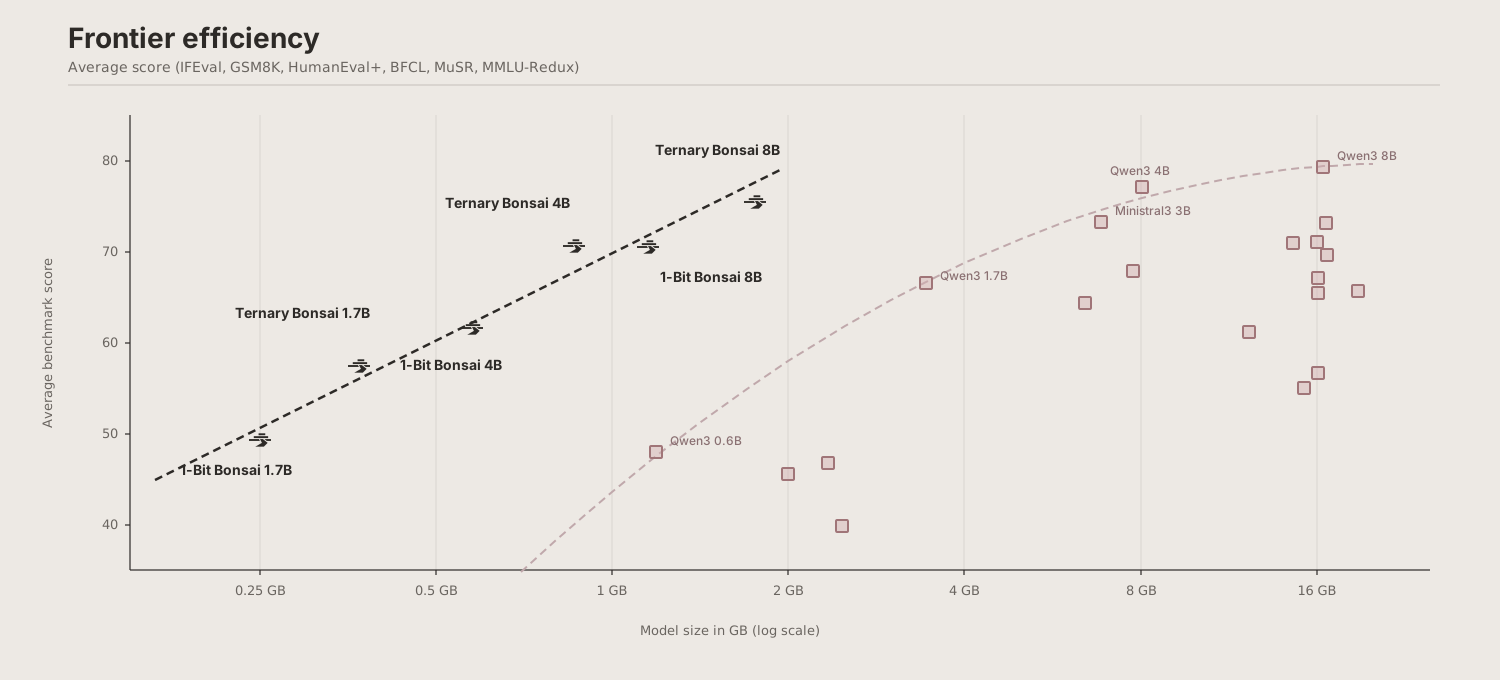
Evaluated with EvalScope v1.4.2 + vLLM 0.15.1 on NVIDIA H100. Full benchmark suite:
| Model | Size | Avg | MMLU-R | MuSR | IFEval | GSM8K | HE+ | BFCLv3 |
|---|---|---|---|---|---|---|---|---|
| Ternary Bonsai 4B | 1.02 GB | 70.7 | 69.7 | 45.1 | 72.1 | 90.5 | 78.7 | 67.8 |
| 1-bit Bonsai 4B (prior) | 0.57 GB | 62.7 | 58.7 | 41.4 | 69.6 | 87.3 | 71.3 | 48.0 |
| Qwen 3 4B | 8.04 GB | 77.1 | 79.8 | 57.4 | 80.0 | 92.1 | 74.4 | 78.9 |
| Ministral3 3B | 6.86 GB | 73.2 | 77.5 | 56.5 | 73.1 | 91.4 | 69.5 | 71.3 |
| Gemma 3 4B | 7.76 GB | 67.9 | 66.0 | 46.3 | 73.0 | 89.8 | 67.1 | 65.1 |
| Llama 3.2 3B | 6.43 GB | 64.4 | 65.5 | 48.9 | 78.3 | 80.1 | 52.4 | 60.9 |
Intelligence Density
density = -ln(1 - score/100) / size_GB
| Model | Size | Intelligence Density (1/GB) |
|---|---|---|
| Ternary Bonsai 4B | 1.02 GB | 1.202 |
| 1-bit Bonsai 4B (prior) | 0.57 GB | 1.744 |
| Ministral3 3B | 6.86 GB | 0.192 |
| Qwen 3 4B | 8.04 GB | 0.183 |
| Llama 3.2 3B | 6.43 GB | 0.161 |
| Gemma 3 4B | 7.76 GB | 0.146 |
Citation
@techreport{ternarybonsai,
title = {Ternary Bonsai: 1.58-bit Language Models at 8B, 4B, and 1.7B Scale},
author = {Prism ML},
year = {2026},
month = {April},
url = {https://prismml.com}
}
Contact
For questions, feedback, or collaboration inquiries: contact@prismml.com
- Downloads last month
- 6,698
2-bit
16-bit
Model tree for prism-ml/Ternary-Bonsai-4B-gguf
Spaces using prism-ml/Ternary-Bonsai-4B-gguf 3
Collection including prism-ml/Ternary-Bonsai-4B-gguf
Evaluation results
- openai/gsm8k · Gsm8k View evaluation results source leaderboard 90.5
Install (macOS, Linux)
# Start a local OpenAI-compatible server with a web UI: llama serve -hf prism-ml/Ternary-Bonsai-4B-gguf:# Run inference directly in the terminal: llama cli -hf prism-ml/Ternary-Bonsai-4B-gguf: