Instructions to use typhoon-ai/llama-3-typhoon-v1.5-8b-instruct-gguf with libraries, inference providers, notebooks, and local apps. Follow these links to get started.
- Libraries
- llama-cpp-python
How to use typhoon-ai/llama-3-typhoon-v1.5-8b-instruct-gguf with llama-cpp-python:
# !pip install llama-cpp-python from llama_cpp import Llama llm = Llama.from_pretrained( repo_id="typhoon-ai/llama-3-typhoon-v1.5-8b-instruct-gguf", filename="llama-3-typhoon-v1.5-8b-instruct.Q4_K_M.gguf", )
llm.create_chat_completion( messages = "No input example has been defined for this model task." )
- Notebooks
- Google Colab
- Kaggle
- Local Apps Settings
- llama.cpp
How to use typhoon-ai/llama-3-typhoon-v1.5-8b-instruct-gguf with llama.cpp:
Install from brew
brew install llama.cpp # Start a local OpenAI-compatible server with a web UI: llama-server -hf typhoon-ai/llama-3-typhoon-v1.5-8b-instruct-gguf:Q4_K_M # Run inference directly in the terminal: llama-cli -hf typhoon-ai/llama-3-typhoon-v1.5-8b-instruct-gguf:Q4_K_M
Install from WinGet (Windows)
winget install llama.cpp # Start a local OpenAI-compatible server with a web UI: llama-server -hf typhoon-ai/llama-3-typhoon-v1.5-8b-instruct-gguf:Q4_K_M # Run inference directly in the terminal: llama-cli -hf typhoon-ai/llama-3-typhoon-v1.5-8b-instruct-gguf:Q4_K_M
Use pre-built binary
# Download pre-built binary from: # https://github.com/ggerganov/llama.cpp/releases # Start a local OpenAI-compatible server with a web UI: ./llama-server -hf typhoon-ai/llama-3-typhoon-v1.5-8b-instruct-gguf:Q4_K_M # Run inference directly in the terminal: ./llama-cli -hf typhoon-ai/llama-3-typhoon-v1.5-8b-instruct-gguf:Q4_K_M
Build from source code
git clone https://github.com/ggerganov/llama.cpp.git cd llama.cpp cmake -B build cmake --build build -j --target llama-server llama-cli # Start a local OpenAI-compatible server with a web UI: ./build/bin/llama-server -hf typhoon-ai/llama-3-typhoon-v1.5-8b-instruct-gguf:Q4_K_M # Run inference directly in the terminal: ./build/bin/llama-cli -hf typhoon-ai/llama-3-typhoon-v1.5-8b-instruct-gguf:Q4_K_M
Use Docker
docker model run hf.co/typhoon-ai/llama-3-typhoon-v1.5-8b-instruct-gguf:Q4_K_M
- LM Studio
- Jan
- Ollama
How to use typhoon-ai/llama-3-typhoon-v1.5-8b-instruct-gguf with Ollama:
ollama run hf.co/typhoon-ai/llama-3-typhoon-v1.5-8b-instruct-gguf:Q4_K_M
- Unsloth Studio
How to use typhoon-ai/llama-3-typhoon-v1.5-8b-instruct-gguf with Unsloth Studio:
Install Unsloth Studio (macOS, Linux, WSL)
curl -fsSL https://unsloth.ai/install.sh | sh # Run unsloth studio unsloth studio -H 0.0.0.0 -p 8888 # Then open http://localhost:8888 in your browser # Search for typhoon-ai/llama-3-typhoon-v1.5-8b-instruct-gguf to start chatting
Install Unsloth Studio (Windows)
irm https://unsloth.ai/install.ps1 | iex # Run unsloth studio unsloth studio -H 0.0.0.0 -p 8888 # Then open http://localhost:8888 in your browser # Search for typhoon-ai/llama-3-typhoon-v1.5-8b-instruct-gguf to start chatting
Using HuggingFace Spaces for Unsloth
# No setup required # Open https://huggingface.co/spaces/unsloth/studio in your browser # Search for typhoon-ai/llama-3-typhoon-v1.5-8b-instruct-gguf to start chatting
- Docker Model Runner
How to use typhoon-ai/llama-3-typhoon-v1.5-8b-instruct-gguf with Docker Model Runner:
docker model run hf.co/typhoon-ai/llama-3-typhoon-v1.5-8b-instruct-gguf:Q4_K_M
- Lemonade
How to use typhoon-ai/llama-3-typhoon-v1.5-8b-instruct-gguf with Lemonade:
Pull the model
# Download Lemonade from https://lemonade-server.ai/ lemonade pull typhoon-ai/llama-3-typhoon-v1.5-8b-instruct-gguf:Q4_K_M
Run and chat with the model
lemonade run user.llama-3-typhoon-v1.5-8b-instruct-gguf-Q4_K_M
List all available models
lemonade list
Llama-3-Typhoon-1.5-8B: Thai Large Language Model (Instruct) - GGUF
Llama-3-Typhoon-1.5-8B-instruct is a instruct Thai 🇹🇠large language model with 8 billion parameters, and it is based on Llama3-8B.
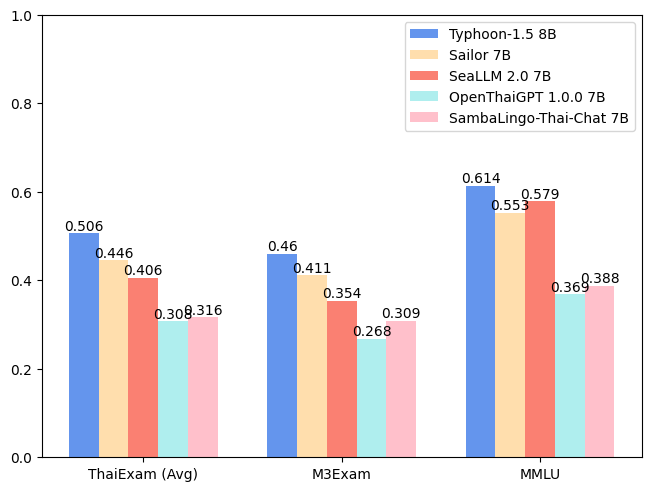
Here is gguf converted of Typhoon-1.5-8b-instruct.
Chat Template
We use llama3 chat-template for LM Studio.
{
"name": "Llama 3",
"inference_params": {
"input_prefix": "<|start_header_id|>user<|end_header_id|>\n\n",
"input_suffix": "<|eot_id|><|start_header_id|>assistant<|end_header_id|>\n\n",
"pre_prompt": "You are a helpful assistant who're always speak Thai.",
"pre_prompt_prefix": "<|start_header_id|>system<|end_header_id|>\n\n",
"pre_prompt_suffix": "<|eot_id|>",
"antiprompt": [
"<|start_header_id|>", "<|eot_id|>"
]
}
}
Intended Uses & Limitations
This model is an instructional model. However, it’s still undergoing development. It incorporates some level of guardrails, but it still may produce answers that are inaccurate, biased, or otherwise objectionable in response to user prompts. We recommend that developers assess these risks in the context of their use case.
Follow us
https://twitter.com/opentyphoon
Support
SCB10X AI Team
- Kunat Pipatanakul, Potsawee Manakul, Sittipong Sripaisarnmongkol, Natapong Nitarach, Pathomporn Chokchainant, Kasima Tharnpipitchai
- If you find Typhoon-8B useful for your work, please cite it using:
@article{pipatanakul2023typhoon,
title={Typhoon: Thai Large Language Models},
author={Kunat Pipatanakul and Phatrasek Jirabovonvisut and Potsawee Manakul and Sittipong Sripaisarnmongkol and Ruangsak Patomwong and Pathomporn Chokchainant and Kasima Tharnpipitchai},
year={2023},
journal={arXiv preprint arXiv:2312.13951},
url={https://arxiv.org/abs/2312.13951}
}
Contact Us
- General & Collaboration: kasima@scb10x.com, pathomporn@scb10x.com
- Technical: kunat@scb10x.com
- Downloads last month
- 185
4-bit

ollama run hf.co/typhoon-ai/llama-3-typhoon-v1.5-8b-instruct-gguf:Q4_K_M