Instructions to use ubergarm/Qwen3.5-397B-A17B-GGUF with libraries, inference providers, notebooks, and local apps. Follow these links to get started.
- Libraries
- llama-cpp-python
How to use ubergarm/Qwen3.5-397B-A17B-GGUF with llama-cpp-python:
# !pip install llama-cpp-python from llama_cpp import Llama llm = Llama.from_pretrained( repo_id="ubergarm/Qwen3.5-397B-A17B-GGUF", filename="IQ2_KL/Qwen3.5-397B-A17B-IQ2_KL-00001-of-00004.gguf", )
llm.create_chat_completion( messages = [ { "role": "user", "content": "What is the capital of France?" } ] ) - Notebooks
- Google Colab
- Kaggle
- Local Apps Settings
- llama.cpp
How to use ubergarm/Qwen3.5-397B-A17B-GGUF with llama.cpp:
Install from brew
brew install llama.cpp # Start a local OpenAI-compatible server with a web UI: llama-server -hf ubergarm/Qwen3.5-397B-A17B-GGUF:Q2_K # Run inference directly in the terminal: llama-cli -hf ubergarm/Qwen3.5-397B-A17B-GGUF:Q2_K
Install from WinGet (Windows)
winget install llama.cpp # Start a local OpenAI-compatible server with a web UI: llama-server -hf ubergarm/Qwen3.5-397B-A17B-GGUF:Q2_K # Run inference directly in the terminal: llama-cli -hf ubergarm/Qwen3.5-397B-A17B-GGUF:Q2_K
Use pre-built binary
# Download pre-built binary from: # https://github.com/ggerganov/llama.cpp/releases # Start a local OpenAI-compatible server with a web UI: ./llama-server -hf ubergarm/Qwen3.5-397B-A17B-GGUF:Q2_K # Run inference directly in the terminal: ./llama-cli -hf ubergarm/Qwen3.5-397B-A17B-GGUF:Q2_K
Build from source code
git clone https://github.com/ggerganov/llama.cpp.git cd llama.cpp cmake -B build cmake --build build -j --target llama-server llama-cli # Start a local OpenAI-compatible server with a web UI: ./build/bin/llama-server -hf ubergarm/Qwen3.5-397B-A17B-GGUF:Q2_K # Run inference directly in the terminal: ./build/bin/llama-cli -hf ubergarm/Qwen3.5-397B-A17B-GGUF:Q2_K
Use Docker
docker model run hf.co/ubergarm/Qwen3.5-397B-A17B-GGUF:Q2_K
- LM Studio
- Jan
- vLLM
How to use ubergarm/Qwen3.5-397B-A17B-GGUF with vLLM:
Install from pip and serve model
# Install vLLM from pip: pip install vllm # Start the vLLM server: vllm serve "ubergarm/Qwen3.5-397B-A17B-GGUF" # Call the server using curl (OpenAI-compatible API): curl -X POST "http://localhost:8000/v1/chat/completions" \ -H "Content-Type: application/json" \ --data '{ "model": "ubergarm/Qwen3.5-397B-A17B-GGUF", "messages": [ { "role": "user", "content": "What is the capital of France?" } ] }'Use Docker
docker model run hf.co/ubergarm/Qwen3.5-397B-A17B-GGUF:Q2_K
- Ollama
How to use ubergarm/Qwen3.5-397B-A17B-GGUF with Ollama:
ollama run hf.co/ubergarm/Qwen3.5-397B-A17B-GGUF:Q2_K
- Unsloth Studio
How to use ubergarm/Qwen3.5-397B-A17B-GGUF with Unsloth Studio:
Install Unsloth Studio (macOS, Linux, WSL)
curl -fsSL https://unsloth.ai/install.sh | sh # Run unsloth studio unsloth studio -H 0.0.0.0 -p 8888 # Then open http://localhost:8888 in your browser # Search for ubergarm/Qwen3.5-397B-A17B-GGUF to start chatting
Install Unsloth Studio (Windows)
irm https://unsloth.ai/install.ps1 | iex # Run unsloth studio unsloth studio -H 0.0.0.0 -p 8888 # Then open http://localhost:8888 in your browser # Search for ubergarm/Qwen3.5-397B-A17B-GGUF to start chatting
Using HuggingFace Spaces for Unsloth
# No setup required # Open https://huggingface.co/spaces/unsloth/studio in your browser # Search for ubergarm/Qwen3.5-397B-A17B-GGUF to start chatting
- Pi
How to use ubergarm/Qwen3.5-397B-A17B-GGUF with Pi:
Start the llama.cpp server
# Install llama.cpp: brew install llama.cpp # Start a local OpenAI-compatible server: llama-server -hf ubergarm/Qwen3.5-397B-A17B-GGUF:Q2_K
Configure the model in Pi
# Install Pi: npm install -g @mariozechner/pi-coding-agent # Add to ~/.pi/agent/models.json: { "providers": { "llama-cpp": { "baseUrl": "http://localhost:8080/v1", "api": "openai-completions", "apiKey": "none", "models": [ { "id": "ubergarm/Qwen3.5-397B-A17B-GGUF:Q2_K" } ] } } }Run Pi
# Start Pi in your project directory: pi
- Hermes Agent new
How to use ubergarm/Qwen3.5-397B-A17B-GGUF with Hermes Agent:
Start the llama.cpp server
# Install llama.cpp: brew install llama.cpp # Start a local OpenAI-compatible server: llama-server -hf ubergarm/Qwen3.5-397B-A17B-GGUF:Q2_K
Configure Hermes
# Install Hermes: curl -fsSL https://hermes-agent.nousresearch.com/install.sh | bash hermes setup # Point Hermes at the local server: hermes config set model.provider custom hermes config set model.base_url http://127.0.0.1:8080/v1 hermes config set model.default ubergarm/Qwen3.5-397B-A17B-GGUF:Q2_K
Run Hermes
hermes
- Atomic Chat new
- Docker Model Runner
How to use ubergarm/Qwen3.5-397B-A17B-GGUF with Docker Model Runner:
docker model run hf.co/ubergarm/Qwen3.5-397B-A17B-GGUF:Q2_K
- Lemonade
How to use ubergarm/Qwen3.5-397B-A17B-GGUF with Lemonade:
Pull the model
# Download Lemonade from https://lemonade-server.ai/ lemonade pull ubergarm/Qwen3.5-397B-A17B-GGUF:Q2_K
Run and chat with the model
lemonade run user.Qwen3.5-397B-A17B-GGUF-Q2_K
List all available models
lemonade list
Check out Thireus GGUF-Tool-Suite quants!
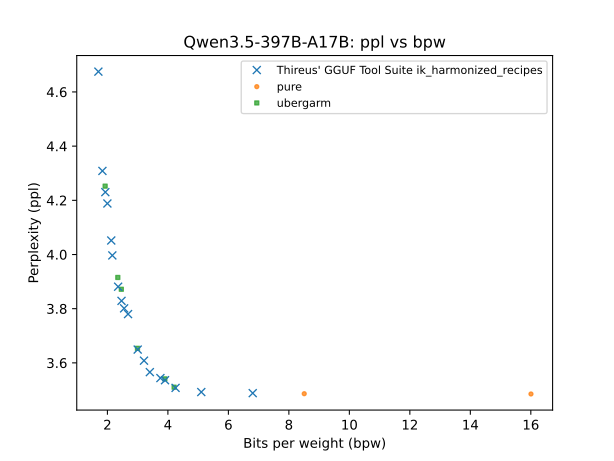
Holy smokes, if I understand it correctly @Thireus just finished testing ~660 runs of KLD for big Qwen3.5-397B-A17B?! (60 layers x 11 tensor types per layer).
I think the approach is to take baseline measurement of KLD using Q8_0, then do 660 runs to measure relative sensitivity of every tensor/layer, and use the tool to download the shards and glue them together with a metadata only first gguf split file..
Seems like it is working quite well looking at this graph!!
Amazing job, @Thireus

That's right :)
Been doing this for almost 1 year lol
The approach is described here: https://github.com/Thireus/GGUF-Tool-Suite/blob/main/docs/Benchmarking%20models%20-%20How.md
Mother of God! What an epic effort. I'm still reading in disbelief but you make even the German spirit of "document everything" seem small and pitiful! Hut ab, @Thireus !π
P.S. I'm still reading but I have a feeling some very geeky weeks are coming!
@ubergarm , you made me double check the ppl results. There was a shift of ppl assignment. Rest assured your quants are still on the same average curve! Sorry about that. π
thanks for double checking and letting me know!
Your quants are still really good and if you're quantizing more layers likely faster than mine. I'm leaving the non-routed experts full q8_0 much of the time (the always active weights).
Also your tool allows for perfect fit for a given rig/hardware configuration which is beyond my ability to do by hand.
Appreciate you and have a great weekend!
@ubergarm , well you are producing GGUF uberquickly while with my tool it takes days to benchmark all the things. But indeed once benchmark is done there is not much else to do since the quant assign script automatically assigns the correct quant combination and produces the recipe in seconds for the target size the user selects.
Thank you for all your work as always. Specifically with the imatrix calibration dataset and files!
hi @Thireus
If I want download your GGUF without browser, just download all links and rename them into shared command prefix path with -SPECIAL_TENSOR-00001-of-01099.gguf suffix ?
https://huggingface.co/Thireus/Qwen3.5-397B-A17B-THIREUS-BF16-SPECIAL_SPLIT/resolve/main/Qwen3.5-397B-A17B-THIREUS-BF16-SPECIAL_TENSOR-00001-of-01099.gguf
https://huggingface.co/Thireus/Qwen3.5-397B-A17B-THIREUS-IQ4_KT-SPECIAL_SPLIT/resolve/main/Qwen3.5-397B-A17B-THIREUS-IQ4_KT-SPECIAL_TENSOR-00002-of-01099.gguf
https://huggingface.co/Thireus/Qwen3.5-397B-A17B-THIREUS-IQ4_KT-SPECIAL_SPLIT/resolve/main/Qwen3.5-397B-A17B-THIREUS-IQ4_KT-SPECIAL_TENSOR-00003-of-01099.gguf
https://huggingface.co/Thireus/Qwen3.5-397B-A17B-THIREUS-IQ3_K-SPECIAL_SPLIT/resolve/main/Qwen3.5-397B-A17B-THIREUS-IQ3_K-SPECIAL_TENSOR-00004-of-01099.gguf
https://huggingface.co/Thireus/Qwen3.5-397B-A17B-THIREUS-IQ3_K-SPECIAL_SPLIT/resolve/main/Qwen3.5-397B-A17B-THIREUS-IQ3_K-SPECIAL_TENSOR-00005-of-01099.gguf
https://huggingface.co/Thireus/Qwen3.5-397B-A17B-THIREUS-IQ4_KT-SPECIAL_SPLIT/resolve/main/Qwen3.5-397B-A17B-THIREUS-IQ4_KT-SPECIAL_TENSOR-00006-of-01099.gguf
@baytrail , yes that's right. make sure to rename all these .gguf with the same prefix before the "-xxxxx-of-01099.gguf", for example "my_custom_gguf-xxxxx-of-01099.gguf". Then you can either point llama-server to the first one or you can use the llama-gguf-split utility to merge them into one single gguf.
Alternatively, I can recommend to use the cli utility quant_downloader.sh from https://github.com/Thireus/GGUF-Tool-Suite as described in the readme section:
GIT_LFS_SKIP_SMUDGE=1 git clone https://github.com/Thireus/GGUF-Tool-Suite
cd GGUF-Tool-Suite
# Make sure to copy the relevant download.conf for the model before running quant_assign.py
rm -f download.conf
# Use the download.conf of the chosen model
cp -f models/DeepSeek-R1-0528/download.conf .
mkdir -p kitchen && cd kitchen
# Obtain a recipe example for the chosen model from ../recipe_examples/
../quant_downloader.sh ../recipe_examples/ik_harmonized_recipes/DeepSeek-R1-0528.THIREUS-1.9413bpw-4.3624ppl.151GB-GGUF_11GB-GPU_140GB-CPU.569b7f6_bb4f3c8.recipe
Most importantly, if you do not plan to merge the gguf shards into one single file, you'll need to make sure to have compiled ik_llama.cpp with -DGGML_MAX_CONTEXTS=2048 as described in the readme, as well as using ulimit -n 9999, otherwise you'll face a limitation that the binary cannot load that many .gguf files.