

CogVLM2-Video-Llama3-Base
介绍
CogVLM2-Video 在多个视频问答任务上达到了 state-of-the-art 的性能,能够实现一分钟内的视频理解。 我们提供了两个示例视频,分别展现了 CogVLM2-Video 的 视频理解和时间序列定位能力。
榜单性能
下图显示了 CogVLM2-Video 在 MVBench、VideoChatGPT-Bench 和 Zero-shot VideoQA 数据集 (MSVD-QA、MSRVTT-QA、ActivityNet-QA) 上的性能。
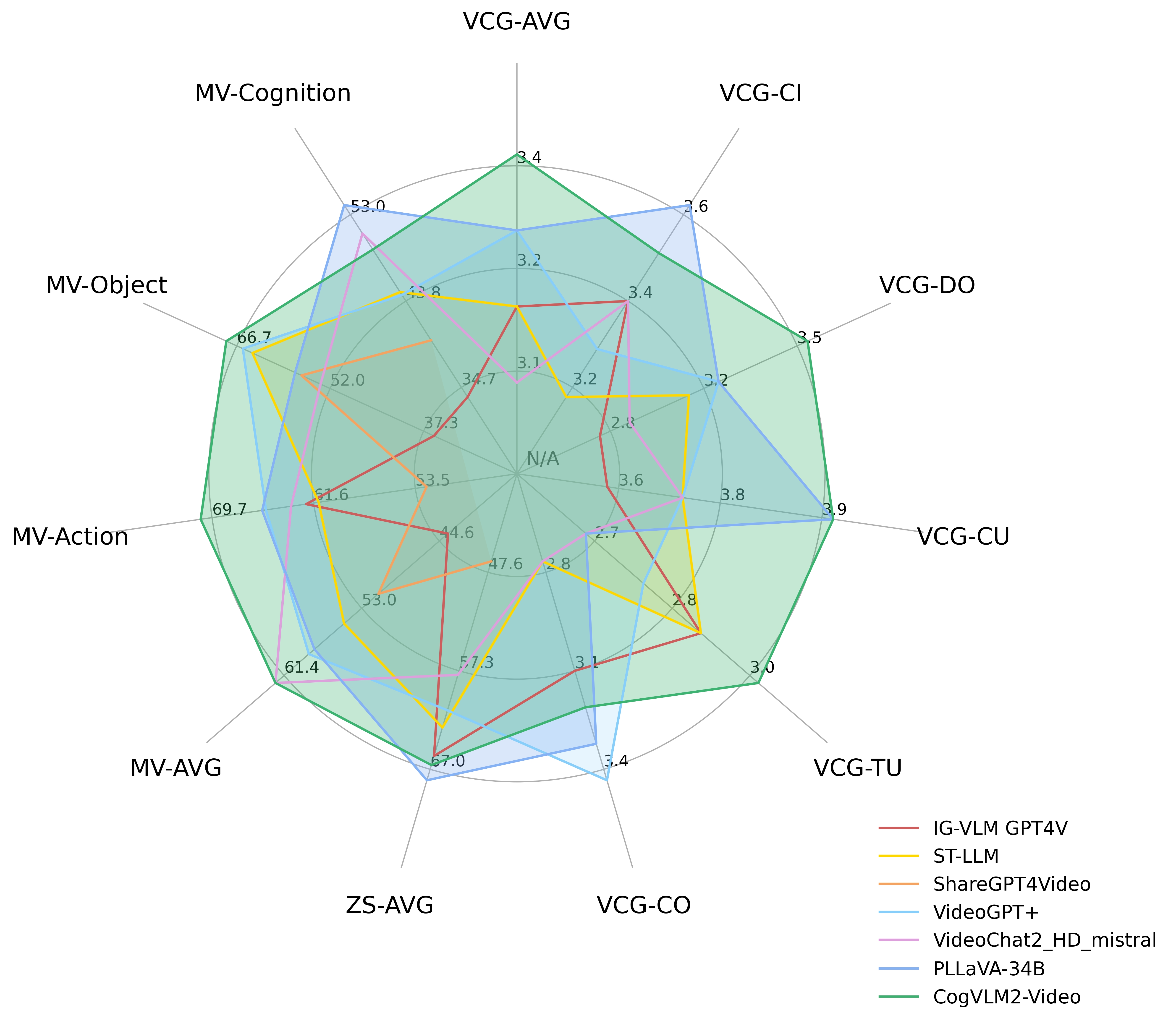
其中 VCG 指的是 VideoChatGPTBench,ZS 指的是零样本 VideoQA 数据集,MV-* 指的是 MVBench 中的主要类别。
具体榜单测试数据如下:
| Models | VCG-AVG | VCG-CI | VCG-DO | VCG-CU | VCG-TU | VCG-CO | ZS-AVG |
|---|---|---|---|---|---|---|---|
| IG-VLM GPT4V | 3.17 | 3.40 | 2.80 | 3.61 | 2.89 | 3.13 | 65.70 |
| ST-LLM | 3.15 | 3.23 | 3.05 | 3.74 | 2.93 | 2.81 | 62.90 |
| ShareGPT4Video | N/A | N/A | N/A | N/A | N/A | N/A | 46.50 |
| VideoGPT+ | 3.28 | 3.27 | 3.18 | 3.74 | 2.83 | 3.39 | 61.20 |
| VideoChat2_HD_mistral | 3.10 | 3.40 | 2.91 | 3.72 | 2.65 | 2.84 | 57.70 |
| PLLaVA-34B | 3.32 | 3.60 | 3.20 | 3.90 | 2.67 | 3.25 | 68.10 |
| CogVLM2-Video | 3.41 | 3.49 | 3.46 | 3.87 | 2.98 | 3.23 | 66.60 |
CogVLM2-Video 在 MVBench 数据集上的表现
| Models | AVG | AA | AC | AL | AP | AS | CO | CI | EN | ER | FA | FP | MA | MC | MD | OE | OI | OS | ST | SC | UA |
|---|---|---|---|---|---|---|---|---|---|---|---|---|---|---|---|---|---|---|---|---|---|
| IG-VLM GPT4V | 43.7 | 72.0 | 39.0 | 40.5 | 63.5 | 55.5 | 52.0 | 11.0 | 31.0 | 59.0 | 46.5 | 47.5 | 22.5 | 12.0 | 12.0 | 18.5 | 59.0 | 29.5 | 83.5 | 45.0 | 73.5 |
| ST-LLM | 54.9 | 84.0 | 36.5 | 31.0 | 53.5 | 66.0 | 46.5 | 58.5 | 34.5 | 41.5 | 44.0 | 44.5 | 78.5 | 56.5 | 42.5 | 80.5 | 73.5 | 38.5 | 86.5 | 43.0 | 58.5 |
| ShareGPT4Video | 51.2 | 79.5 | 35.5 | 41.5 | 39.5 | 49.5 | 46.5 | 51.5 | 28.5 | 39.0 | 40.0 | 25.5 | 75.0 | 62.5 | 50.5 | 82.5 | 54.5 | 32.5 | 84.5 | 51.0 | 54.5 |
| VideoGPT+ | 58.7 | 83.0 | 39.5 | 34.0 | 60.0 | 69.0 | 50.0 | 60.0 | 29.5 | 44.0 | 48.5 | 53.0 | 90.5 | 71.0 | 44.0 | 85.5 | 75.5 | 36.0 | 89.5 | 45.0 | 66.5 |
| VideoChat2_HD_mistral | 62.3 | 79.5 | 60.0 | 87.5 | 50.0 | 68.5 | 93.5 | 71.5 | 36.5 | 45.0 | 49.5 | 87.0 | 40.0 | 76.0 | 92.0 | 53.0 | 62.0 | 45.5 | 36.0 | 44.0 | 69.5 |
| PLLaVA-34B | 58.1 | 82.0 | 40.5 | 49.5 | 53.0 | 67.5 | 66.5 | 59.0 | 39.5 | 63.5 | 47.0 | 50.0 | 70.0 | 43.0 | 37.5 | 68.5 | 67.5 | 36.5 | 91.0 | 51.5 | 79.0 |
| CogVLM2-Video | 62.3 | 85.5 | 41.5 | 31.5 | 65.5 | 79.5 | 58.5 | 77.0 | 28.5 | 42.5 | 54.0 | 57.0 | 91.5 | 73.0 | 48.0 | 91.0 | 78.0 | 36.0 | 91.5 | 47.0 | 68.5 |
评估和复现
我们遵循以前的研究来评估我们模型的性能。在不同的基准测试中,我们为每个基准测试制作特定于任务的提示:
# For MVBench
prompt = f"Carefully watch the video and pay attention to the cause and sequence of events, the detail and movement of objects, and the action and pose of persons. Based on your observations, select the best option that accurately addresses the question.\n " + f"{prompt.replace('Short Answer.', '')}\n" + "Short Answer:"
# For VideoChatGPT-Bench
prompt = f"Carefully watch the video and pay attention to the cause and sequence of events, the detail and movement of objects, and the action and pose of persons. Based on your observations, comprehensively answer the following question. Your answer should be long and cover all the related aspects\n " + f"{prompt.replace('Short Answer.', '')}\n" + "Answer:"
# For Zero-shot VideoQA
prompt = f"The input consists of a sequence of key frames from a video. Answer the question comprehensively including all the possible verbs and nouns that can discribe the events, followed by significant events, characters, or objects that appear throughout the frames.\n " + f"{prompt.replace('Short Answer.', '')}\n" + "Answer:"
有关评估代码,请参阅 PLLaVA 中的 评估脚本。
快速调用
本仓库为 base 版本模型,不支持对话。
您可以在我们的 github 中快速安装对应的 Python包 依赖和运行模型推理。
模型协议
此模型根据 CogVLM2 LICENSE 发布。对于使用 Meta Llama 3 构建的模型,还请遵守 LLAMA3_LICENSE。
引用
我们即将发布技术报告,尽情期待。