Instructions to use Archsloth/Qwen3.8-27B-GGUF with libraries, inference providers, notebooks, and local apps. Follow these links to get started.
- Notebooks
- Google Colab
- Kaggle
- Local Apps Settings
- llama.cpp
How to use Archsloth/Qwen3.8-27B-GGUF with llama.cpp:
Install (macOS, Linux)
curl -LsSf https://llama.app/install.sh | sh # Start a local OpenAI-compatible server with a web UI: llama serve -hf Archsloth/Qwen3.8-27B-GGUF:Q6_K # Run inference directly in the terminal: llama cli -hf Archsloth/Qwen3.8-27B-GGUF:Q6_K
Install from WinGet (Windows)
winget install llama.cpp # Start a local OpenAI-compatible server with a web UI: llama serve -hf Archsloth/Qwen3.8-27B-GGUF:Q6_K # Run inference directly in the terminal: llama cli -hf Archsloth/Qwen3.8-27B-GGUF:Q6_K
Use pre-built binary
# Download pre-built binary from: # https://github.com/ggerganov/llama.cpp/releases # Start a local OpenAI-compatible server with a web UI: ./llama-server -hf Archsloth/Qwen3.8-27B-GGUF:Q6_K # Run inference directly in the terminal: ./llama-cli -hf Archsloth/Qwen3.8-27B-GGUF:Q6_K
Build from source code
git clone https://github.com/ggerganov/llama.cpp.git cd llama.cpp cmake -B build cmake --build build -j --target llama-server llama-cli # Start a local OpenAI-compatible server with a web UI: ./build/bin/llama-server -hf Archsloth/Qwen3.8-27B-GGUF:Q6_K # Run inference directly in the terminal: ./build/bin/llama-cli -hf Archsloth/Qwen3.8-27B-GGUF:Q6_K
Use Docker
docker model run hf.co/Archsloth/Qwen3.8-27B-GGUF:Q6_K
- LM Studio
- Jan
- vLLM
How to use Archsloth/Qwen3.8-27B-GGUF with vLLM:
Install from pip and serve model
# Install vLLM from pip: pip install vllm # Start the vLLM server: vllm serve "Archsloth/Qwen3.8-27B-GGUF" # Call the server using curl (OpenAI-compatible API): curl -X POST "http://localhost:8000/v1/chat/completions" \ -H "Content-Type: application/json" \ --data '{ "model": "Archsloth/Qwen3.8-27B-GGUF", "messages": [ { "role": "user", "content": [ { "type": "text", "text": "Describe this image in one sentence." }, { "type": "image_url", "image_url": { "url": "https://cdn.britannica.com/61/93061-050-99147DCE/Statue-of-Liberty-Island-New-York-Bay.jpg" } } ] } ] }'Use Docker
docker model run hf.co/Archsloth/Qwen3.8-27B-GGUF:Q6_K
- Ollama
How to use Archsloth/Qwen3.8-27B-GGUF with Ollama:
ollama run hf.co/Archsloth/Qwen3.8-27B-GGUF:Q6_K
- Unsloth Desktop
- Pi
How to use Archsloth/Qwen3.8-27B-GGUF with Pi:
Start the llama.cpp server
# Install llama.cpp: brew install llama.cpp # Start a local OpenAI-compatible server: llama serve -hf Archsloth/Qwen3.8-27B-GGUF:Q6_K
Configure the model in Pi
# Install Pi: npm install -g @earendil-works/pi-coding-agent # Add to ~/.pi/agent/models.json: { "providers": { "llama-cpp": { "baseUrl": "http://localhost:8080/v1", "api": "openai-completions", "apiKey": "none", "models": [ { "id": "Archsloth/Qwen3.8-27B-GGUF:Q6_K" } ] } } }Run Pi
# Start Pi in your project directory: pi
- Docker Model Runner
How to use Archsloth/Qwen3.8-27B-GGUF with Docker Model Runner:
docker model run hf.co/Archsloth/Qwen3.8-27B-GGUF:Q6_K
- Lemonade
How to use Archsloth/Qwen3.8-27B-GGUF with Lemonade:
Pull the model
# Download Lemonade from https://lemonade-server.ai/ lemonade pull Archsloth/Qwen3.8-27B-GGUF:Q6_K
Run and chat with the model
lemonade run user.Qwen3.8-27B-GGUF-Q6_K
List all available models
lemonade list
- Hermes Agent
How to use Archsloth/Qwen3.8-27B-GGUF with Hermes Agent:
Start the llama.cpp server
# Install llama.cpp: brew install llama.cpp # Start a local OpenAI-compatible server: llama serve -hf Archsloth/Qwen3.8-27B-GGUF:Q6_K
Configure Hermes
# Install Hermes: curl -fsSL https://hermes-agent.nousresearch.com/install.sh | bash hermes setup # Point Hermes at the local server: hermes config set model.provider custom hermes config set model.base_url http://127.0.0.1:8080/v1 hermes config set model.default Archsloth/Qwen3.8-27B-GGUF:Q6_K
Run Hermes
hermes
- Atomic Chat
- OpenClaw
How to use Archsloth/Qwen3.8-27B-GGUF with OpenClaw:
Start the llama.cpp server
# Install llama.cpp: brew install llama.cpp # Start a local OpenAI-compatible server: llama serve -hf Archsloth/Qwen3.8-27B-GGUF:Q6_K
Configure OpenClaw
# Install OpenClaw: npm install -g openclaw@latest # Register the local server and set it as the default model: openclaw onboard --non-interactive --mode local \ --auth-choice custom-api-key \ --custom-base-url http://127.0.0.1:8080/v1 \ --custom-model-id "Archsloth/Qwen3.8-27B-GGUF:Q6_K" \ --custom-provider-id llama-cpp \ --custom-compatibility openai \ --custom-text-input \ --accept-risk \ --skip-health
Run OpenClaw
openclaw agent --local --agent main --message "Hello from Hugging Face"
Most quantized weights ship with an adjective. Ours ship with a table.
Head to head with unsloth/Qwen3.8-27B-GGUF,
same Q6_K rung — KL divergence from bf16, lower is better:
Korean −36.9 % · English −15.0 %
Two axes measured, two ahead. What we did not win is further down, with its number.
📚 Collection
▶ Archsloth MODELs — every build in the ARCHsloth Q4 grade Qwen3-4B · Qwen3.5-9B · Qwen3.8-27B

Qwen3.8-27B · ARCHsloth Q6
Same rung. Same tensor types. Only the rounding differs.
Which file do I want?
| File | Size | What it is |
|---|---|---|
Qwen3.8-27B-AS-Q6_K.gguf ⭐ |
22.43 GB | The weights. This is the model. |
mmproj-F32.gguf |
1.84 GB | The vision tower. Only needed if you want the model to see images. |
Qwen3.8-27B is a vision-language model. Text-only chat needs the first file alone; pass
--mmproj mmproj-F32.gguf to llama-server to turn the eyes on. The vision tower is not
quantized — it is carried at full precision, exactly as the base model shipped it.
There is no Q4 file in this repository. Why not.
[measured] Q6_K — the same rung, both sides
KL divergence from the bf16 original. Lower is better. llama-perplexity --kl-divergence,
ctx 512, 60 chunks, held-out Korean and English text that is not in the calibration set.
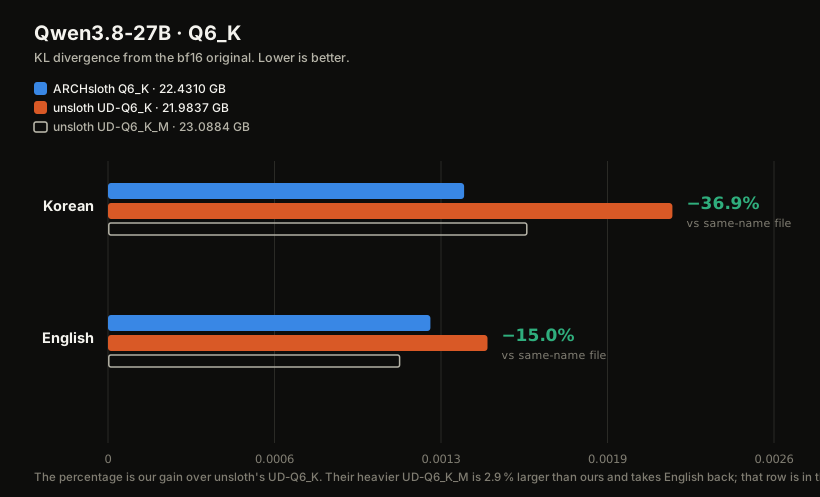
| bytes | Korean | English | |
|---|---|---|---|
ARCHsloth Q6_K |
22,430,999,840 | 0.001385 | 0.001254 |
unsloth UD-Q6_K |
21,983,677,344 | 0.002195 | 0.001476 |
unsloth UD-Q6_K_M |
23,088,409,504 | 0.001632 | 0.001137 |
| Against | Korean | English |
|---|---|---|
unsloth UD-Q6_K — same rung |
−36.9 % | −15.0 % |
unsloth UD-Q6_K_M — 2.9 % larger than ours |
−15.1 % | +10.3 % |
Same-top-p moves the same direction as the divergence on every row (98.222 % vs 97.693 % on
Korean). Full statistics: EVAL.md. Raw per-run logs: eval/logs/.
Quickstart
# text only
llama-cli -m Qwen3.8-27B-AS-Q6_K.gguf -p "안녕하세요" -ngl 99
# OpenAI-compatible server, with vision
llama-server -m Qwen3.8-27B-AS-Q6_K.gguf --mmproj mmproj-F32.gguf \
--host 127.0.0.1 --port 8080 --jinja
A 27B is a dense model: every token reads the whole file. Plan for the weights plus the KV cache, and the cache is what decides whether a long-context session fits.
What is actually different
--scheme GGUF:Q6_K optimize the rounding for the quantizer that is used at export
--enable_alg_ext sign-gradient rounding search (SignRoundV2, arXiv:2512.04746)
--dataset cal_archsloth.jsonl
--iters 200 --nsamples 128
Nothing else. Bit widths and tensor types are llama.cpp's standard Q6_K. Nothing below
4 bits anywhere.
The calibration set — it ships in this repo
cal_archsloth.jsonl, 500 samples of exactly 9,000 characters each, Korean and English
interleaved at the sample level. Interleaving is what mattered, not the ratio.
Details: CALIBRATION.md.
What we did not win
[measured]Our Q4_K_M lost English, so it is not in this repository. AgainstQwen3.8-27B-UD-Q4_K_M.ggufit took Korean by −12.8 % and gave English away by +15.8 %. A rung we do not win is a rung we do not ship. It returns when it wins.[measured]UD-Q6_K_Mkeeps English. That file is 2.9 % larger than ours. We take Korean from it by −15.1 % and it takes English back by +10.3 %. Against the file at our own rung,UD-Q6_K, we are ahead on both.[measured]Two axes, not ten. Korean and English are measured here. The ten-axis sweep that the 4B card carries has not been run on this model. We publish only what we ran ourselves.[pending]Long-context retrieval, agentic tool use, and the vision axis.
Reproduce this
# 1. the comparison file, straight from its own repository
hf download unsloth/Qwen3.8-27B-GGUF Qwen3.8-27B-UD-Q6_K.gguf --local-dir rival
# 2. the reference the distance is measured from
python llama.cpp/convert_hf_to_gguf.py Qwen/Qwen3.8-27B --outtype bf16 --outfile ref-BF16.gguf
# 3. teacher logits, once per evaluation text
llama-perplexity -m ref-BF16.gguf -f eval/eval_ko.txt \
--kl-divergence-base base_ko.dat -ngl 99 -c 512 --chunks 60
# 4. every candidate against the same teacher, same text, same chunks
llama-perplexity -m <candidate>.gguf -f eval/eval_ko.txt \
--kl-divergence --kl-divergence-base base_ko.dat -ngl 99 -c 512 --chunks 60
If a number here does not replicate on your hardware, open a discussion and we will correct it.
Lineage
| Component | Origin |
|---|---|
| Weights | Qwen/Qwen3.8-27B, unmodified — quantized from the original, not from anyone else's quantization |
| Layout, bit widths, tensor types | llama.cpp standard Q6_K, unchanged |
| Vision tower | carried at full precision, not quantized |
| Runtime | upstream llama.cpp, unmodified |
| Rounding search | Intel AutoRound with enable_alg_ext (SignRoundV2) |
| Calibration corpus, evaluation set, and the measurement | ours — all three ship in this repo |
License
Apache-2.0, inherited from the base model. Comparison files are named so you can fetch the exact bytes we measured.
- Downloads last month
- 146
6-bit
Model tree for Archsloth/Qwen3.8-27B-GGUF
Base model
Qwen/Qwen3.8-27B