| --- |
| library_name: transformers |
| license: apache-2.0 |
| license_link: https://huggingface.co/Qwen/Qwen3.6-27B/blob/main/LICENSE |
| pipeline_tag: image-text-to-text |
| base_model: Qwen/Qwen3.6-27B |
| tags: |
| - nvfp4 |
| - quantized |
| - compressed-tensors |
| - blackwell |
| - qwen3.6 |
| - vlm |
| - vllm |
| quantized_by: vrfai |
| --- |
| |
| # Qwen3.6-27B-NVFP4 |
|
|
| NVFP4 quantized version of [Qwen/Qwen3.6-27B](https://huggingface.co/Qwen/Qwen3.6-27B) by [vrfai](https://huggingface.co/vrfai) using [llm-compressor](https://github.com/vllm-project/llm-compressor). |
|
|
| Tested and deployed on **2× NVIDIA RTX 5090** with full tensor-parallel inference via vLLM. |
|
|
| ## NVFP4 Quantization Details |
|
|
| | | | |
| |---|---| |
| | **Base model** | [Qwen/Qwen3.6-27B](https://huggingface.co/Qwen/Qwen3.6-27B) | |
| | **Quantization** | NVFP4 — weights FP4, activations FP4 (dynamic local), scales FP8 | |
| | **Format** | `compressed-tensors` (native vLLM support) | |
| | **Tool** | [vllm-project/llm-compressor](https://github.com/vllm-project/llm-compressor) | |
| | **Requires** | NVIDIA Blackwell GPU (SM 120+), vLLM ≥ 0.19 | |
|
|
| ### What's Quantized / What's Not |
|
|
| The quantization strategy carefully preserves the most sensitive components in BF16 while aggressively compressing the compute-heavy stable layers: |
|
|
| | Component | Precision | Reason | |
| |---|---|---| |
| | FFN / MLP — all 64 transformer layers | **NVFP4** | High parameter density, stable under quantization | |
| | Full-attention projections (q/k/v/o) — 16 GQA layers | **NVFP4** | Standard attention, tolerant to 4-bit | |
| | DeltaNet / Linear-attention projections — 48 layers | **BF16** | Gated linear recurrence is sensitive to numerical errors | |
| | Vision encoder — all 27 blocks + merger | **BF16** | Vision tower preserved to maintain multimodal quality | |
| | `lm_head` | **BF16** | Output logits preserved for generation stability | |
|
|
| > The architecture of Qwen3.6-27B interleaves 3 × DeltaNet (linear attention) layers with 1 × full GQA attention every 4 layers (16 such groups × 4 = 64 layers total). Only the full-attention group and all FFN layers are quantized; the DeltaNet recurrent cores are untouched. |
|
|
| ### Quantization Config (llm-compressor) |
|
|
| ```yaml |
| # recipe.yaml |
| QuantizationModifier: |
| targets: [Linear] |
| scheme: NVFP4 |
| ignore: |
| - lm_head |
| # Vision encoder — all 27 blocks (attn + mlp) + merger |
| - re:model\.visual\.blocks\.\d+\..* |
| - model.visual.merger.linear_fc1 |
| - model.visual.merger.linear_fc2 |
| # DeltaNet / Linear-attention layers (layers 0–2, 4–6, 8–10, ..., 60–62) |
| - re:model\.language_model\.layers\.\d+\.linear_attn\..* |
| ``` |
|
|
| --- |
|
|
| ## Quick Start (vLLM) |
|
|
| ```bash |
| vllm serve vrfai/Qwen3.6-27B-NVFP4 \ |
| --max-model-len 8192 \ |
| --gpu-memory-utilization 0.9 \ |
| --dtype auto \ |
| --trust-remote-code \ |
| --tensor-parallel-size 2 |
| ``` |
|
|
| For single-GPU Blackwell (e.g., RTX 5090 with 32 GB): |
|
|
| ```bash |
| vllm serve vrfai/Qwen3.6-27B-NVFP4 \ |
| --max-model-len 8192 \ |
| --gpu-memory-utilization 0.92 \ |
| --dtype auto \ |
| --trust-remote-code |
| ``` |
|
|
| ### Python (Transformers) |
|
|
| ```python |
| from transformers import AutoModelForCausalLM, AutoTokenizer |
| |
| model_name = "vrfai/Qwen3.6-27B-NVFP4" |
| tokenizer = AutoTokenizer.from_pretrained(model_name, trust_remote_code=True) |
| model = AutoModelForCausalLM.from_pretrained( |
| model_name, |
| torch_dtype="auto", |
| device_map="auto", |
| trust_remote_code=True, |
| ) |
| |
| messages = [{"role": "user", "content": "Explain quantization in one paragraph."}] |
| text = tokenizer.apply_chat_template(messages, tokenize=False, add_generation_prompt=True) |
| inputs = tokenizer(text, return_tensors="pt").to(model.device) |
| outputs = model.generate(**inputs, max_new_tokens=512) |
| print(tokenizer.decode(outputs[0][inputs.input_ids.shape[1]:], skip_special_tokens=True)) |
| ``` |
|
|
| ### OpenAI-compatible API |
|
|
| ```python |
| from openai import OpenAI |
| |
| client = OpenAI(base_url="http://localhost:8000/v1", api_key="EMPTY") |
| |
| response = client.chat.completions.create( |
| model="vrfai/Qwen3.6-27B-NVFP4", |
| messages=[{"role": "user", "content": "Hello!"}], |
| temperature=0.7, |
| max_tokens=512, |
| ) |
| print(response.choices[0].message.content) |
| ``` |
|
|
| --- |
|
|
| ## Tested Environment |
|
|
| | Component | Version | |
| |-----------|---------| |
| | vLLM | 0.19.1 | |
| | Transformers | 5.6.0 | |
| | PyTorch | 2.10.0+cu128 | |
| | CUDA | 12.8 (nvcc 12.8.61) | |
| | llm-compressor | compressed-tensors 0.14.0.1 | |
| | GPU | 2× NVIDIA RTX 5090 (tensor-parallel-size 2) | |
| | OS | Ubuntu 24 | |
|
|
| --- |
|
|
| ## Best Practices |
|
|
| **Sampling parameters:** |
|
|
| | Mode | temperature | top_p | top_k | presence_penalty | |
| |------|-------------|-------|-------|------------------| |
| | Thinking — general | 1.0 | 0.95 | 20 | 0.0 | |
| | Thinking — coding (WebDev) | 0.6 | 0.95 | 20 | 0.0 | |
| | Non-thinking / instruct | 0.7 | 0.80 | 20 | 1.5 | |
| |
| **Output length:** Recommend `max_new_tokens=32768` for most tasks; up to 81920 for complex math/coding benchmarks. |
| |
| **Thinking mode** (enable via chat template): |
| ```python |
| text = tokenizer.apply_chat_template( |
| messages, |
| tokenize=False, |
| add_generation_prompt=True, |
| chat_template_kwargs={"enable_thinking": True}, |
| ) |
| ``` |
| |
| --- |
| |
| ## Credits |
| |
| - **Original model:** [Qwen Team](https://huggingface.co/Qwen) (Alibaba Group) |
| - **NVFP4 quantization:** [vrfai](https://huggingface.co/vrfai) |
| - **Quantization framework:** [vllm-project/llm-compressor](https://github.com/vllm-project/llm-compressor) |
| |
| --- |
| |
| *Below is the original model card from [Qwen/Qwen3.6-27B](https://huggingface.co/Qwen/Qwen3.6-27B):* |
| |
| --- |
| |
| <img width="400px" src="https://qianwen-res.oss-accelerate.aliyuncs.com/Qwen3.6/logo.png"> |
| |
| [](https://chat.qwen.ai) |
| |
| > [!Note] |
| > This repository contains model weights and configuration files for the post-trained model in the Hugging Face Transformers format. |
| > |
| > These artifacts are compatible with Hugging Face Transformers, vLLM, SGLang, KTransformers, etc. |
| |
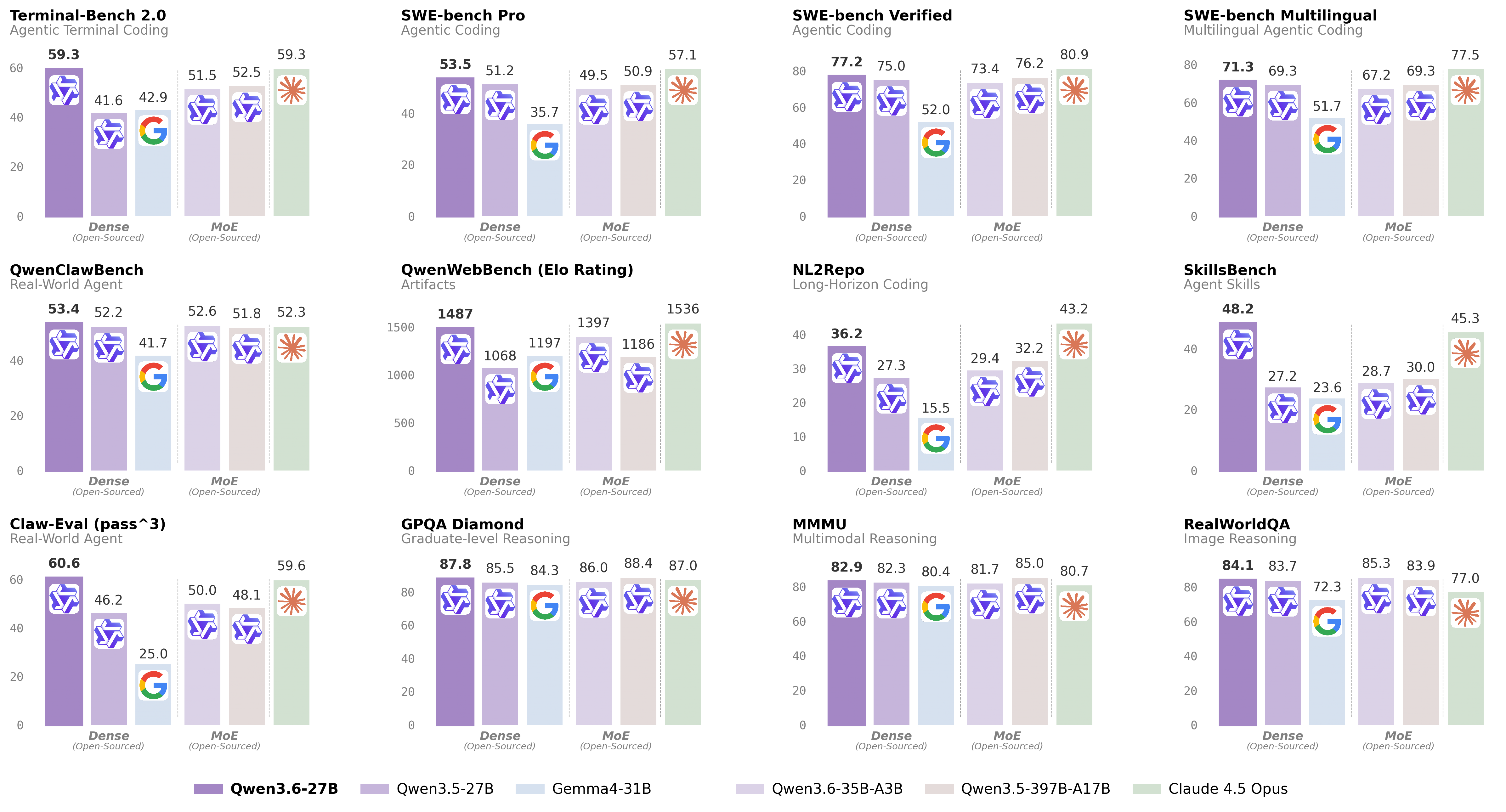
| Following the February release of the Qwen3.5 series, we're pleased to share the first open-weight variant of Qwen3.6. Built on direct feedback from the community, Qwen3.6 prioritizes stability and real-world utility, offering developers a more intuitive, responsive, and genuinely productive coding experience. |
| |
| ## Qwen3.6 Highlights |
| |
| This release delivers substantial upgrades, particularly in |
| |
| - **Agentic Coding:** the model now handles frontend workflows and repository-level reasoning with greater fluency and precision. |
| - **Thinking Preservation:** we've introduced a new option to retain reasoning context from historical messages, streamlining iterative development and reducing overhead. |
| |
|  |
| |
| For more details, please refer to our blog post [Qwen3.6-27B](https://qwen.ai/blog?id=qwen3.6-27b). |
| |
| ## Model Overview |
| |
| - Type: Causal Language Model with Vision Encoder |
| - Training Stage: Pre-training & Post-training |
| - Language Model |
| - Number of Parameters: 27B |
| - Hidden Dimension: 5120 |
| - Token Embedding: 248320 (Padded) |
| - Number of Layers: 64 |
| - Hidden Layout: 16 × (3 × (Gated DeltaNet → FFN) → 1 × (Gated Attention → FFN)) |
| - Gated DeltaNet: |
| - Number of Linear Attention Heads: 48 for V and 16 for QK |
| - Head Dimension: 128 |
| - Gated Attention: |
| - Number of Attention Heads: 24 for Q and 4 for KV |
| - Head Dimension: 256 |
| - Rotary Position Embedding Dimension: 64 |
| - Feed Forward Network: |
| - Intermediate Dimension: 17408 |
| - LM Output: 248320 (Padded) |
| - MTP: trained with multi-steps |
| - Context Length: 262,144 natively and extensible up to 1,010,000 tokens. |
| |
| ### Citation |
| |
| ```bibtex |
| @misc{qwen3.6-27b, |
| title = {{Qwen3.6-27B}: Flagship-Level Coding in a {27B} Dense Model}, |
| author = {{Qwen Team}}, |
| month = {April}, |
| year = {2026}, |
| url = {https://qwen.ai/blog?id=qwen3.6-27b} |
| } |
| ``` |
| |


